web
You’re offline. This is a read only version of the page.
close
Skip to main content

Notifications

Announcements

No record found.

Community site session details

Community site session details

Session Id :
Supply chain | Supply Chain Management, Commerce
Suggested Answer

Workflow escalation to the next level in hierarchy

(0) ShareShare
ReportReport
Posted on by 168

Hi All,

My question is specific to the purchase requisition workflow, but the answer I think can be applied to any workflow using hierarchy of approval.

I want my workflow to simply escalate into the next level up in the hierarchy, if an approver did not approve on time.

So if requester A reports to B, B reports to C, and C reports to D

And based on approval limit a workflow is sitting with B for approval - once the due date has passed I want the workflow to simply escalate from B to C.

So here is what I am trying, is that the right direction?

So on the Approval step, on the Escalation tab:

1. I selected "use escalation path"

2. I create a new escalation path line

pastedimage1602976866463v1.png

3. On "Assignment Type" tab I selected "Hierarchy"
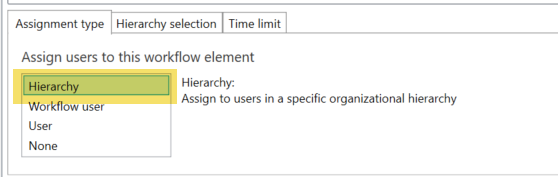
pastedimage1602976946088v2.png

4. On "Hierarchy Selection tab I selected "managerial hierarchy" (since I am using the default position hierarchy), 
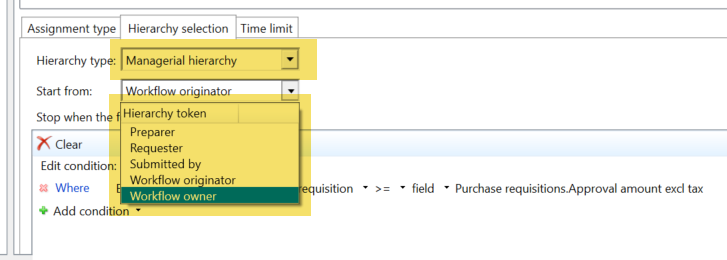
pastedimage1602977054442v3.png

5. The stop condition makes sure the employee has enough approval limit:

pastedimage1602977805301v4.png

So my first question: what should be the "start from" value?

My second, related, question is trying to understand what is the meaning of all these "start from" options here?

- "Preparer" is the person who created the the requisition (for themselves, or on behalf of another person)

- "Requester" I am guessing is the person specified on the purchase requisition line, as "requester"? As each line can have a different requester, how is this value used on the purchase requisition?

- "Workflow Owner" is easy - just the person set up as the workflow configuration owner.

- "Workflow Submitter" must be the person who submitted the workflow (I guess it can be different than the preparer), but what is  "Workflow originator" which sounds quite similar to "submitter"?

thanks in advance for your help!

I have the same question (0)
  • MATTGUO Profile Picture
    22,349 Moderator on at

    Hi Zvika,

    I don't think that the approver will be jumped from B to C with the escalation without the option of "Workflow item owner".

    The behavior of Workflow submitter should be same like workflow originator. Please see the pictures of two users clicking the same one PO workflow and they get different results.

    pastedimage1603090514938v1.png

    pastedimage1603090537735v2.png

    For PR, only the preparer/creator can submit the PR, so the Workflow Submitter should be same as preparer and originator.

    And in all my tests, the requester always chooses the requester who is in the first line number. You can add the instruction to test.

    pastedimage1603093298592v4.png


  • ZvikaR Profile Picture
    168 on at

    Thanks for the information.

    Kind of strange to me out of the box functionality cannot address a trivial requirement such as escalating to the next person in the hierarchy.

    maybe Microsoft can focus on providing that rather than some bells of whistles...

  • Rikard Ekengren Profile Picture
    52 on at

    Were you able to solve this? 

  • Suggested answer
    ZvikaR Profile Picture
    168 on at

    I have not, apparently this simple business scenario is not covered out of the box by Microsoft.

    However, I learn a "rumor" that Microsoft plans to retire the workflow engine completely early next year and replace it with with Power Automate - so I guess they might not be interested to invest further in this current technology.

    Let's hope power automate can do that more easily.

  • Rikard Ekengren Profile Picture
    52 on at

    Even though you cannot escalate automatically in a setting you could use different stop conditions dependent on how complex the hierarchy is. You could utilize the Position title for this. For example Where the "Employee.Approval limit.Purchase requisition > field > Purchase requisitions.Approval amount" and Job title is not value "PR < 10 000". Then you can add one more escalation path with more stop conditions.

  • Bell.D Profile Picture
    107 on at

    It's strange there is no functionality like assigning to the next person in the queue. 

Under review

Thank you for your reply! To ensure a great experience for everyone, your content is awaiting approval by our Community Managers. Please check back later.

Helpful resources

Quick Links

Responsible AI policies

As AI tools become more common, we’re introducing a Responsible AI Use…

Neeraj Kumar – Community Spotlight

We are honored to recognize Neeraj Kumar as our Community Spotlight honoree for…

Leaderboard > Supply chain | Supply Chain Management, Commerce

#1
Siv Sagar Profile Picture

Siv Sagar 283 Super User 2025 Season 2

#2
Laurens vd Tang Profile Picture

Laurens vd Tang 213 Super User 2025 Season 2

#3
André Arnaud de Calavon Profile Picture

André Arnaud de Cal... 152 Super User 2025 Season 2

Last 30 days Overall leaderboard

Featured topics

Product updates

Dynamics 365 release plans
