web
You’re offline. This is a read only version of the page.
close
Skip to main content

Announcements

No record found.

News and Announcements icon
Community site session details

Community site session details

Session Id :
Microsoft Dynamics GP (Archived)

MICR Batch printing problems

(0) ShareShare
ReportReport
Posted on by

Good afternoon! 

I'll start with saying that I'm taking over managing our GP from someone who left the company on some not so great terms, so I'm learning as I go with an active environment.

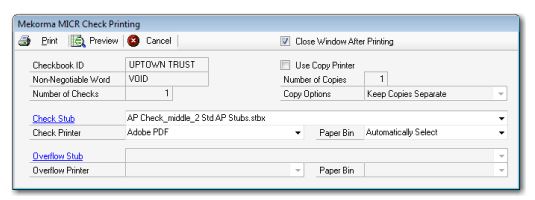
I recently had to set someone up with a new computer and a new installation of GP 2013 using Mekorma MICR for check printing. My user is having issues with printing checks, even though her Windows recognizes the printer and prints test pages fine. What happens is it loads up the Mekorma MICR Check Printing screen (see attached for example) and when she clicks print on this screen, it will stop responding. For some reason, it seems like there is a disconnect between GP 2013 (which has the printer listed), MICR, and the printer itself. I've checked other users who use the same company and printer and are able to print fine, and I have yet to uncover what setting I must have missed when setting up the new user. Any help or pointers is appreciated! Thanks!4760.Capture.JPG
*This post is locked for comments

I have the same question (0)
  • MG-16101311-0 Profile Picture
    26,225 on at

    Hi,

    I work for Mekorma and will be happy to help. 

    I am not sure if the image you attached is an exact representation of what you are seeing on the user's computer, but I noticed you have Adobe PDF listed as the check printer. This drop-down will also contain a list of all the printers that are installed on the user's computer. Check to see if the check printer is listed there.

    Also, are you on a Citrix or Terminal Server environment? Is the MICR Check Printing window showing up just fine for all other users or are you using Named Printers? If using named printers, be sure to go to Administration > Setup > System > Named Printers and ensure the user in question has a printer assigned to them, assuming you are not using a default printer for everyone.

    I would also recommend you contact our Support team and open a support case. Usually, it's easier to assist this way.

  • Community Member Profile Picture
    on at

    From time to time clients report that the MICR line at the base of their checks fails to print correctly. Reports include substitute non-MICR fonts printing in place, seemingly random or garbage characters, black boxes, or nothing at all. Tell The Bell

  • Suggested answer
    MG-16101311-0 Profile Picture
    26,225 on at

    You need to ensure the MICR font is installed on the affected machines or Citrix / Terminal Server from which you are printing. Go to the Microsoft Dynamics GP folder and locate the micre13b5.ttf file. Right-click on it and select Install. Since this font gets intalled in the Windows\Font directory, if you have User Account Control (UAC) enabled, you will need to click on Yes when challenged to run with administrative permissions.

  • Community Member Profile Picture
    on at

    In the center of your screen shot, there is a field labeled "Check Printer" which is currently set to Adobe PDF.  If you change that to your check printer, do the checks print?  Usually, once you change it the first time, you do not need to worry about it on future batches.

  • Community Member Profile Picture
    on at

    I recently had to set someone up with a new computer and a new installation of GP 2013 using Mekorma MICR for check printing prepaidgiftbalance

  • ac asev Profile Picture
    10 on at

    The MICR line on checks must be printed using magnetic toner. This special toner is only available for laser printers (and some special dot matrix printers.) Inkjet printers can not print MICR! In general, your printer manufacturer will not sell this special toner.

  • ac asev Profile Picture
    10 on at

    The MICR line on checks must be printed using magnetic toner. This special toner is only available for laser printers (and some special dot matrix printers.) Inkjet printers can not print MICR! In general, your printer manufacturer will not sell this special toner.

    https://namecombinertool.com/

Under review

Thank you for your reply! To ensure a great experience for everyone, your content is awaiting approval by our Community Managers. Please check back later.

Helpful resources

Quick Links

Introducing the 2026 Season 1 community Super Users

Congratulations to our 2026 Super Stars!

Meet the Microsoft Dynamics 365 Contact Center Champions

We are thrilled to have these Champions in our Community!

Congratulations to the April Top 10 Community Leaders

These are the community rock stars!

Leaderboard > 🔒一 Microsoft Dynamics GP (Archived)

#1
talty09 Profile Picture

talty09 2

#1
Anthony Beatty Profile Picture

Anthony Beatty 2

#3
CP04-islander Profile Picture

CP04-islander 1

Last 30 days Overall leaderboard

Featured topics

Product updates

Dynamics 365 release plans
