web
You’re offline. This is a read only version of the page.
close
Skip to main content

Announcements

News and Announcements icon
Community site session details

Community site session details

Session Id :
Microsoft Dynamics GP (Archived)
Answered

How to import excel data into Analytical Payroll default dimension window

(0) ShareShare
ReportReport
Posted on by 829

Hi All,

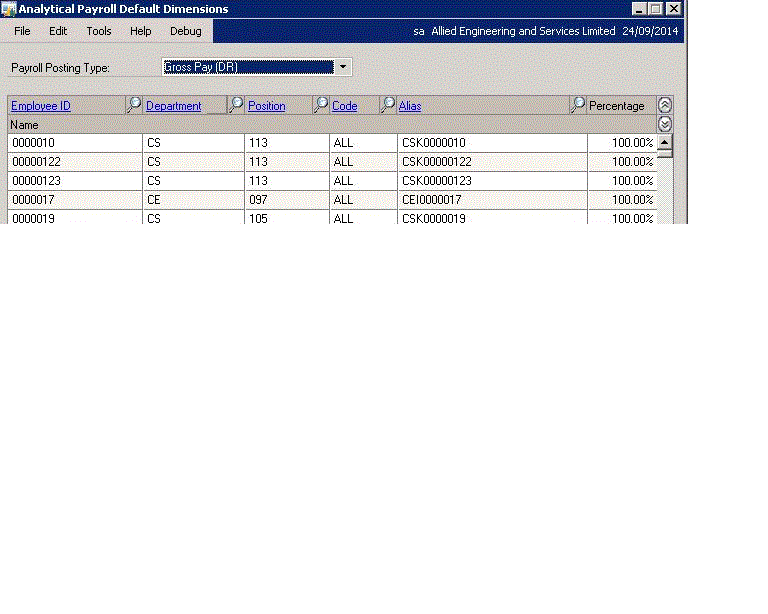
Please quide me for import excel data to Analytical Payroll default dimension window against pay types which are same for all.I was tried macro but it is not working because it cant change line number in macro generated.

Regards

Danish
*This post is locked for comments

I have the same question (0)
  • soma Profile Picture
    24,410 on at

    I think, no other option available for your requirement. Have you tried to use Table Import?

    For macro, have you used mail merge or not?

    Hope this helps!!!

  • Suggested answer
    Redbeard Profile Picture
    12,931 on at

    Danish,

    The problem with your macro, if I understand you correctly, is the window you are trying to import into does not have line numbers.  This type of window only provides relative positions for rows, which change when the data is scrolled through.

    I have had limited success importing into these types of windows, with the window expanded to its max, and datasets short enough to fit into the number of lines without requiring a scroll down.  If memory serves,  the practical limit was 16.  But that was for a custom form.

    If you can't use this approach, I have seen consultants use smart connect to create new nodes as import destinations.

  • Mahmoud Saadi Profile Picture
    32,738 on at

    Hello Danish

    Redbeard has cleared the way for you to proceed. This type of data import could be quite difficult as you may need to consider several parameters related to the line sequence

    I have been working recently on an Excel-based macro generator tool with VBA code, which should meet this requirement. It is designed to handle such imports for analytical data related to journal entries. It will be published soon for testing. In case you are interested, you may be part of the beta testing phase.

  • Danish Viqar Profile Picture
    829 on at

    Hi Mahmoud Saadi,

    Yes both of you saying right that these types of macro difficult to implement.

    Yes please send me your developed macro so I will test on my data.

    Regards

    Danish

  • Danish Viqar Profile Picture
    829 on at

    Thanks Redbeard.

    Let me check with smartconnect.

    Danish

  • Verified answer
    Danish Viqar Profile Picture
    829 on at

    I just did it with below script for subject window against all combo values.


    INSERT INTO AAG03000
    (EMPLOYID,DEPRTMNT,JOBTITLE,PAYROLCD,UPRACTYP,aaAliasID,aaAssignedPercent)
    SELECT EMPLOYID,DEPRTMNT,JOBTITLE,PAYROLCD,10,aaAliasID,aaAssignedPercent
    FROM AAG03000 WHERE UPRACTYP=1

    Regards

    Danish

Under review

Thank you for your reply! To ensure a great experience for everyone, your content is awaiting approval by our Community Managers. Please check back later.

Helpful resources

Quick Links

Season of Sharing Community Challenge Launch!

Jump in, show your community spirit, and win prizes!

Women in Power Builds Momentum

Expanding mentorship, skilling, and AI innovation

Congratulations to the May Top 10 Community Leaders

These are the community rock stars!

Leaderboard > 🔒一 Microsoft Dynamics GP (Archived)

#1
Dan Liebl Profile Picture

Dan Liebl 2

Last 30 days Overall leaderboard

Featured topics

Product updates

Dynamics 365 release plans
