web
You’re offline. This is a read only version of the page.
close
Skip to main content

Notifications

Announcements

No record found.

Community site session details

Community site session details

Session Id :
Small and medium business | Business Central, N...
Answered

Sales Order - Only MSRP Pricing Will Show

(1) ShareShare
ReportReport
Posted on by 25

Hi again,

My customers are complaining that their discount is not showing. When the quantity is 1, it's obvious,  but >1 makes it look like they are paying full price because the unit price is showing as MSRP.
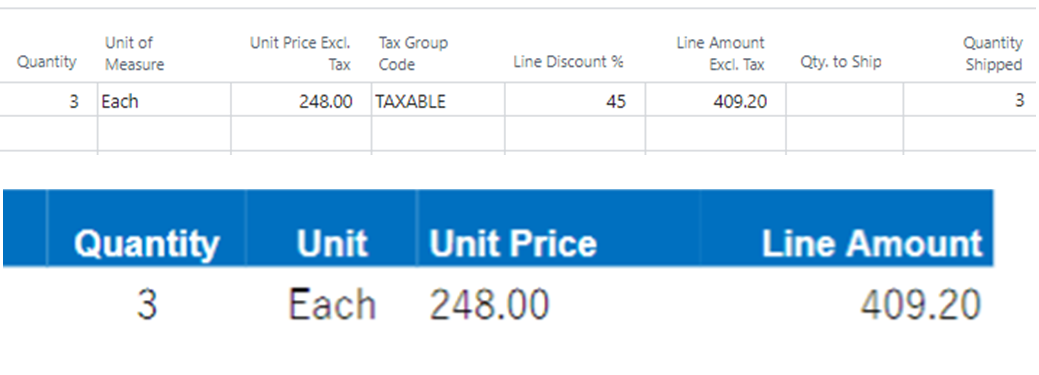
unitprice.png

On the customer card, the discount is selected under Customer Disc. Group. MSRP pricing is on the item card. The calculations are correct, but the MSRP price always shows under unit price. I see under Customization, there is no column to add to show the unit price including the discount. 

I'm really hoping this does not have to be done using Customer Price Groups...I have over 300 skews and 300 customers and 7 different Customer Disc Groups.

Cheers

Lisa

I have the same question (0)
  • Suggested answer
    MahGah Profile Picture
    15,529 on at

    Hi

    Unit Price is always MSRP in card. Hence, it shows like that. This is basically MSRP for one Unit. Then the Line Amount is the line that consider (QTY X MSRP) X % Discount.

    In your example they have 3 for 248 each which means 744. But in line amount you see 409.20 which reflect the 45% discount.

    Do you want to see the total MSRP before discount and then see it after discount?

    Thanks

  • LisaV11111 Profile Picture
    25 on at

    Hi there,

    No, I only want Unit Price to show including the discount. On this example, it would show as $136.40 instead of MSRP. Is that possible?

    I understand that it may not be possible with the way it is set up. If a change needs to happen with the item setup or customer card, please let me know.

    Thanks,

    Lisa

  • Dallefeld Profile Picture
    211 User Group Leader on at

    I believe that you will need a customization.

  • Suggested answer
    MahGah Profile Picture
    15,529 on at

    As Kim mentioned that required customization. Basically you need system calculate discount for you and show you unit cost after discount.

    You cannot achieve this through item or customer setup.

    Does your user wants to see MSRP after discount because they want to communicate to customer Unit Price after discount?

    You can add Line Discount Amount to the page. this way user can see how much discount customer receive and then can divide by QTY and remove from MSRP (which is not ideal).

  • LisaV11111 Profile Picture
    25 on at

    Hi there,

    I hope not. It's either that or I type every price including discount into every single order. :(

  • Suggested answer
    MahGah Profile Picture
    15,529 on at

    Hi

    Can you please let us know why you need MSRP after discount in each line? Keep in mind that MSRP is the starting point of discount calculation. In your case if you type 136.40 then system will apply 45% discount to it and then the final bill will be for 75.07.

  • LisaV11111 Profile Picture
    25 on at

    Navision always showed the discounted price, never MSRP. See below.

    unitprice2.png

    With the invoice/order confirmations showing MSRP, they keep coming back to me thinking they were charged MSRP. Ever since sending invoices from BC, the customers are confused by this, even though the invoice total is correct.

  • LisaV11111 Profile Picture
    25 on at

    It's how every customer sends in a Purchase Order. No PO's are sent in without the discounted unit price on it. This is why showing MSRP is so confusing for them.

  • Suggested answer
    MahGah Profile Picture
    15,529 on at

    Thanks for screen. The screen you have shared is in Report side (like SO Confirmation). I heard that Nav SO confirmation had a different design or some companies customized that report. Please check with your partner on this because they have a tools to modify that report for you.

    Basically report is what your customer sees. It is an easy modification and they will see what you want them to see. I hope this help.

  • LizHK Profile Picture
    191 on at

    I'm having exact same issue - customers want to see Unit Price after discount (Unit Price | Discount % | Unit Price after Discount) but I cannot find equivalent item to add(from Word 1306) . If you find a good solution please update here as well. Thanks!

Under review

Thank you for your reply! To ensure a great experience for everyone, your content is awaiting approval by our Community Managers. Please check back later.

Helpful resources

Quick Links

Responsible AI policies

As AI tools become more common, we’re introducing a Responsible AI Use…

Neeraj Kumar – Community Spotlight

We are honored to recognize Neeraj Kumar as our Community Spotlight honoree for…

Leaderboard > Small and medium business | Business Central, NAV, RMS

#1
OussamaSabbouh Profile Picture

OussamaSabbouh 3,098

#2
Jainam M. Kothari Profile Picture

Jainam M. Kothari 1,556 Super User 2025 Season 2

#3
YUN ZHU Profile Picture

YUN ZHU 1,108 Super User 2025 Season 2

Last 30 days Overall leaderboard

Featured topics

Product updates

Dynamics 365 release plans
