web
You’re offline. This is a read only version of the page.
close
Skip to main content

Announcements

No record found.

News and Announcements icon
Community site session details

Community site session details

Session Id :
Finance | Project Operations, Human Resources, ...
Unanswered

Error When Creating a New Custom Workflow

(0) ShareShare
ReportReport
Posted on by 1,044

Hello awesome community!

I'm trying and learning to create a custom workflow.

After creating all the necessary objects in Visual studio, I went to the workflow set up screen.

Clicked on "New" button, selected my custom workflow, opened the workflow and entered my credentials to log in, and then I started to design the workflow in the workflow designer.

After I finished from the design. I clicked on "save and close" button and I was asked if I want to activate the workflow.

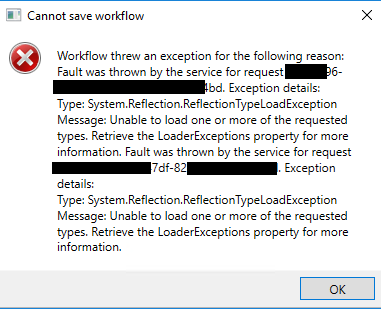
I clicked on "Activate the workflow" and then an error window appeared.

Here is a screenshot of the error screen:
pastedimage1651890873763v2.png

And I'm not sure how to solve this issue...

The workflow design was: START => TASK => APPROVAL => END.

Any advice is appreciated!

Thanks in advance !

I have the same question (0)
  • Gunjan Bhattachayya Profile Picture
    35,429 on at

    Hi Momochi,

    Are you able to configure and save any of the standard workflows without issues?

  • Momochi Profile Picture
    1,044 on at

    Hi Gunjan,

    Yes, I just edited another custom workflow which is working fine, I edited the description of the workflow. saved the new version and activated.

    but for some reason the one I developed is getting this error....

  • André Arnaud de Calavon Profile Picture
    305,150 Super User 2026 Season 1 on at

    Hi Momochi,

    The error might indicate that some objects are missing. Can you review your workflow objects and possible compare with other standard objects to check if you missed something?

  • Momochi Profile Picture
    1,044 on at

    Hi Andre,

    Actually, it turned out to be an environmental issue.

    I imported the project on another cloud VM and the workflow was saved and worked.

    I'm not sure what is the issue in my machine.

Under review

Thank you for your reply! To ensure a great experience for everyone, your content is awaiting approval by our Community Managers. Please check back later.

Helpful resources

Quick Links

Introducing the 2026 Season 1 community Super Users

Congratulations to our 2026 Super Stars!

Meet the Microsoft Dynamics 365 Contact Center Champions

We are thrilled to have these Champions in our Community!

Congratulations to the April Top 10 Community Leaders

These are the community rock stars!

Leaderboard > Finance | Project Operations, Human Resources, AX, GP, SL

#1
Giorgio Bonacorsi Profile Picture

Giorgio Bonacorsi 804

#2
André Arnaud de Calavon Profile Picture

André Arnaud de Cal... 639 Super User 2026 Season 1

#3
Subra Profile Picture

Subra 528

Last 30 days Overall leaderboard

Product updates

Dynamics 365 release plans
