web
You’re offline. This is a read only version of the page.
close
Skip to main content

Announcements

No record found.

News and Announcements icon
Community site session details

Community site session details

Session Id :
Customer experience | Sales, Customer Insights,...
Unanswered

How to Expand D365/Power Automate Data Query Problem with "Expand Query" Filter on a Field on a Related Entity/Table?

(0) ShareShare
ReportReport
Posted on by 1,589

I am running a process that is moving D365 email attachments to azure blob storage.

There are hundreds of thousands of attachments so I need to speed it up.

Due some limits I have to pluck them off one by one and am using the following to do so.
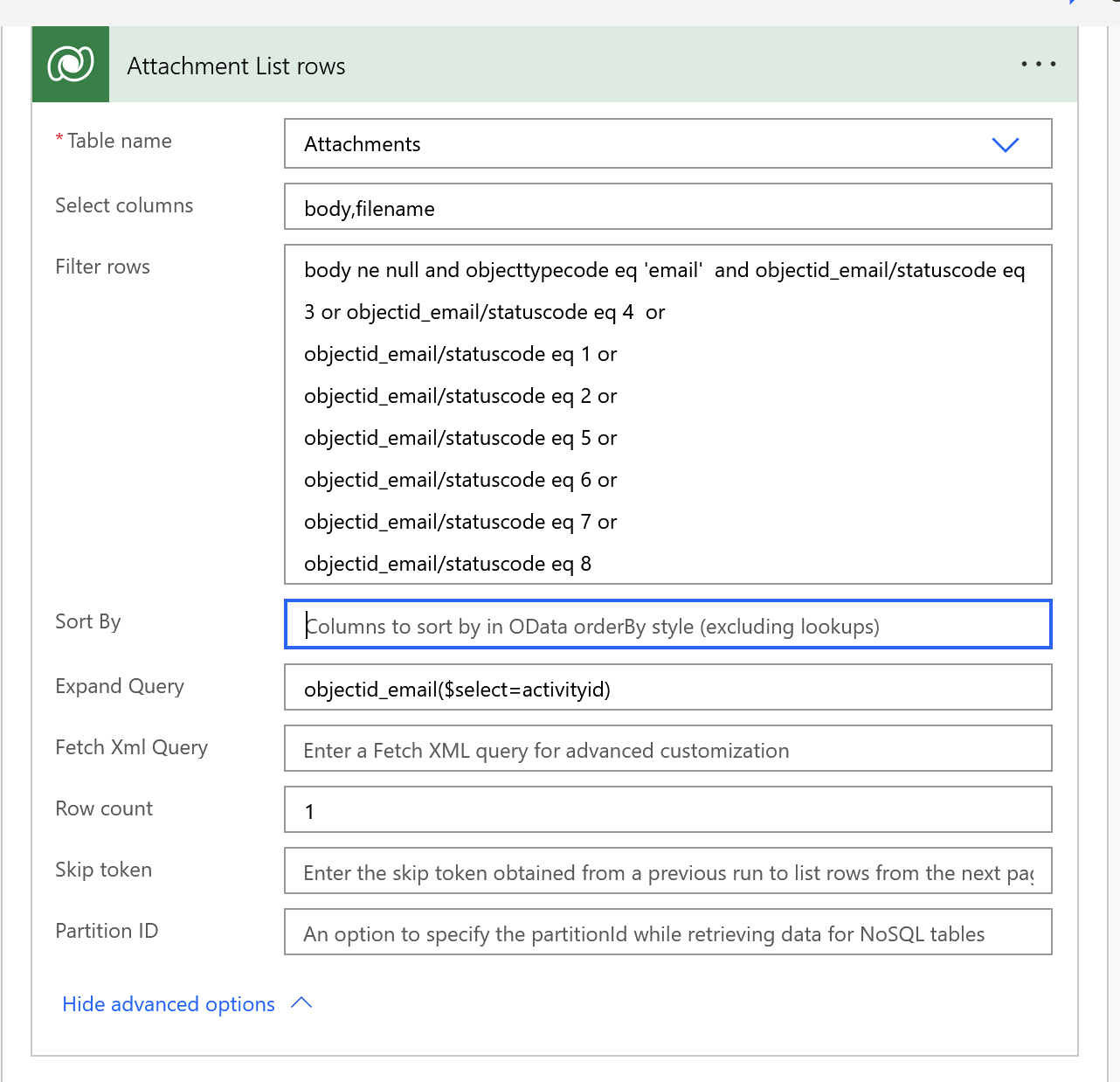
Screen-Shot-2022_2D00_03_2D00_28-at-4.01.00-PM.png

The problem is I need to create a second one that starts at the bottom or grabs the top record where the sort is back created on date desc. 

How do I need this so that I can filter on the email entity's created on date? 

Keep in mind the email entity is an expanded query and is a separate d365 table than attachment. 

Attachment does not have a createdon or modifiedon date I can sort by,

I get an error saying the property does not exist if I add createdon desc in the sort by field.

How can I add a desc order by email createdon desc or an order by email createdon asc to this?

I have the same question (0)
  • ACECORP Profile Picture
    1,589 on at

    If I edit the Expand Query to this: objectid_email($select=activityid) and $orderby=createdon asc

    I get the following error: Term 'objectid_email($select=activityid) and $orderby=createdon asc' is not valid in a $select or $expand expression.

  • ACECORP Profile Picture
    1,589 on at

    If I try the following in the expand query section: objectid_email($select=activityid) $filter=createdon gt DateTime'2012-05-29T09:13:28'

    I get the following error: Term 'objectid_email($select=activityid) $filter=createdon gt DateTime'2012-05-29T09:13:28'' is not valid in a $select or $expand expression.

    I am sure this is not being written correctly and is basically a syntax or format error, but I do not know exactly what I need to change to fix it. 

Under review

Thank you for your reply! To ensure a great experience for everyone, your content is awaiting approval by our Community Managers. Please check back later.

Helpful resources

Quick Links

Introducing the 2026 Season 1 community Super Users

Congratulations to our 2026 Super Stars!

Meet the Microsoft Dynamics 365 Contact Center Champions

We are thrilled to have these Champions in our Community!

Congratulations to the April Top 10 Community Leaders

These are the community rock stars!

Leaderboard > Customer experience | Sales, Customer Insights, CRM

#1
ManoVerse Profile Picture

ManoVerse 107 Super User 2026 Season 1

#2
11manish Profile Picture

11manish 94

#3
Muhammad Shahzad Shafique Profile Picture

Muhammad Shahzad Sh... 69 Most Valuable Professional

Last 30 days Overall leaderboard

Product updates

Dynamics 365 release plans
