web
You’re offline. This is a read only version of the page.
close
Skip to main content

Notifications

Announcements

No record found.

Community site session details

Community site session details

Session Id :
Finance | Project Operations, Human Resources, ...
Suggested Answer

Databaselog for all fields in Release Product

(0) ShareShare
ReportReport
Posted on by 537

Hi all,

I want to open database log to track all update to fields at Release product or at least at Invent Table.

However, after setup databse log, and update some fields, I cannot see any update history to Database log. I think I havenot selected the correct table or fields.
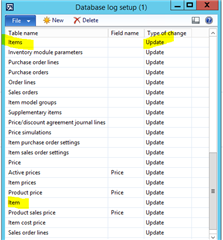
pastedimage1601353408405v3.png

Do you guys have experience to track fields Release product table , please share it with me.
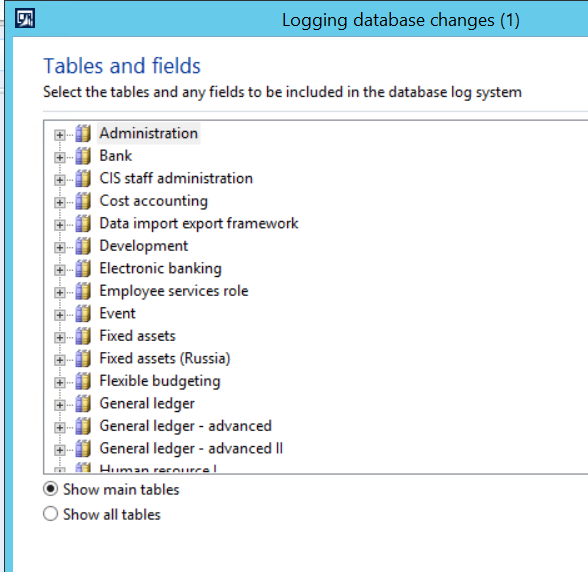
pastedimage1601353398107v2.png

Thanks

Ett

I have the same question (0)
  • Suggested answer
    Ludwig Reinhard Profile Picture
    Microsoft Employee on at

    Hi Ett,

    Are you legally obliged to track those changes or do you simply want to find out who made changes e.g. to a released product?

    In the latter case, would it be possible to not give specific people edit rights on your items by configuring their security roles?

    Best regards,

    Ludwig

  • Martin Dráb Profile Picture
    237,976 Most Valuable Professional on at

    Does AX 2012 has the option to "Show table names"? It's there in D365FO and I believe it's in AX 2012 too. Then you don't have to speculate if "Items" is the right table or not, because there may be multiple tables with the same label. You'll simply check if the table name is InventTable or not.

  • Ett Profile Picture
    537 on at

    Hi Ludwig,

    We want to track who changed and history of changes.

    Currently people from different department (purchase, sales, ar, ap) can access Release product and edit some fields and we have not finalized user security yet as there may have some restriction on their daily activities.

    Thanks

    Ett

  • Ett Profile Picture
    537 on at

    Hi Martin,

    In 2012, we dont have option "show table names". That's why my setup to "Item" seems not to be correct.

    Do you have any solution?

    Many thanks

    Ett

  • Suggested answer
    Ludwig Reinhard Profile Picture
    Microsoft Employee on at

    Hi Ett,

    Wouldn't it be better to not allow people making changes to the item setup by making use of security roles?

    With the database log you can try finding the one who is 'guilty' of making a probably unintended change.

    In other words, you try to fix something that already got wrong.

    To avoid that things can go wrong, you can use roles and security configurations that only allow your experts to make changes to items.

    That's in my opinion the better way to tackle this issue.

    Best regards,

    Ludwig

  • Suggested answer
    André Arnaud de Calavon Profile Picture
    301,148 Super User 2025 Season 2 on at

    Hi Ett,

    Can you share which exact fields are currently not logged with the settings above? I do agree that you really need to spend time to setup the security correctly. Small correction... you already should have spent the time to setup the security correctly. It is a risk to go live with too wide permissions for the users.

    As you currently also selected the sales order lines, the database log might have a performance impact. Besides, who will review the thousands of records being created by the database log?

  • Ludwig Reinhard Profile Picture
    Microsoft Employee on at

    Good morning ETT,

    Just wanted to follow up on this thread and ask if you made some progress and got things resolved or whether you need any other information from the community?

    Best regards,

    Ludwig

Under review

Thank you for your reply! To ensure a great experience for everyone, your content is awaiting approval by our Community Managers. Please check back later.

Helpful resources

Quick Links

Responsible AI policies

As AI tools become more common, we’re introducing a Responsible AI Use…

Neeraj Kumar – Community Spotlight

We are honored to recognize Neeraj Kumar as our Community Spotlight honoree for…

Leaderboard > Finance | Project Operations, Human Resources, AX, GP, SL

#1
André Arnaud de Calavon Profile Picture

André Arnaud de Cal... 449 Super User 2025 Season 2

#2
Martin Dráb Profile Picture

Martin Dráb 422 Most Valuable Professional

#3
BillurSamdancioglu Profile Picture

BillurSamdancioglu 239 Most Valuable Professional

Last 30 days Overall leaderboard

Product updates

Dynamics 365 release plans
