web
You’re offline. This is a read only version of the page.
close
Skip to main content

Notifications

Announcements

No record found.

Community site session details

Community site session details

Session Id :
Small and medium business | Business Central, N...
Suggested Answer

KPI Web Service / Financial Reports Link Broken

(0) ShareShare
ReportReport
Posted on by 213

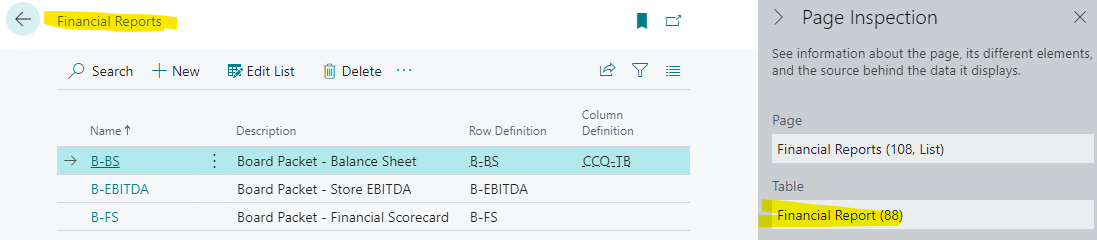
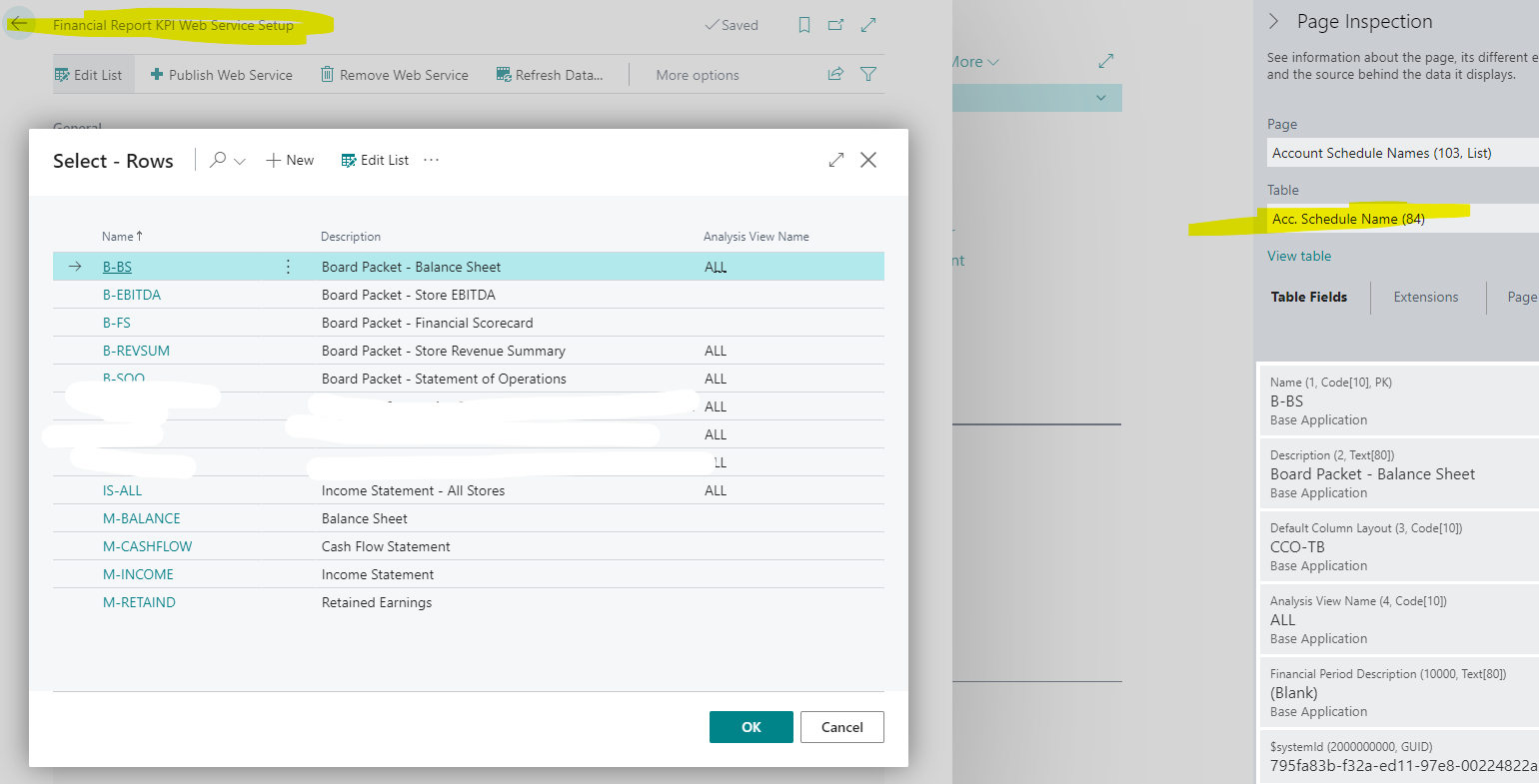
After a recent Business Central update when Account Schedules was renamed Financial Reports, I can't select those Financial Reports to add to the KPI Web Service page to be published.  The KPI web service page is still pointing to Table 84 - Acc. Schedule Name.  But because of the change, it should be pointing to Table 88 - Financial Report.  So I can't select any new Financial Reports that I have created so that they can be published.  Our Microsoft partner isn't getting complaints of this from other customers, so not sure what's going on...

The Financial Reports data is stored in Table 88...
pastedimage1671642074574v2.png

But when you go to add a Financial Report to the KPI Web Service, it's looking at Table 84 - Account Schedule, which doesn't list any new Financial Reports added to Table 88:
pastedimage1671641741808v1.png

I have the same question (0)
  • Suggested answer
    Inge M. Bruvik Profile Picture
    1,111 Moderator on at

    Have you tried to look at the KPI's on page 197 instead?

    In the standard system that is the KPI page that is published as a webservice now.

  • Agazziz Profile Picture
    213 on at

    Page 197 is where you can view the published KPI data, but in order for it to be published, you have to add the Financial Report (formerly Account Schedule) to page 195 - Acc. Sched. Web Serv. Setup.

    The problem is that on page 195, you can't add a Financial Report, it's instead directing you to the old Account Schedule list.  But Financial Reports replaced Account Schedules, so any new reports that you create cannot be published - that's the problem that I am running into.  I think Microsoft should have changed page 195 to point to the Financial Reports table, but instead, it's still being directed to the old Account Schedules table, so I can't and publish any new Financial Report KPI's.    

  • Suggested answer
    Inge M. Bruvik Profile Picture
    1,111 Moderator on at

    Yes, i can see that. Your partner should help you to register a supportcase to Microsoft around this.

Under review

Thank you for your reply! To ensure a great experience for everyone, your content is awaiting approval by our Community Managers. Please check back later.

Helpful resources

Quick Links

Responsible AI policies

As AI tools become more common, we’re introducing a Responsible AI Use…

Neeraj Kumar – Community Spotlight

We are honored to recognize Neeraj Kumar as our Community Spotlight honoree for…

Leaderboard > Small and medium business | Business Central, NAV, RMS

#1
OussamaSabbouh Profile Picture

OussamaSabbouh 2,664

#2
YUN ZHU Profile Picture

YUN ZHU 960 Super User 2025 Season 2

#3
Jainam M. Kothari Profile Picture

Jainam M. Kothari 773 Super User 2025 Season 2

Last 30 days Overall leaderboard

Featured topics

Product updates

Dynamics 365 release plans



