web
You’re offline. This is a read only version of the page.
close
Skip to main content

Notifications

Announcements

No record found.

Community site session details

Community site session details

Session Id :
Microsoft Dynamics AX (Archived)

Auto creation of Item requirement on the back of the project purchase order

(0) ShareShare
ReportReport
Posted on by

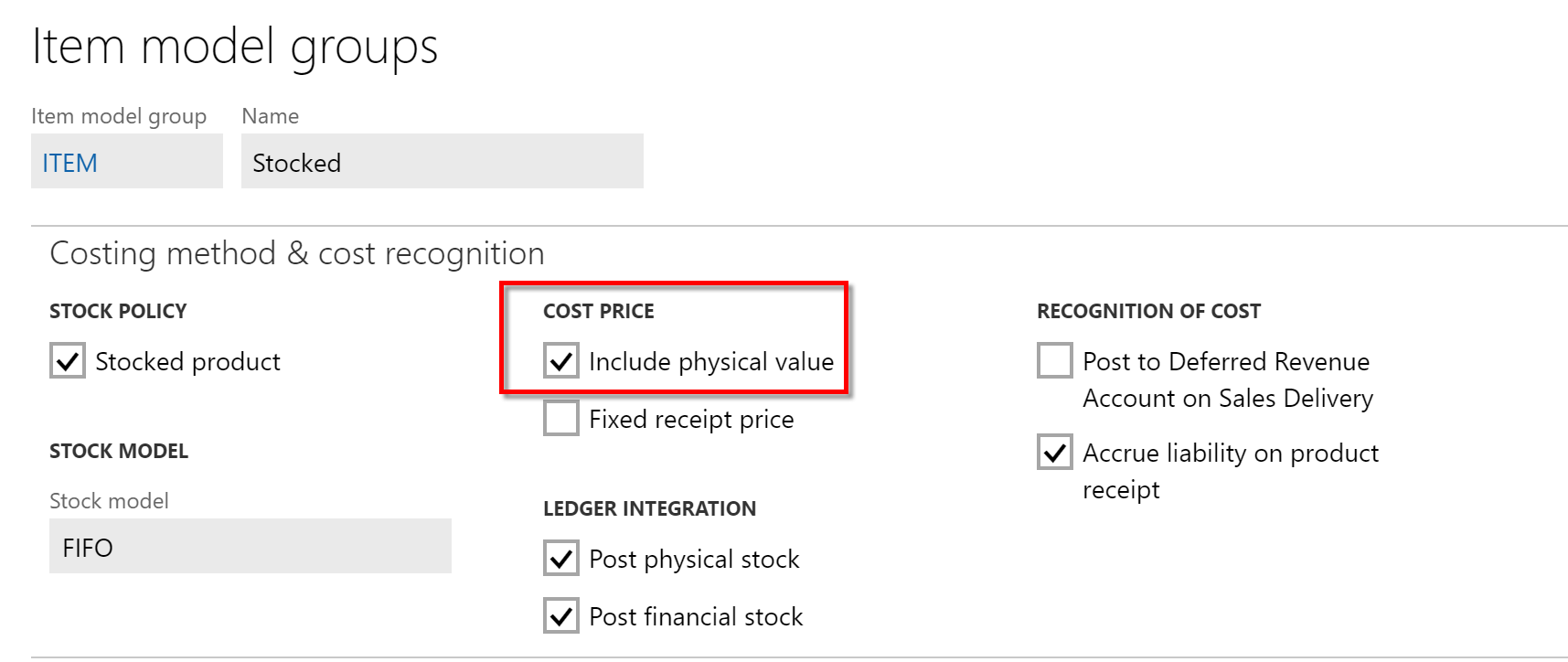
System is not auto creating the item requirement record on the back of the project purchase order. All the required parameters for this to happen are checked already. Please have a look below:
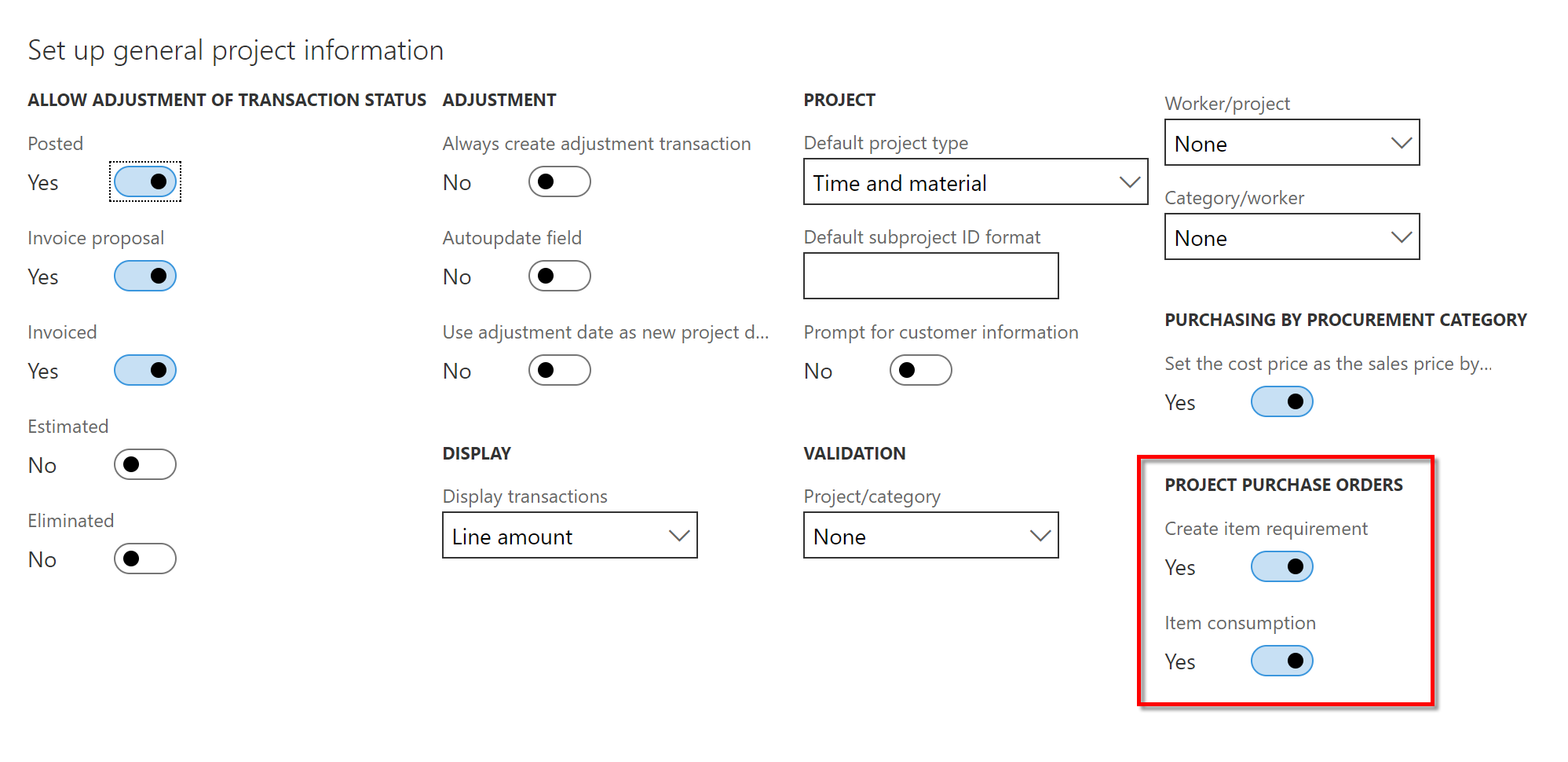
53478.1.png

02878.2.png

What more setup am i missing?

*This post is locked for comments

I have the same question (0)
  • Suggested answer
    Ludwig Reinhard Profile Picture
    Microsoft Employee on at

    Hi Sarang Kusare,

    Can you double check that your PO is linked to a project, that it includes a PO line, which includes an item that links to a project category and that the PO is confirmed?

    Best regards,

    Ludwig

  • Community Member Profile Picture
    on at

    Yes, the PO is a project PO, the item in the PO line has a project category linked to it and the PO is confirmed.

  • Ludwig Reinhard Profile Picture
    Microsoft Employee on at

    Hi,

    What is the item type of the item that you included in your PO?

    Is it a service item or an ordinary product?

    Best regards,

    Ludwig

  • Community Member Profile Picture
    on at

    As seen from the screenshot above, the item is a STOCKED type of a product.

  • Suggested answer
    Ludwig Reinhard Profile Picture
    Microsoft Employee on at

    Hi Saran Kusare,

    Yes, I can see the stocked product parameter from the item model group form :-)

    Yet, what can you identify from the released product form in the field 'product type'?

    Can you also check the following:

    In the PO General tab, open the related orders tab. Can you see a sales order with the order type 'item requirement' from there?

    Best regards,

    Ludwig

  • Community Member Profile Picture
    on at

    Hi Ludwig,

    I do not see any Sales Order of type Item requirement.

    1884.3.png

    Regards

    Sarang

  • Ludwig Reinhard Profile Picture
    Microsoft Employee on at

    Hi Sarang,

    This looks intersting.

    What can you identify in the PO line - Project tab?

    Best regards,

    Ludwig

  • Community Member Profile Picture
    on at

    Hello Ludwig,

    Please find the screenshot below for the PO line:

    2474.4.png

    Thanks

    Sarang

  • Verified answer
    Ludwig Reinhard Profile Picture
    Microsoft Employee on at

    Hi Sarang,

    I replicated the issue in my newly setup VM and noticed that the item requirement form not longer shows anything as in prior versions. Yet, I got a sales order with the type 'item requirement' created. Can you double check in your project under 'manage-related information - item tasks - sales orders' that no item requirement sales order is created?

    Do you know whether the parameters were active before the PO was created?

    That is, if you create a new PO with your current settings, can you identify an item-requirements sales order that is created?

    Best regards,

    Ludwig

  • Community Member Profile Picture
    on at

    Hello Ludwig,

    THANKS A LOT. This solved the problem. I could see a Sales order under Manage > Related information > Item tasks > Sales orders. I could also see the delivery note being posted for the same and the voucher as well, which is what i was ultimately interested in .i.e. the cost consumption on project.

    8611.1.png

    Having all said above, i am still  not sure why Microsoft did this and if they have done that then why did then not display it under the Item requirement.

    Anyways thanks a lot Dr.Ludwig.

    Kind Regards

    Sarang

Under review

Thank you for your reply! To ensure a great experience for everyone, your content is awaiting approval by our Community Managers. Please check back later.

Helpful resources

Quick Links

Responsible AI policies

As AI tools become more common, we’re introducing a Responsible AI Use…

Neeraj Kumar – Community Spotlight

We are honored to recognize Neeraj Kumar as our Community Spotlight honoree for…

Leaderboard > 🔒一 Microsoft Dynamics AX (Archived)

#1
Priya_K Profile Picture

Priya_K 4

#1
Martin Dráb Profile Picture

Martin Dráb 4 Most Valuable Professional

#3
Ali Zaidi Profile Picture

Ali Zaidi 2

Last 30 days Overall leaderboard

Featured topics

Product updates

Dynamics 365 release plans
