web
You’re offline. This is a read only version of the page.
close
Skip to main content

Announcements

No record found.

News and Announcements icon
Community site session details

Community site session details

Session Id :
Microsoft Dynamics 365 | Integration, Dataverse...
Answered

How can I programmatically access the value returned by a Fetch XML query directly as if it were returning a variable?

(0) ShareShare
ReportReport
Posted on by 1,589


I am trying to get and then access a dollar value that has nothing to do with a d365 record.

It’s a total dollar value that I need to use to populate a field on a record in D365.

I must assign this field to an output parameter as part of a custom workflow activity, so the value is available to use in the workflow.

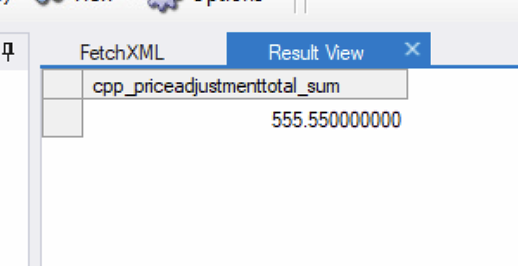
I have a fetch XML query that gets this value by doing aggregate addition.


This is the output as it is a single value as shown.
OutputValueAndField.png

There is no “record”, no “Guid”, this is just a numeric value I need to get and deal with.

The problem is my code below is trying to access it as if it is a d365 entity record, which of course it cannot.

 public class ResultTypeMoney : ACECalculateTax
    {
        protected override void Execute(CodeActivityContext executionContext)
        {
            base.Execute(executionContext);

            if ((service.RetrieveMultiple(ActiveRecordQuery_1).Entities.Count) > 0)
            { Result_1.Set(executionContext, service.RetrieveMultiple(ActiveRecordQuery_1)); }
            else { Result_1.Set(executionContext, 0.00); }

            if (service.RetrieveMultiple(ActiveRecordQuery_2).Entities.Count > 0)
            { Result_2.Set(executionContext, service.RetrieveMultiple(ActiveRecordQuery_2));}
            else { Result_2.Set(executionContext, 0.00); }

        }

        [Output("Result_1")]
        public OutArgument Result_1 { get; set; }


        [Output("Result_2")]
        public OutArgument Result_2 { get; set; }
    }

Line 7-9 and 11-13 are attempting to access and deal with the result of the fetchXML query as if it were a record with Guid, Entity, and Fields. 

The code below is looking to access an entity. 

if ((service.RetrieveMultiple(ActiveRecordQuery_1).Entities.Count) > 0)

However, I just need to check to see if the dollar value exists and if it is created than 0.00

if (555.55/or whatever this value is because it will always be different > 0)

What do I need to change, so that I can access the value in the returned cpp_priceadjustmenttotal_sum field directly as if it were a variable and not an entity?

I have the same question (0)
  • Suggested answer
    a33ik Profile Picture
    84,331 Most Valuable Professional on at

    Hello,

    Actually, there will be a record. Just a single one.

    Check the second part of this article - carldesouza.com/.../

  • ACECORP Profile Picture
    1,589 on at

    I made what looks like the change shown in the second portion of that knowledge article as shown, but it is erroring out on line 8 with an invalid cast error. 

       public class ResultTypeMoney : ACECalculateTax
    
        {
            protected override void Execute(CodeActivityContext executionContext)
            {
                base.Execute(executionContext);
                TracingService.Trace("We have entered the Execute Function inside the Calculation Class.");
                EntityCollection theValue_1 = service.RetrieveMultiple(ActiveRecordQuery_1);
    
                foreach (var c in theValue_1.Entities)
                {
                    float Result_1_Value = (float)((AliasedValue)c["cpp_priceadjustmenttotal_sum"]).Value;
                    TracingService.Trace("Result_1_Value = : "   Result_1_Value);
                    if (Result_1_Value > 0.00)
                    {Result_1.Set(executionContext, Result_1_Value);}
                    else { Result_1.Set(executionContext, 0.00); }
                }
    
                EntityCollection theValue_2 = service.RetrieveMultiple(ActiveRecordQuery_2);
    
                foreach (var c in theValue_2.Entities)
                {
                    float Result_2_Value = (float)((AliasedValue)c["cpp_tax_sum"]).Value;
                    TracingService.Trace("Result_2_Value = : "   Result_2_Value);
                    if (Result_2_Value > 0.00)
                    { Result_2.Set(executionContext, Result_2_Value); }
                    else { Result_2.Set(executionContext, 0.00); }
                }
            }
    
            [Output("Result_1")]
            public OutArgument Result_1 { get; set; }
    
    
            [Output("Result_2")]
            public OutArgument Result_2 { get; set; }
        }

    I am not fully understanding how I need to change the code so that I can do what I am seeking to achieve, which is directly accessing the value that's returned by the fetchxml.  

    EntityCollection theValue_1 = service.RetrieveMultiple(ActiveRecordQuery_1);

    The original code was doing this:

     Result_1.Set(executionContext, service.RetrieveMultiple(ActiveRecordQuery_1));

    I am at a loss for what to do. It seems the problem centers around service.RetrieveMultiple

    ActiveRecordQuery_1 is storing the following FetchXML Code:


    The full code so you can see the Input Parameter (Input Argument) where the FetchXML is coming from is shown below. 

    namespace ACECalculatedTaxFix
    {
        public abstract class ACECalculatedTaxFix : BaseWorkflow
        { }
    
            public abstract class ACECalculateTax : CodeActivity
            {
                protected IOrganizationService service;
                protected FetchExpression ActiveRecordQuery_1;
                protected FetchExpression ActiveRecordQuery_2;
    
                
                protected override void Execute(CodeActivityContext executionContext)
                {
                    ITracingService tracingService = executionContext.GetExtension();
                    tracingService.Trace("Custom Workflow Activity Started.");
                    if (executionContext == null)
                    {
                        throw new ArgumentNullException("serviceProvider");
                    }
    
                    //Construct the Local plug-in context.
                    var context = executionContext.GetExtension();
                    var servicefactory = executionContext.GetExtension();
                    service = servicefactory.CreateOrganizationService(context.UserId);
                    tracingService.Trace("User ID: "   context.UserId);
                    var CurrentEntityID = context.PrimaryEntityId;
                    tracingService.Trace("Primary Entity ID: "   context.PrimaryEntityId);
                    var entityLogicalName = context.PrimaryEntityName;
                    tracingService.Trace("Primary Entity Name: "   context.PrimaryEntityName);
    
                    var userId = context.InitiatingUserId;
                    var entityReference = new DynamicUrlParser(RecordUrl.Get(executionContext));
    
                    tracingService.Trace("URL parser completed successfully");
    
                    string fetchActive_1 = QueryForActiveRecords_1.Get(executionContext);
                    fetchActive_1 = String.Format(fetchActive_1, entityReference.Id.ToString());
    
                    tracingService.Trace("fetchActive_1 = QueryForActiveRecords_1 has been loaded");
    
                    string fetchActive_2 = QueryForActiveRecords_2.Get(executionContext);
                    fetchActive_2 = String.Format(fetchActive_2, entityReference.Id.ToString());
    
                    tracingService.Trace("fetchActive_2 = QueryForActiveRecords_2 has been loaded");
    
                    ActiveRecordQuery_1 = new FetchExpression(fetchActive_1);
    
                    tracingService.Trace("Line 61  ActiveRecordQuery_1 = new FetchExpression(fetchActive_1); Executed");
    
    
                    ActiveRecordQuery_2 = new FetchExpression(fetchActive_2);
    
                    tracingService.Trace("Line 66  ActiveRecordQuery_1 = new FetchExpression(fetchActive_1); Executed");
    
                    tracingService.Trace("At End of Main CodeActivityContext.");
                }
    
                [Input("Record Dynamic Url")]
                [RequiredArgument]
                public InArgument RecordUrl { get; set; }
    
                [Input("QueryForActiveRecords_1")]
                public InArgument QueryForActiveRecords_1 { get; set; }
    
                [Input("QueryForActiveRecords_2")]
                public InArgument QueryForActiveRecords_2 { get; set; }
    
    
            }
    
            public class ResultTypeMoney : ACECalculateTax
    
            {
                protected override void Execute(CodeActivityContext executionContext)
                {
                    ITracingService tracingService = executionContext.GetExtension();
                    base.Execute(executionContext);
                    tracingService.Trace("Line 92 Executed - We have entered the Execute Function inside the Calculation Class.");
                    EntityCollection theValue_1 = service.RetrieveMultiple(ActiveRecordQuery_1);
    
                    foreach (var c in theValue_1.Entities)
                    {
                        float Result_1_Value = (float)((AliasedValue)c["cpp_priceadjustmenttotal_sum"]).Value;
                        tracingService.Trace("Result_1_Value = : "   Result_1_Value);
                        if (Result_1_Value > 0.00)
                        { Result_1.Set(executionContext, Result_1_Value); }
                        else { Result_1.Set(executionContext, 0.00); }
                    }
    
                    EntityCollection theValue_2 = service.RetrieveMultiple(ActiveRecordQuery_2);
    
                    foreach (var c in theValue_2.Entities)
                    {
                        float Result_2_Value = (float)((AliasedValue)c["cpp_tax_sum"]).Value;
                        tracingService.Trace("Result_2_Value = : "   Result_2_Value);
                        if (Result_2_Value > 0.00)
                        { Result_2.Set(executionContext, Result_2_Value); }
                        else { Result_2.Set(executionContext, 0.00); }
                    }
                }
    
                [Output("Result_1")]
                public OutArgument Result_1 { get; set; }
    
    
                [Output("Result_2")]
                public OutArgument Result_2 { get; set; }
            }
    
    }
    

  • Verified answer
    a33ik Profile Picture
    84,331 Most Valuable Professional on at

    I believe that's the aggregate of money field, so the code should look like:

    var Result_1_Value = (Money)((AliasedValue)c["cpp_priceadjustmenttotal_sum"]).Value;

    Good luck.

  • ACECORP Profile Picture
    1,589 on at

    Bing! That did it! Thanks so much!

Under review

Thank you for your reply! To ensure a great experience for everyone, your content is awaiting approval by our Community Managers. Please check back later.

Helpful resources

Quick Links

Introducing the 2026 Season 1 community Super Users

Congratulations to our 2026 Super Stars!

Meet the Microsoft Dynamics 365 Contact Center Champions

We are thrilled to have these Champions in our Community!

Congratulations to the March Top 10 Community Leaders

These are the community rock stars!

Leaderboard > Microsoft Dynamics 365 | Integration, Dataverse, and general topics

#1
11manish Profile Picture

11manish 156

#2
André Arnaud de Calavon Profile Picture

André Arnaud de Cal... 71 Super User 2026 Season 1

#3
ManoVerse Profile Picture

ManoVerse 54 Super User 2026 Season 1

Last 30 days Overall leaderboard

Product updates

Dynamics 365 release plans
