web
You’re offline. This is a read only version of the page.
close
Skip to main content

Notifications

Announcements

No record found.

Community site session details

Community site session details

Session Id :
Supply chain | Supply Chain Management, Commerce
Suggested Answer

How to change allowed threshold for number of open transactional statements

(0) ShareShare
ReportReport
Posted on by 137

Encountered the below error during creation of transactional statement via batch job:

"The number of open transactional statements (50) for store XXXX has exceeded the allowed threshold of 50, and therefore no new statements will be created for the store."

Any idea where we can increase this threshold?

I have the same question (0)
  • Suggested answer
    Ramune Profile Picture
    on at

    Hi Vysakh,

    From the store -> Statement/closing fast tab -> Verify that Maximum Difference -> Posting

    Maximum Difference -> Transaction

    Verify what amounts are set there.

    But also you have to verify if there isd any difference in statement lines and be sure you want these differences to be posted.

  • Vysakh Profile Picture
    137 on at

    Hi Ramune,

    The issue is that the statement itself is not getting created because customer already has more than 50 open statements.

    Hence the error message is visible in the batch job history. Keep in mind that we are able to manually create a new statement, but not via batch job.

  • Suggested answer
    Ramune Profile Picture
    on at

    Hi Vysakh,

    I see. I think the limit is hardcoded. We did see similar issue earlier and there are some details:

    Cause:

    Limit exceeded to have open statement on the store.

    Resolution:

    Closing open statements fix the issue.

  • Suggested answer
    Ramune Profile Picture
    on at

    Hi Vysakh,

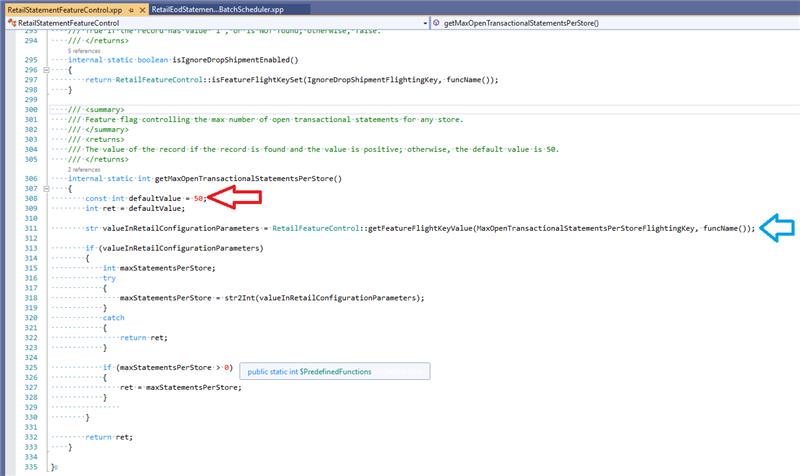
    In addition - there is flighting key to modify this default value

    This is taken from this class as bellow:class RetailEodStatementTransactionalCalculateBatchScheduler

    ...

    int maxOpenStatementsPerStore = RetailStatementFeatureControl::getMaxOpenTransactionalStatementsPerStore();if (openStatementsForCurrentStore.RecId >= maxOpenStatementsPerStore)

    {

    warning(strFmt("@Retail:RetailEODMaxTransactionalStatementsPerStoreReached", openStatementsForCurrentStore.RecId, _storeTable.StoreNumber, maxOpenStatementsPerStore));

    RetailEodStatementPostLogger::maxTransactionalStatementsForStoreReached(openStatementsForCurrentStore.RecId, maxOpenStatementsPerStore, _storeTable.RecId);return;

    }

    ...this code: maxOpenStatementsPerStore = RetailStatementFeatureControl::getMaxOpenTransactionalStatementsPerStore()
    pastedimage1651051480815v1.png

    To change this default value it is required to enable this Flighting key: MaxOpenTransactionalStatementsPerStoreFlightingKey

Under review

Thank you for your reply! To ensure a great experience for everyone, your content is awaiting approval by our Community Managers. Please check back later.

Helpful resources

Quick Links

Responsible AI policies

As AI tools become more common, we’re introducing a Responsible AI Use…

Neeraj Kumar – Community Spotlight

We are honored to recognize Neeraj Kumar as our Community Spotlight honoree for…

Leaderboard > Supply chain | Supply Chain Management, Commerce

#1
Laurens vd Tang Profile Picture

Laurens vd Tang 298 Super User 2025 Season 2

#2
Siv Sagar Profile Picture

Siv Sagar 183 Super User 2025 Season 2

#3
André Arnaud de Calavon Profile Picture

André Arnaud de Cal... 118 Super User 2025 Season 2

Last 30 days Overall leaderboard

Featured topics

Product updates

Dynamics 365 release plans



