web
You’re offline. This is a read only version of the page.
close
Skip to main content

Notifications

Announcements

No record found.

Community site session details

Community site session details

Session Id :
Microsoft Dynamics CRM (Archived)

How to Remove Notification Banner

(0) ShareShare
ReportReport
Posted on by

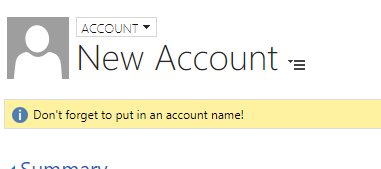
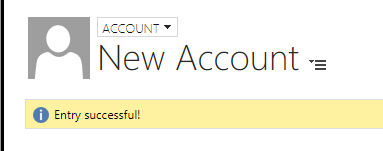
The below script was created to remind the end user to insert an account name onLoad and also respond "Entry successful!" when an account name has been entered. The problem is that the script will display the banner throughout the process. What I need is to know how to remove the banner once the account name is entered successfully. What can I add to my script to display for a certain amount of time?
1423.NewAccount.PNG

NewAccount2.PNG

function onLoad() {
if(Xrm.Page.getAttribute("name").getValue() == null){
Xrm.Page.ui.setFormNotification("Please enter account name!", "INFO", "1");
}
}

function onChange() {
if (Xrm.Page.getAttribute("name").getValue() == null){
Xrm.page.ui.setFormNotification("Entry successful!", "INFO", "1");
}
}

*This post is locked for comments

I have the same question (0)
  • Suggested answer
    ashlega Profile Picture
    34,477 on at

    Hi,

     you need to use clearFormNotification with the same id:

    msdn.microsoft.com/.../gg327828.aspx

     so, I'm guessing, it might look like this:

    function onChange() {

    if (Xrm.Page.getAttribute("name").getValue() != null){

    Xrm.page.ui.clearFormNotification("1");

    }

    }

    If you wanted to display a notification for a few seconds.. might use

    setTimeout

    function onChange() {

    if (Xrm.Page.getAttribute("name").getValue() != null){

    Xrm.page.ui.setFormNotification("Entry successful!", "INFO", "1");

    setTimeout(function(){Xrm.page.ui.clearFormNotification("1");}, 3000);

    }

    }

  • TomSmelser Profile Picture
    1,570 on at

    This can be cleared with Xrm.Page.ui.clearFormNotification().

    You can probably use a js form timer if you want to time it.

    Good Luck!

  • Community Member Profile Picture
    on at

    would this be a separate function or apart of one of the current functions?

  • Community Member Profile Picture
    on at

    This script sent back an error sorry I am new to js

  • ashlega Profile Picture
    34,477 on at

    Hi,

     would need to see the error.. Could you post a screenshot and/or the error message?

  • Community Member Profile Picture
    on at

    0243.Account-3.PNG

  • ashlega Profile Picture
    34,477 on at

    I think you may have copied that first "setTimeout", so there is, likely, a syntax error.. it was just a reference, so the only part you need to copy is this:

    function onChange() {

    if (Xrm.Page.getAttribute("name").getValue() != null){

    Xrm.page.ui.setFormNotification("Entry successful!", "INFO", "1");

    setTimeout(function(){Xrm.page.ui.clearFormNotification("1");}, 3000);

    }

    }

  • Community Member Profile Picture
    on at

    Same error

    this is what I used

    function onChange() {

    if (Xrm.Page.getAttribute("name").getValue() != null){

    Xrm.page.ui.clearFormNotification("1");

    }

    }

    function onChange() {

    if (Xrm.Page.getAttribute("name").getValue() != null){

    Xrm.page.ui.setFormNotification("Entry successful!", "INFO", "1");

    setTimeout(function(){Xrm.page.ui.clearFormNotification("1");}, 3000);

    }

    }

  • ashlega Profile Picture
    34,477 on at

    Ah.. ok. Those are two different ways you can do it:

    a) You can just clear the notificaiton

    b) You can display "Entry successful" and, then, clear that one after 3 seconds

    Can't do both, though, so you'll need to remove one of the "OnChanges" from the script

    (b) is, likely, the closest to what you wanted to have originally, so it should be like this:

    function onChange() {

    if (Xrm.Page.getAttribute("name").getValue() != null){

    Xrm.page.ui.setFormNotification("Entry successful!", "INFO", "1");

    setTimeout(function(){Xrm.page.ui.clearFormNotification("1");}, 3000);

    }

    }

Under review

Thank you for your reply! To ensure a great experience for everyone, your content is awaiting approval by our Community Managers. Please check back later.

Helpful resources

Quick Links

Responsible AI policies

As AI tools become more common, we’re introducing a Responsible AI Use…

Neeraj Kumar – Community Spotlight

We are honored to recognize Neeraj Kumar as our Community Spotlight honoree for…

Leaderboard > 🔒一 Microsoft Dynamics CRM (Archived)

#1
SA-08121319-0 Profile Picture

SA-08121319-0 4

#1
Calum MacFarlane Profile Picture

Calum MacFarlane 4

#3
Alex Fun Wei Jie Profile Picture

Alex Fun Wei Jie 2

Last 30 days Overall leaderboard

Featured topics

Product updates

Dynamics 365 release plans



