web
You’re offline. This is a read only version of the page.
close
Skip to main content

Notifications

Announcements

No record found.

Community site session details

Community site session details

Session Id :
Microsoft Dynamics 365 | Integration, Dataverse...
Answered

Dynamics CRM Optimization

(0) ShareShare
ReportReport
Posted on by 5

Hello! I'm not sure if this is the right place, so if its not I apologize! But i recently started a new job at a company that uses dynamics CRM and i feel like we arent using the functionality to its capacity. For example, is there anyway to make an IF/Then type rule for drop down menus? Like if i were to select one thing it would auto populate into other dropdowns?

I have the same question (0)
  • Pankaj Gogoi Profile Picture
    3,177 on at

    Hi Mothimman,

    You have to write trigger a function on onChange of the lookup field in the form. Here are few links for your reference.

    blog.magnetismsolutions.com/.../how-to-get-and-set-a-lookup-field-using-javascript-in-dynamics-365

    community.dynamics.com/.../804224

    Best Regards

    PG

  • Verified answer
    Wahaj Rashid Profile Picture
    11,321 on at

    Hi,

    This is the right forum, welcome.

    There are several amazing features in Microsoft Dynamics 365 platform that you can use to make it efficient and tailor as per your needs.

    You can use Microsoft Flows, Processes, Business Rules, JavaScript (requires coding) and Plugins (requires coding) to ingest your logic. These are all broad topics, to start with, here are few links:

    https://docs.microsoft.com/en-us/dynamics365/customerengagement/on-premises/customize/create-business-rules-recommendations-apply-logic-form

    https://crmbook.powerobjects.com/system-administration-in-dynamics-365/processes/#:~:text=What%20is%20a%20Process%20in,proceed%20to%20the%20next%20step.

    I would suggest you to look into Business Rules (requires no coding), here is a nice video:

    https://www.youtube.com/watch?v=inOe7tG4-yw

    For your question, regarding cascaded drop downs (i am not sure about your scenario), suggested way is to use Lookups in this case.

    You can filter lookups based on other lookup's value using out-of-the-box features, here is an example:

    https://carldesouza.com/filtering-lookup-fields-in-dynamics-365/

    You can apply filters on dropdowns as well (we call it optionsets), however it requires coding, you can look at following articles:

    https://docs.microsoft.com/en-us/previous-versions/dynamicscrm-2015/developers-guide/gg594433(v=crm.7)?redirectedfrom=MSDN

    Here is a tool for filtered optionsets:

    https://crmoptionsets.azurewebsites.net/

    If you are not familiar with Microsoft Dynamics 365 customization, it would be great if you can share a specific scenario, will be happy to put you in the right direction.

    Best,

    Wahaj

    (if it helps, mark it verified)

  • Mothimman Profile Picture
    5 on at

    Hi Wahaj, thank you for the response and all the info. Im trying my best to parcel through it and see what i need. I am trying to figure this out for myself so i can present the new function to my boss but I'm not sure if I have the permissions necessary to do so. So that may be a moot point.

    Basically we work with a variety of corporations and when one of our clients is getting registered with a Corp there are all these other fields like statuses and whatnot that need to be filled out. But within each corporation the labels are always the same. So itd be like if I pick "ABC corp" it would autofill the status, the client level and whatnot. I'm definitely a novice so thank you for bearing with me.

  • Mothimman Profile Picture
    5 on at

    Posting again because I think I replied to my own post not this comment.

    Hi Wahaj, thank you for the response and all the info. Im trying my best to parcel through it and see what i need. I am trying to figure this out for myself so i can present the new function to my boss but I'm not sure if I have the permissions necessary to do so. So that may be a moot point.

    Basically we work with a variety of corporations and when one of our clients is getting registered with a Corp there are all these other fields like statuses and whatnot that need to be filled out. But within each corporation the labels are always the same. So itd be like if I pick "ABC corp" it would autofill the status, the client level and whatnot. I'm definitely a novice so thank you for bearing with me.

  • Suggested answer
    Wahaj Rashid Profile Picture
    11,321 on at

    Hi,

    As per my understanding, when you pick ABC Corporation in the form (of an Entity X), you would like to copy some details from ABC Corporation's record to the record of Entity X.

    I am assuming, Corporation is a lookup on the form (lookups are a reference to another record).

    I will explain this using the following scenario:

    When I select a Customer on Quote, the address should auto-populate (copied from customer record).

    There are 2 common ways to achieve this:

    • Relationship Mapping: quote has N:1 relationship with Customer entity. We can define Relationship mapping between Quote and Customer entity and copy data on Quote. To configure mapping, look at the following:

    https://readyxrm.blog/2017/02/01/dynamics-365-entity-field-mappings-explained/

    However, relationship mapping only works when you create the child record form Parent form. For example, when we create a Quote from Account (customer) form.

    • Processes: we can configure processes to trigger on an event to do some tasks. In this case, we can configure a real-time process (often called workflows), which triggers on Create or Update of your entity's record and updates data from the Corporation record.

    These are the steps to create a process:

    • Go to Advanced Settings -> Processes.
    • Click new to create a new process.
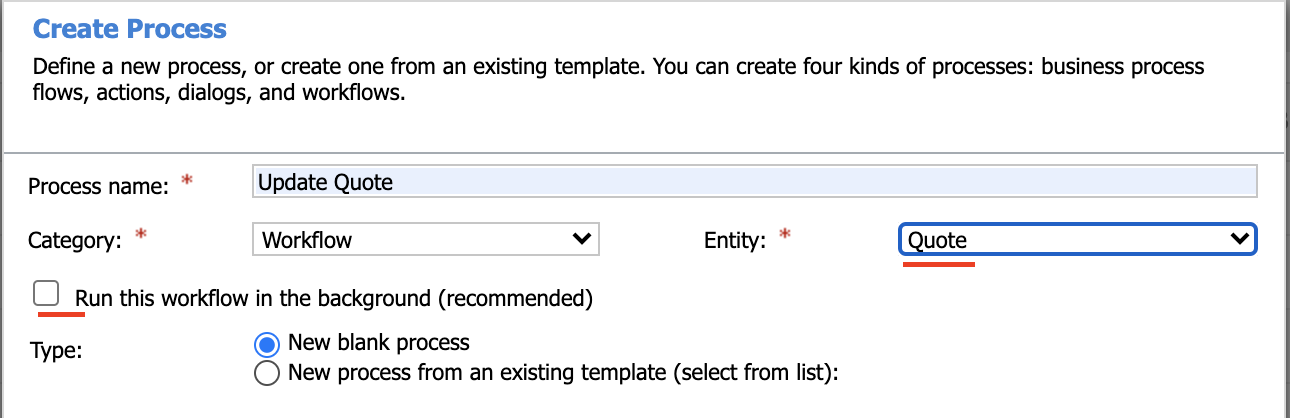
    • Select the following configuration and click ok.
    pastedimage1596752921112v1.png

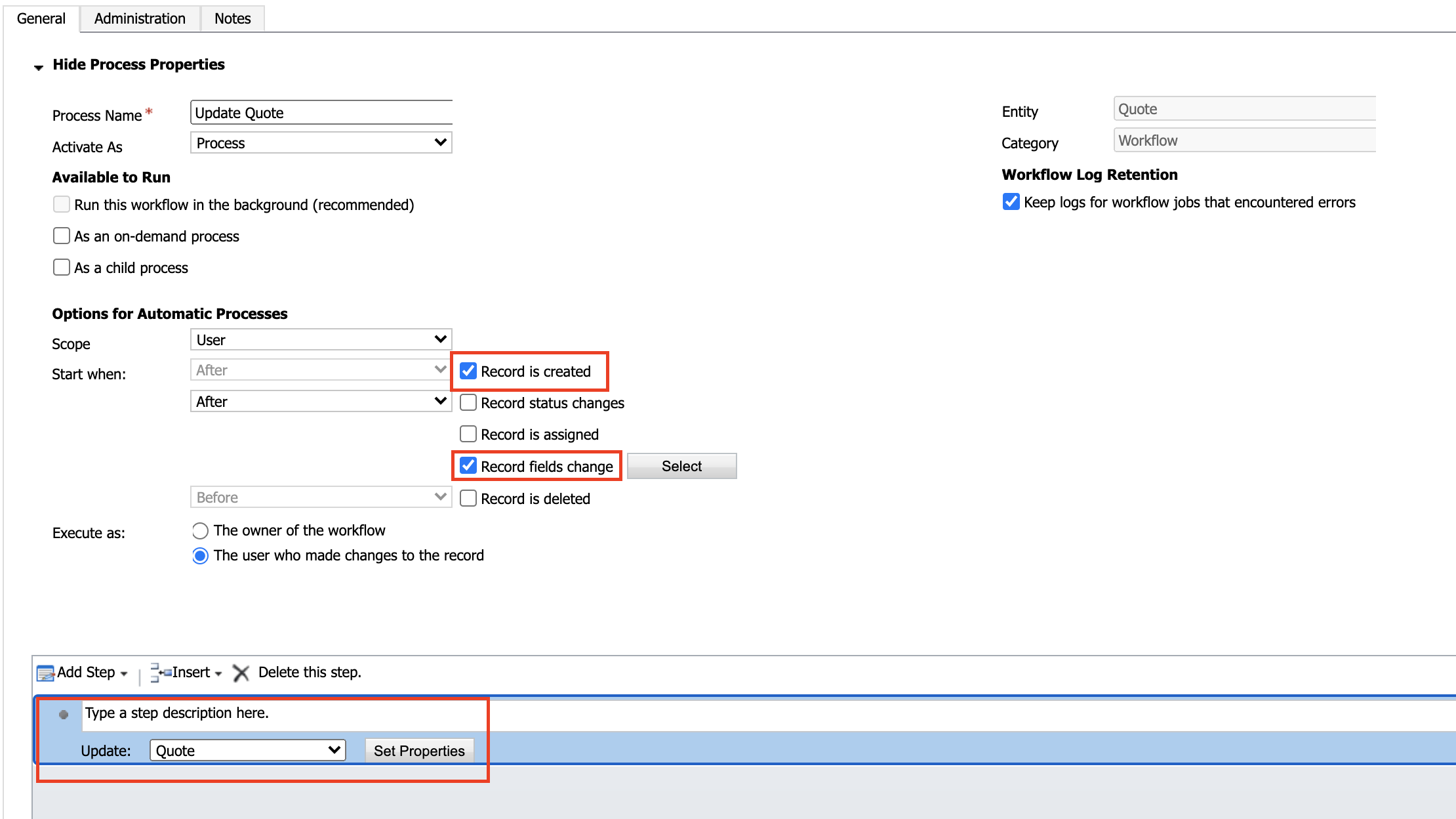
    • We trigger this process on the creation of Quote and when the Customer lookup is updated. We add an Update Action (step) to Copy Address from Customer to Quote.
    pastedimage1596753152811v2.png

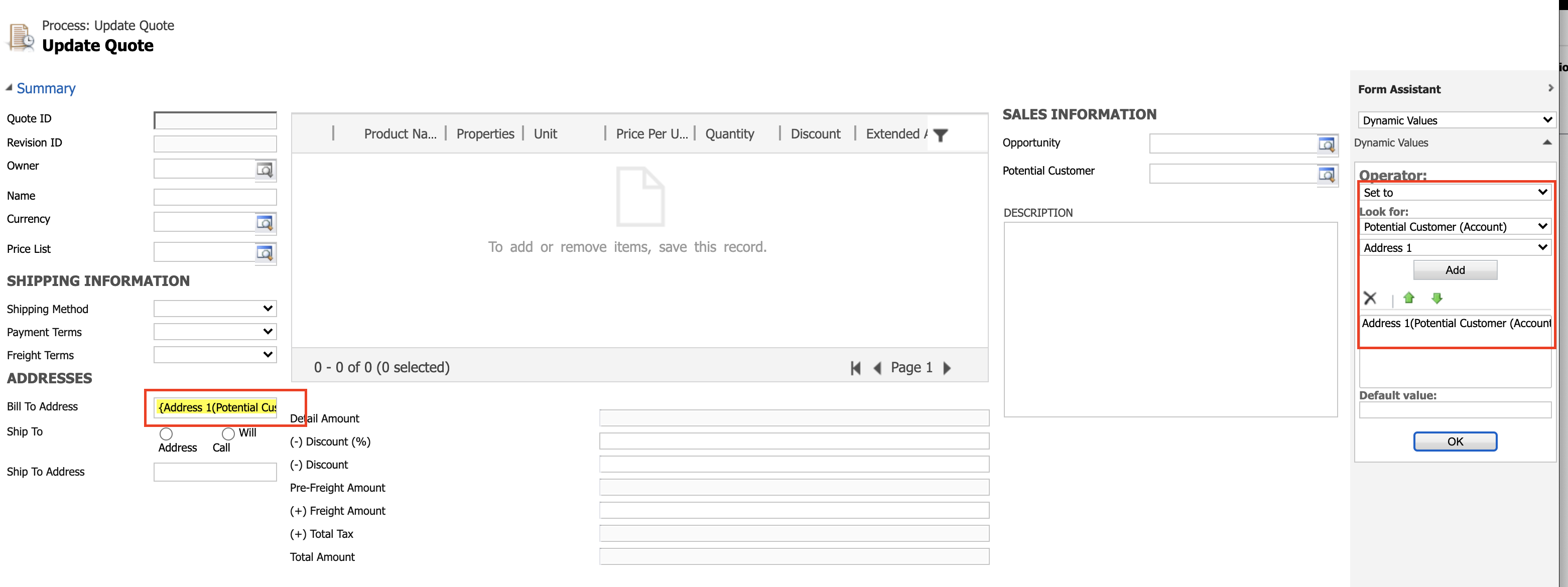
    • Here is the Update step configuration:
    pastedimage1596753345598v3.png

    You can see we are copying Customers Address information to Quote. We can copy any information from a lookup as per the need.

    Once activated, this process will execute (real-time) when we select a Customer (in your case it could be Corporation).

    I hope this gives you an idea of how to achieve this. Exact steps could vary based on your needs and environment.

    Furthermore, you would be needing a System Customizer security role to this configuration.

    Best,

    Wahaj

    (if it helps, mark it verified)

  • RobertAndersonHunt Profile Picture
    20 on at

    Wahaj’s advice is good.

    You can also use calculated fields and quick-view forms.

    Calculated fields can be set up so that they look for data from a related record, so In your Contract entity, you could have your Client lookup field, and then have a “ClientLevel” calculated field which is set to equal “Client.ClientLevel”. The only drawback is that you if you’re looking at Contracts in a View, you won’t be able to sort by these calculated fields.

    Quick-View forms show a snapshot of a related record, so rather than the “Client Level” field existing in your Contract entity, it would still be in the Client entity and not editable from the Contract.

    You can put fields from related records on a report or a view, so it’s sometimes not necessary to put data from related records on e.g. your Contract entity. It depends on exactly how you want to use the data once you‘ve got it there.

Under review

Thank you for your reply! To ensure a great experience for everyone, your content is awaiting approval by our Community Managers. Please check back later.

Helpful resources

Quick Links

Responsible AI policies

As AI tools become more common, we’re introducing a Responsible AI Use…

Neeraj Kumar – Community Spotlight

We are honored to recognize Neeraj Kumar as our Community Spotlight honoree for…

Leaderboard > Microsoft Dynamics 365 | Integration, Dataverse, and general topics

#1
iampranjal Profile Picture

iampranjal 41

#2
Martin Dráb Profile Picture

Martin Dráb 36 Most Valuable Professional

#3
Satyam Prakash Profile Picture

Satyam Prakash 35

Last 30 days Overall leaderboard

Product updates

Dynamics 365 release plans



