web
You’re offline. This is a read only version of the page.
close
Skip to main content

Announcements

No record found.

News and Announcements icon
Community site session details

Community site session details

Session Id :
Supply chain | Supply Chain Management, Commerce
Suggested Answer

Customized workflow Conditional decision not Working !!!!!

(0) ShareShare
ReportReport
Posted on by 25

Hello all,

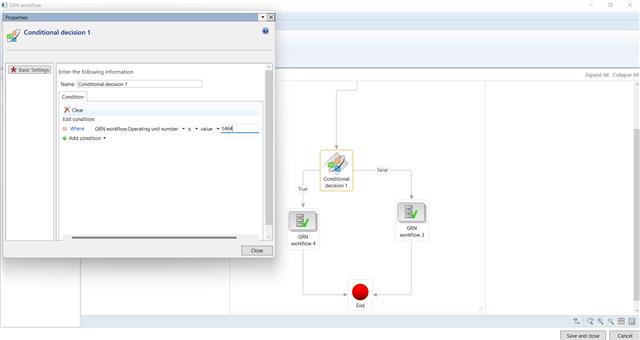
I have created one custom workflow few days ago. Now, we have a requirement to add one condition in it. But the condition isn't working at all. 

The condition always returns true. Is there anything we have to modify using code or we are missing something in the workflow?
pastedimage1652086785175v1.jpeg

Here, as shown in the image, I have added one condition to the workflow, that If the department is 1464 then GRN workflow 4, else GRN workflow 3.

But whatever department I have in my table, it always returns true in the condition, and runs GRN workflow 4.

I also have ledgerDimension recId in my table, which has department value. But this also doesn't work, Even if the value is blank, it returns true.

pastedimage1652086785181v2.jpeg

I debugged the submit manager class, in which I am getting my table with all the values in it.

And I have activated the new version. It also shows in the workflow history.

What am I doing wrong here? Is anything missing from frontend or from coding side?

Thanks in advance,

I have the same question (0)
  • Suggested answer
    WillWU Profile Picture
    22,363 on at

    Hi partner,

    Could you provide a more clear screenshot?

    This seems like a very simple conditional decisions. Did you try another decisions  and check if it works?

    Are you sure  the number you entered is correct?

  • Suggested answer
    Mallesh Deshapaga Profile Picture
    1,811 on at

    Hi Bhavin,

    Can you help me with the workflow name- in which module you have customized ?

    Example: Some of the header level workflows doesn't support for the True or false decisions, it always takes true decision. So you can use the parallel activity workflow and check.

    Please read this blog- It may give you some inputs.

    www.linkedin.com/.../

Under review

Thank you for your reply! To ensure a great experience for everyone, your content is awaiting approval by our Community Managers. Please check back later.

Helpful resources

Quick Links

Introducing the 2026 Season 1 community Super Users

Congratulations to our 2026 Super Stars!

Meet the Microsoft Dynamics 365 Contact Center Champions

We are thrilled to have these Champions in our Community!

Congratulations to the April Top 10 Community Leaders

These are the community rock stars!

Leaderboard > Supply chain | Supply Chain Management, Commerce

#1
André Arnaud de Calavon Profile Picture

André Arnaud de Cal... 164 Super User 2026 Season 1

#2
Laurens vd Tang Profile Picture

Laurens vd Tang 105 Super User 2026 Season 1

#3
Zain Mehmood Profile Picture

Zain Mehmood 89 Most Valuable Professional

Last 30 days Overall leaderboard

Product updates

Dynamics 365 release plans
