web
You’re offline. This is a read only version of the page.
close
Skip to main content

Notifications

Announcements

No record found.

Community site session details

Community site session details

Session Id :
Microsoft Dynamics AX (Archived)

Reporting tools in Visual Studio

(0) ShareShare
ReportReport
Posted on by

Hello,

I'm trying to make some reporting for Ax2012.

However i'm not able to see report in Visual studio!

I've installed SQL Server Data Tool for Visual Studio 2014...But no way to create AX reporting projet(see attached picture).
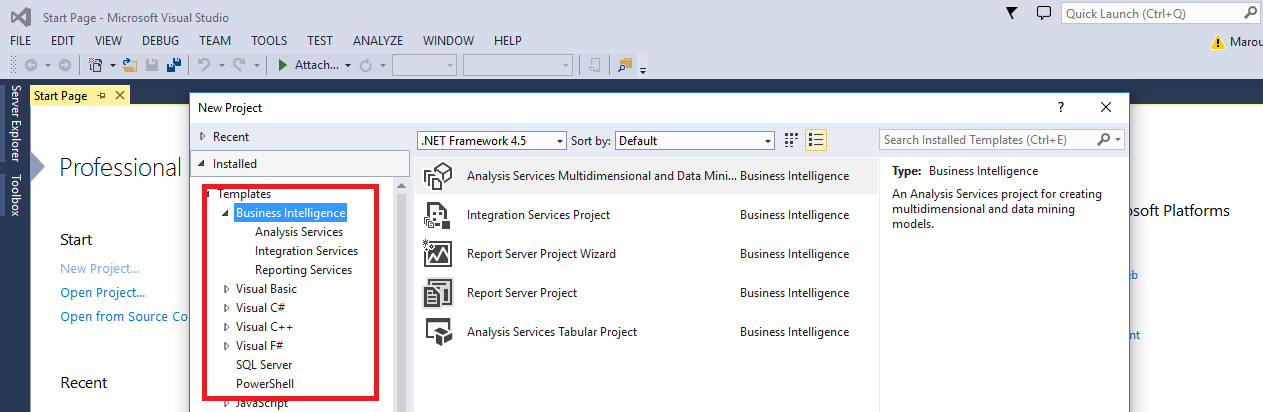
6237.reporting.png

Any help please,

Thanks in Advance

*This post is locked for comments

I have the same question (0)
  • Douglas Noel Profile Picture
    3,905 on at

    Hi,

    SQLDataTools is only one part of the prerequisites.

    you need:

    Ax2012: VisualStudio 2010,

    (starting from Ax2012R3CU8: VisualStudio 2013)

    plus the matching VisualStudioTools(for VS2010 or VS2013) from the maybe slipsteamed installer dvd (ax) or an AxUpdate Package

    Without these VS Extensions you won't be able to access/create Ax specific projects.

    regards Douglas

  • Community Member Profile Picture
    on at

    Hello,

    Thanks for your answer.

    Just for your information, I've Visual 2010 installed and I can make reporting in VS2010.

    ReportingVS2010.png

    But not for SQLDataTools.

  • Douglas Noel Profile Picture
    3,905 on at

    Hi,

    can you please clarify your problem. You're using VS2010, so you gave an Ax Version lower than R3CU8, you are able to access the AOT frim within VS. Up to this everything fine.

    What do you mean with 'for sql data tools'?

    Please elaborate.

    AddOn: maybe it's necessary to install BusinessIntelligenceStudio from VS2008 if you can't open the design.

    regards Douglas

  • Douglas Noel Profile Picture
    3,905 on at

    Sorry typo:

    BIStudio from SQL2008 not VS2008

    regards Douglas

  • Community Member Profile Picture
    on at

    I want to make reporting using SQLDataTools 2014 like my colleagues.

    this is AX2012 version:

    7752.version.png

  • Douglas Noel Profile Picture
    3,905 on at

    Wow,

    this is crazy. Let's summarize: You are using binaries (at least on client side) from Ax2012R3 RTM (=below 2k12r3cu8) - this means VS2010 and have an application which is already on 2k12r3cu13.

    'Normally' you should have some newer binaries (at least cu level) here.

    Can you please check with your colleagues:

    - which VS version they are using? 2010 too?

    - which kernel version is shown in their clients

    Something seems to be wrong

    regards Douglas

  • Community Member Profile Picture
    on at

    Yes, it's strange!

    We have the same cofiguration...We have updated kernel to Cu13.

    May be CU13 is not installed for client?! How Can I do it please?

  • Douglas Noel Profile Picture
    3,905 on at

    The Cu13  binaries are definitely not installed on your client, that's 5he main cause.

    There are a lot of issues going client side r3rtm to r3cu8 and above, is like passing a frontier to a virtual R4 using AxUpdate installer.

    The best way (from experience) to do this:

    - create a slipstreamed ax2k12r3cu13 installer dvd (on disc)

    - deinstall VS Tools 2010 or the complete ax client things (if you run in problems), normally deinstalling of everything is not required.

    - install reportviewer components 2012 and sql2012 datatypes

    - run setup from your dvd

    - tag VisualStudioTools2013

    - VS2013pro has to be installed for selecting this

    that's all (Check the exe Version of Ax32.exe after installing). It mustn't be the old one.

    BUT please check the version of the aos exe if it is really on cu13 too.

    You should have identical binaries (ax) on all computers.

    Even check if the reporting server extensions on the ssrs are already updated corectly.

    And please check if your colleagues using VS2013 (NOT VS2010)

    regards Douglas

  • Community Member Profile Picture
    on at

    OK, man

    Thank you very much for your help.

Under review

Thank you for your reply! To ensure a great experience for everyone, your content is awaiting approval by our Community Managers. Please check back later.

Helpful resources

Quick Links

Responsible AI policies

As AI tools become more common, we’re introducing a Responsible AI Use…

Neeraj Kumar – Community Spotlight

We are honored to recognize Neeraj Kumar as our Community Spotlight honoree for…

Leaderboard > 🔒一 Microsoft Dynamics AX (Archived)

#1
Martin Dráb Profile Picture

Martin Dráb 4 Most Valuable Professional

#1
Priya_K Profile Picture

Priya_K 4

#3
MyDynamicsNAV Profile Picture

MyDynamicsNAV 2

Last 30 days Overall leaderboard

Featured topics

Product updates

Dynamics 365 release plans
