web
You’re offline. This is a read only version of the page.
close
Skip to main content

Notifications

Announcements

No record found.

Community site session details

Community site session details

Session Id :
Microsoft Dynamics GP (Archived)

Errors in Row definition after migration from FRx to MR

(0) ShareShare
ReportReport
Posted on by

Hi All,

I have migrated from FRx SP9 to MR 2012 and after successful migration i have opened the report designer and there are some errors in Row definitions.I have a row definition "consol_PL_simple" which has a red exclamation on it and when i open this report definition it gave me below error.
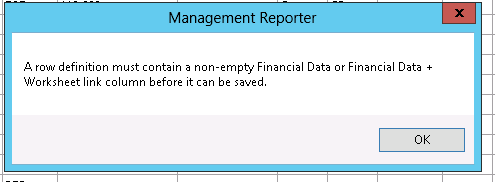
row-def-error.PNG

I went to the report definition and deleted the blank rows and added "DES" in the column C for all the rows where the column J is empty.

And then i tried to save the definition but again the same error is occurring as in the above screenshot.

Can any one help me here what else fix need to be done here to fix the row definition error.

Regards,

Aravind Reddy.

*This post is locked for comments

I have the same question (0)
  • RogerRogerATX Profile Picture
    1,515 on at

    I think we would need to see the row definitions as well....

  • Community Member Profile Picture
    on at

    Hi Roger,

    Below is the screenshot of the Row definition screenshot.

    row-def.PNG

  • RogerRogerATX Profile Picture
    1,515 on at

    Does any row have a value in Column J?  I don't see any on this grab - and that's what the error says...you have to have at least one row with something (valid) in Column J.

  • Community Member Profile Picture
    on at

    Hi Roger,

    None of the row has a value in Column J.

    After migration , this row definition has got no value in the Column J for entire rows.

    As I'm very new to MR , Could you please let me know which value i should keep in column J?

    Regards,

    Aravind Reddy

  • RogerRogerATX Profile Picture
    1,515 on at

    It's similar to FRx - if you double click in the cell it can autopopulate the values there for you - this is where you enter the GL Account Number or range(s).  The format is slightly different than FRx was though.

  • Community Member Profile Picture
    on at

    I haven't worked on FRx as well, this is the first time i'm working FRx .

    I clicked on the Column J and below is the screenshot of the popup that i have got.

    Can you please guide which segment to select here.Colummn-J.PNG

    Regards,

    Aravind Reddy.

  • RogerRogerATX Profile Picture
    1,515 on at

    Each segment matches the account segment for the company(s) in GP...looks like the GL accounts are something like

    xxxx-xxxx-xxxx-xxxx  (# of digits is probably wrong)

    If you double click inside each segment section you should get another pop up and if you drill into it it should show you the range of segments that matches your current GP company (bottom bar of MR, it's your default company which you can change anytime)

    So just choose any value and it should allow you to save.  But this is where you assign the GL account codes to match the line of the financial statement.

  • Community Member Profile Picture
    on at

    I have 150 rows in the present row definition.

    When i double click on segment 3 ,i have got a pop up to select range of segments as in below screenshot.segment-3.PNG

    Here i can select from any number to any another number with out overlapping the range in other row.

    Is my understanding correct?

    regards,

    Aravind Reddy

  • RogerRogerATX Profile Picture
    1,515 on at

    That is correct.  Or you can select just one.  If you need to not have them overlap (but let's say you want 1000 and then 1140 to 1205 - click ok and then go to the next row on the previous screen and do this again on the dimensions popup.)

  • Community Member Profile Picture
    on at

    Thanks you very much for your reply Roger!.

    I have added Column J for all the Rows and then i tried to save definition.

    This time i have got some errors as in below screenshot.

    2210.error2.PNG

    Also , there is another error as in screen 2 saying that a) Print control options can only be used if the format code is TOT , CAL or Blank in Column G

    2) you can only specify a normal credit balance f the format code is TOT , CAL or Blank in Column F.

    2210.error2.PNG

    Can you please guide how to fix those issues.

    Regards,

    Aravind Reddy

Under review

Thank you for your reply! To ensure a great experience for everyone, your content is awaiting approval by our Community Managers. Please check back later.

Helpful resources

Quick Links

Responsible AI policies

As AI tools become more common, we’re introducing a Responsible AI Use…

Neeraj Kumar – Community Spotlight

We are honored to recognize Neeraj Kumar as our Community Spotlight honoree for…

Leaderboard > 🔒一 Microsoft Dynamics GP (Archived)

#1
Community Member Profile Picture

Community Member 2

#2
mtabor Profile Picture

mtabor 1

#2
Victoria Yudin Profile Picture

Victoria Yudin 1

Last 30 days Overall leaderboard

Featured topics

Product updates

Dynamics 365 release plans



