web
You’re offline. This is a read only version of the page.
close
Skip to main content

Notifications

Announcements

No record found.

Community site session details

Community site session details

Session Id :
Microsoft Dynamics CRM (Archived)

Is it possible to search for Custom Field in Price List Item lookup

(0) ShareShare
ReportReport
Posted on by

Hi All,

Hoping you've all had a good christmas and have some amazing plans for the new year!

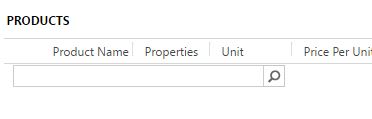
I'm trying to see if it's possible to search for a custom field on the product entity when using the "Price List Items in Entity Price List" lookup view on the Quote/Opportunity/Order record in the Product search box.

I have created 'new_manufacturerpartnumber" on the product entity and wish to be able to search for this string using that search box on the mentioned fields
0844.Capture.JPG

Many Thanks

*This post is locked for comments

I have the same question (0)
  • Suggested answer
    TheMarkChristie Profile Picture
    10,328 Moderator on at

    Hi

    There is no out of the box way to do this, You would need custom code written to do this,

    What is the need for searching the product? Lets see if there is a OOB way to do it

  • Community Member Profile Picture
    on at

    You need to add the custom field in Line Item like Order Line. Add this field in Add Find COlumn of Quick Find View of Order Line.

    2086.Capture.PNG

  • TheMarkChristie Profile Picture
    10,328 Moderator on at

    Hi Saad

    That will only work if you are trying to get the field from the Price List Item - In this instance we are trying to go back to the product for the PLI

  • Community Member Profile Picture
    on at

    Hi Saad,

    Thanks for the response.  This is something I already investigated.  The trouble being, that the search box searches the price list items and the fields cannot be passed down from the Product item.  

  • Community Member Profile Picture
    on at

    Hi Mark,

    Thanks for coming back to me so quick.  As I thought, I might need custom code, not out of range of my ability, but definitely time consuming more than anything so an OOB solution would be preferable.

    Our Sales team are the ones compiling the Opportunities and Quotes and our product naming convention is quite long, therefore missing off most of the product name in the quick find view.  For example, an Office 365 product might start "12 Months (Corp) Office 365 Per User - Band...."  Band being A to Z based on the company size/type, etc.  We also have multiple similar products i.e. HP Laptops, slightly differing specs, so a manufactures part number would locate that exact product.  I know that product number is searchable using this field.  

    I'm just looking to streamline their methods by giving them another way to search without having to find other information, usually they'll have the MPN.

    Many Thanks

  • Suggested answer
    TheMarkChristie Profile Picture
    10,328 Moderator on at

    Have you thought about using Product ID on the PLI?

    You could update the relationship mapping to map over the MPN to Product ID (only if they don't search on product ID) - Then rename Product ID to MPN ?

    As the PLI doesn't let you add anything to it then it could be the only OOB solution for you

  • Suggested answer
    Naveen Goyal Profile Picture
    81 on at

    Hi Ereden_

             I was also having the same problem in some other entities in dynamics CRM and one possible way to implement that is, you get the field from the product entity into price list items form when you choose the lookup of product in price list items. You can do this using javascript.

    And than add that custom field into the quick find view to add that to lookup.

    I hope this can solve your problem.

    Feel free to ask if you need the Javascript code to implement that.

    Regards

    Naveen Goyal

Under review

Thank you for your reply! To ensure a great experience for everyone, your content is awaiting approval by our Community Managers. Please check back later.

Helpful resources

Quick Links

Responsible AI policies

As AI tools become more common, we’re introducing a Responsible AI Use…

Neeraj Kumar – Community Spotlight

We are honored to recognize Neeraj Kumar as our Community Spotlight honoree for…

Leaderboard > 🔒一 Microsoft Dynamics CRM (Archived)

#1
SA-08121319-0 Profile Picture

SA-08121319-0 4

#1
Calum MacFarlane Profile Picture

Calum MacFarlane 4

#3
Alex Fun Wei Jie Profile Picture

Alex Fun Wei Jie 2

Last 30 days Overall leaderboard

Featured topics

Product updates

Dynamics 365 release plans



