web
You’re offline. This is a read only version of the page.
close
Skip to main content

Announcements

No record found.

News and Announcements icon
Community site session details

Community site session details

Session Id :
Small and medium business | Business Central, N...
Answered

Cash Receipt Journal Payment Disc Not Applied

(0) ShareShare
ReportReport
Posted on by 3,305

Hi All

When we use "payment journal" discount is applied, but when using "Cash receipt journal" as below, payment discount is not applied
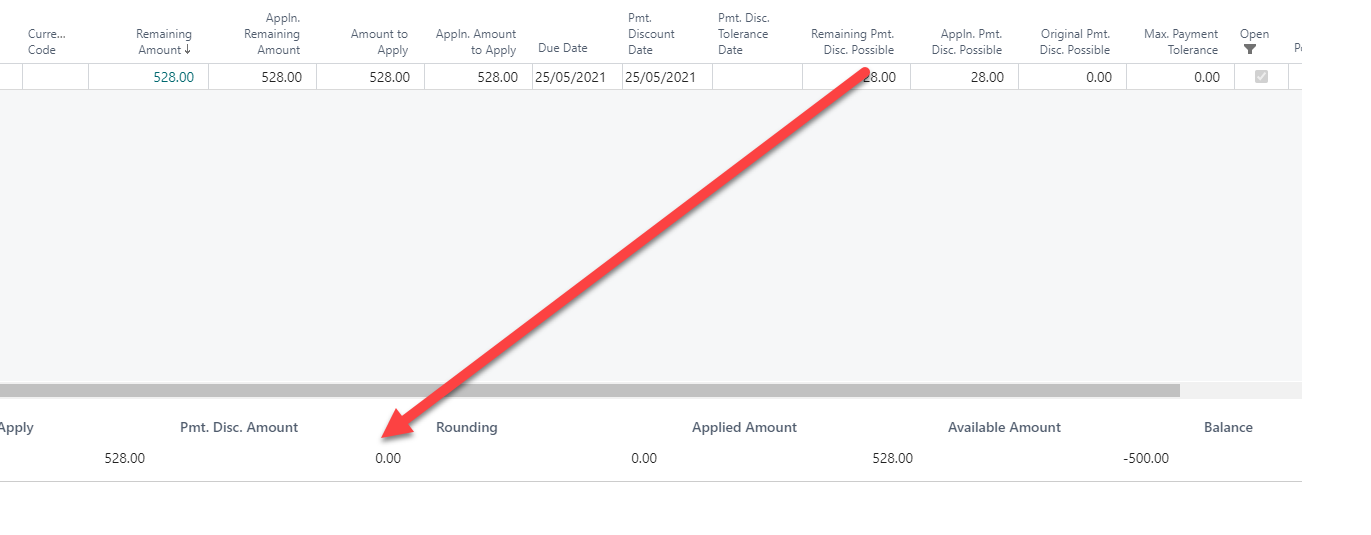
image_5F00_2021_2D00_05_2D00_25_5F00_121230.png

So in the above example what we expect is to apply 28$ as a discount and the balance to be 0.  Cannot figure out how Payment Journal differs.  Changed the discount tolerance days in GL Setup to 1000 but no change

I have the same question (0)
  • Suggested answer
    Andy Sather Profile Picture
    Microsoft Employee on at

    Hello Samantha - I am not seeing those 2 fields on my install of Business Central (Remaining Pmt. Disc Possible, Pmt. Disc. Amount).  Is this part of an Extension?

  • Verified answer
    Community Member Profile Picture
    on at

    Samantha,

    The document in question I see the Due Date is 5/25/21 and the Pmt. Discount Date 5/25/21. What is the Cash Receipts Posting Date? Is it 5/25/21. Here are my 2 tests and explanations:

    Test 1 - Created a Sales Invoice with Due Date = 5/6/21 and Discount Date = 4/16. My C/R posting Date is 4/15/21 and here is my Apply Page:

    pastedimage1621954401819v1.png

    Now Test 2 = Sales Invoice with Due Date and Discount Date = 5/25 and C/R Posting Date = 5/25:

    pastedimage1621954673484v2.png

    When you are entering the Payment, do you leave the Amount blank on the C/R line and click into the Apply Entries to select the invoice to be paid? By doing this and setting each Invoice to be used, the total will come back that equals the Deposit Amount.

    pastedimage1621954763514v3.png

    Hope this helps.

    Thanks,

    Steve

Under review

Thank you for your reply! To ensure a great experience for everyone, your content is awaiting approval by our Community Managers. Please check back later.

Helpful resources

Quick Links

Introducing the 2026 Season 1 community Super Users

Congratulations to our 2026 Super Stars!

Meet the Microsoft Dynamics 365 Contact Center Champions

We are thrilled to have these Champions in our Community!

Congratulations to the April Top 10 Community Leaders

These are the community rock stars!

Leaderboard > Small and medium business | Business Central, NAV, RMS

#1
OussamaSabbouh Profile Picture

OussamaSabbouh 2,086 Super User 2026 Season 1

#2
YUN ZHU Profile Picture

YUN ZHU 1,290 Super User 2026 Season 1

#3
AndrewThomas81 Profile Picture

AndrewThomas81 1,218

Last 30 days Overall leaderboard

Featured topics

Product updates

Dynamics 365 release plans
