web
You’re offline. This is a read only version of the page.
close
Skip to main content

Notifications

Announcements

No record found.

Community site session details

Community site session details

Session Id :
Microsoft Dynamics AX (Archived)

Physical Inventory by Inventory dimension report error

(0) ShareShare
ReportReport
Posted on by 20

Hi Waqas,

I am facing same error with Physical Inventory report.
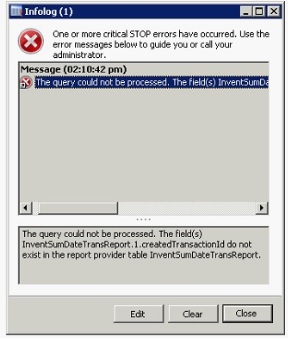
AX throws following error when report is executed using AX client:
"The query could not be processed. The field(s) InventSumDateTransReport.1.createdTransactionId do not exist in the report provider table InventSumDateTransReport.
IPD_5F00_error.jpg

Whereas when we access same report from Report server, following error is faced:
Query execution failed for dataset 'InventSumDateTransReport'. (rsErrorExecutingCommand)
An exception occurred in the query metadata execution. The exception is Pre-Processed RecId parameter not found. Cannot process report. Indicates a development error..
Pre-Processed RecId parameter not found. Cannot process report. Indicates a development error.
Pre-Processed RecId parameter not found. Cannot process report. Indicates a development error"


I tried following but non of them worked:
1. Deleted all reports including DynamicsAX folder from Report server
2. Created new folder
3. Deployed reports using Dynamics AX Management Shell command "publish-axreport - reportname *" 

4. Restarted SSRS service

Next i tried to access the Physical Inventory by dimension report but still the same error as above.

Then i generated full-CIL and synchronize DB but no success.
Cleared all *.auc file in users folder.

Now i am planning to reinstall reporting services, create new report server database, and re-deploy reports. Lets see if it work and update.


Meanwhile, any body have idea what is possible cause of error and how to resolve it.
Thanking in advance.


kind regards,

*This post is locked for comments

I have the same question (0)
  • Sohaib Cheema Profile Picture
    49,438 User Group Leader on at

    which version of ax you are using? CU7 or R3 or RTM?

    Have you done upgrade recently?

    Have you noticed properties CreateRecIdImndex and CreatedTransactionId for InventSumDateTransReport(Table)

    have you tried to modify the report in Visual Studio and tried to refresh data sources and re-deploy report from VS?

    The report is trying to use pre-processedTempDB and unable to find Transaction RecId

  • Suggested answer
    syed baber Profile Picture
    11,633 on at

    Hi,

    Have you done any customisation in this report or are you just trying to run the standard report shipped with Dynamics AX? Try to run any other report which uses CreatedTransactionId field like Customer account statement report and see if you are getting the same error or not.

    Please verify and let me know if you have further queries.

    Thanks

    Baber.

  • Roshani Profile Picture
    20 on at

    Dear Shoaib,

    Thanks for your response.

    We are using AX 2012 R2 CU7, it's upgraded environment from CU1.

    Values of CreateRecIDImndx=Yes,  CreatedTransactionId=No.

    I have opened the InventDimPhys report in Visual studio but i am not able to refresh its datasource (where to look for datasource option)

    VS_5F00_report.jpg

    Please guide next step.

    Secondly if multiple reports have the same issue, what shall be the correct mechanism to resolve this issue.

    Kind regards,

  • Sohaib Cheema Profile Picture
    49,438 User Group Leader on at

    there is yellow Node DataSets, expand it. Select each DataSet one by one and click refresh. Now press ctrl+s and rebuild the project and redeploy the project.

    if multiple reports have the same issue, in my opninion by reddeploying it should be resolved.

  • Roshani Profile Picture
    20 on at

    Thanks again, I tried to "Refresh" the report data source and then "Build" the project. Visual Studio throws following two errors.

    Can you guide why the error(s) are thrown and how to resolve it!

    Error 1:

    System.InvalidOperationException: Object is currently in use elsewhere.

    at Microsoft.VisualStudio.Modeling.GlobalEventManagerImpl.NotifyObservers(Object sender, EventArgs e)

    at Microsoft.VisualStudio.Modeling.ElementEventManagerImpl.NotifyObservers(Object sender, EventArgs e)

    at Microsoft.VisualStudio.Modeling.AddElementLinkCommand.NotifyObservers()

    at Microsoft.VisualStudio.Modeling.Transaction.Commit()

    at Microsoft.Dynamics.Framework.Design.Model.Reports.DataMethodSynchronizerHelper.SynchronizeExistingDataMethods(ModelValidationContext context, ReportDefinition report, List`1 assemblyDataMethods)

    at Microsoft.Dynamics.Framework.Design.Model.Reports.DataMethodConstraint.ValidateDataMethods(ModelValidationContext context, ReportDefinition report)

    at Microsoft.Dynamics.Framework.Design.Model.Reports.ReportConstraint.Validate(ModelValidationContext context, ReportDefinition element)

    at Microsoft.Dynamics.Framework.Design.Model.GenericConstraint`1.Validate(ModelElement modelElement, ModelValidationContext context)

    at Microsoft.Dynamics.Framework.Design.Model.ModelValidationEngine.Validate(ModelElement modelElement, ModelValidationContext context) \SSRS Reports\Reports\InventDimPhys 0 0 InventDimPhys

    Error 2:

    Invoke validation method 'Validation' failed 0 0 InventDimPhys

  • Roshani Profile Picture
    20 on at

    Shoaib, actually i have re-deployed the reports multiple time using publish-axreport cmdlet. Is there any other way to deploy the report so that i can avoid similar errors.

  • Sohaib Cheema Profile Picture
    49,438 User Group Leader on at

    if you visit following url , and use Ctrl+F, you would find your issue there

    System.InvalidOperationException: Object is currently in use elsewhere

    technet.microsoft.com/.../gg731894.aspx

    community.dynamics.com/.../123038

    I am not sure what you have done, during in place upgrade from CU1 to CU7

  • Suggested answer
    Florian Hopfner Profile Picture
    2,461 on at

    I encountered the same problem today and the usual suspects (deploy, cil, sync, restart of reporting server, deletion of auc files) did not solve it. Some further analysis revelead that (at least in my case) KB 2996129 seems to be the culprit because it changed the table definition of table InventSumDateTransReport without changing the report definition of report InventDimPhys. Unfortunately this is not obvious when analyzing the report definition in Visual Studio. Only when viewing the xml of the report definition it becomes apparent that field CreatedTransactionId is still part of the report definition.

    The solution for me was to make a small customization to the report definition so that it is created in the development layer. The report definition then does not contain the field CreatedTransactionId anymore and after deploying this report definition, the report works as expected.

Under review

Thank you for your reply! To ensure a great experience for everyone, your content is awaiting approval by our Community Managers. Please check back later.

Helpful resources

Quick Links

Responsible AI policies

As AI tools become more common, we’re introducing a Responsible AI Use…

Neeraj Kumar – Community Spotlight

We are honored to recognize Neeraj Kumar as our Community Spotlight honoree for…

Leaderboard > 🔒一 Microsoft Dynamics AX (Archived)

#1
Martin Dráb Profile Picture

Martin Dráb 4 Most Valuable Professional

#1
Priya_K Profile Picture

Priya_K 4

#3
MyDynamicsNAV Profile Picture

MyDynamicsNAV 2

Last 30 days Overall leaderboard

Featured topics

Product updates

Dynamics 365 release plans
