web
You’re offline. This is a read only version of the page.
close
Skip to main content

Announcements

No record found.

News and Announcements icon
Community site session details

Community site session details

Session Id :
Microsoft Dynamics AX (Archived)

GL Opening Balance Journal Import through Data Migration Framework.

(0) ShareShare
ReportReport
Posted on by 3,089

Dear Experts,

I am using DMF for the import of Opening Balance Journal. Currently I am facing one problem which is I have imported the journal but following data is not appearing properly.

For Example

Main Account : 110100140

Branch : JED

Department : 07

Cost Center : 0704

Brand : 0101

Employee : 1448

LC : 125478

I have defined within the text file is

LedgerDimension = Main Account

DefaultDimension = Branch|Department|Cost Center|Brand|Employee|LC

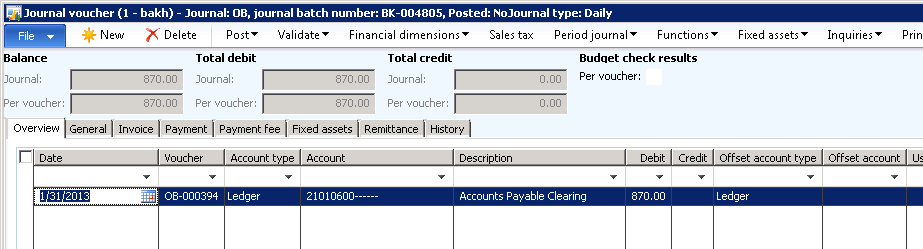
The problem is within the Ledger Journal Line within the Account Column, Main Account is there but there is no further dimension which was I imported within the system. Image is attached. Anyone has resolve this issue or faced this problem.
*This post is locked for comments

I have the same question (0)
  • Kartik Kurup Profile Picture
    435 on at

    This is just a suggestion, but when you add the fields in the Process Group>Entity>Generate source file, you should be able to see and select the LedgerDimension OR the offsetLedgerDimension fields. When I did this for customer transactions, I was able to select a customer and an offset ledger account with the related dimensions that I needed to be attached to the transaction itself. And when I uploaded the data, it was able to put in the dimensions in all the right fields. Under the LedgerDimension OR the offsetLedgerDimension columns in Excel (CSV format), put the data in this format: "60500-01-02-03-014" where 60500 is the customer ID (in your case, the GL account), and all the other fields are the dimensions needed. It's the "-" that counts. I don't think you require multiple columns in excel to specifically populate just the dimensions. You just add it along with the main/offset account itself. Also, check how the import of Dimension is setup under DMF>Setup>Source data formats; highlight the source name and click on 'applications' and see if a format for dimensions is defined.

  • Ahmed Muhammad Alam Profile Picture
    3,089 on at

    Dear Kartik,

    Thanks for your reply, actually what you have explain in your post. I have already tried it and its failed because when I follow this approach system alarm me with the message "Main account should be there [sort of like that]".

    The matter which I have posted was the second approach but the problem you have seen in the Image.

    What I have got that there is a class DMFLedgerBalanceEntityClass.GenerateDefaultDimension there is no code for the Account Type "Ledger", that is missing from it.

  • Anuradha Pandrangi Profile Picture
    260 on at

    Hi Ahmed,

    I have uploaded Opening balances with DMF. I mapped "AccountNum" to "LedgerDimension". And in the file I have give the AccountNum as 110180-001-022 and I can see the main account and dimensions. There is no code for the Account type "Ledger" in DMFLedgerBalanceEntityClass.GenerateDefaultDimension and which is correct.

  • Ahmed Muhammad Alam Profile Picture
    3,089 on at

    Dear Experts,

    I have got some point,

    In DMFDimensionHelper.generateDynamicDimension method

    On line number 54, when the system required to generate the DimensionAttributeList, it fails and thats why

    line number 113, when system generate Dynamic Dimension according the provided LedgerDimension it says

    "Financial Dimension 0 doesn't exist" .

    The final view of the dimensionvalue is below and when system required to generate the LEDGER DIMENSION when it hits the stack 4 it says

    "Financial Dimension 0 doesn't exist"

    dimensionvalue                    <size = 13>

    [13]     =     "1448"

    [1]     =     "21010600-JED-07-0702-0404-1448-"

    [2]     =     "21010600"

    [3]     =     "5"

    [4]     =     "0"                    <--------- problem line

    [5]     =     "JED"

    [6]     =     "0"

    [7]     =     "07"

    [8]     =     "0"

    [9]     =     "0702"

    [10]     =     "0"

    [11]     =     "0404"

    [12]     =     "0"

  • Ahmed Muhammad Alam Profile Picture
    3,089 on at

    Dear Anuradha,

    I have figure out one problem is in DMFDimensionHelper.generateDynamicsDimension method.

  • Ahmed Muhammad Alam Profile Picture
    3,089 on at

    Hello Experts,

    Can anyone send me the code for the below Class method.

    DMFDimensionHelper.generateDynamicsDimension

  • Verified answer
    dolee Profile Picture
    11,279 on at

    Hi,

    See if this help:

    domhk.blogspot.hk/.../data-import-export-framework-financial.html

  • Ahmed Muhammad Alam Profile Picture
    3,089 on at

    Dear Dolee,

    Thanks alot..... for your valueable information. Actually I have figure out the same thing but this is awesome.

  • Santosh Profile Picture
    766 on at

    Hi Ahmed,

    I am uploading Journal using DIEF and it is uploaded as required but found my next number field (Journal Batch Number) is not incrementing. Say while Journal upload journal batch number was 00483. So for next record it should come as 00484 but system is creating same number say 00483 and getting message as "Cannot create a record in Ledger journal table (LedgerJournalTable). Name: GenJrn, General Journal.

    The record already exists."

    What is the reason of happening this.

    Regards,

    Santosh

Under review

Thank you for your reply! To ensure a great experience for everyone, your content is awaiting approval by our Community Managers. Please check back later.

Helpful resources

Quick Links

Introducing the 2026 Season 1 community Super Users

Congratulations to our 2026 Super Stars!

Meet the Microsoft Dynamics 365 Contact Center Champions

We are thrilled to have these Champions in our Community!

Congratulations to the March Top 10 Community Leaders

These are the community rock stars!

Leaderboard > 🔒一 Microsoft Dynamics AX (Archived)

#1
Joris dG Profile Picture

Joris dG 5

#2
Alexey Lekanov Profile Picture

Alexey Lekanov 2

#2
Henrik Nordlöf Profile Picture

Henrik Nordlöf 2 User Group Leader

Last 30 days Overall leaderboard

Featured topics

Product updates

Dynamics 365 release plans
