web
You’re offline. This is a read only version of the page.
close
Skip to main content
Community site session details

Community site session details

Session Id :
Finance | Project Operations, Human Resources, ...
Unanswered

How to use "Group" and COM objects using X++ in D365 FO ?

(0) ShareShare
ReportReport
Posted on by 5

HI All, 

I am retrieving a BOM Designer in Tree structure form, in to excel using X++ In D365, 

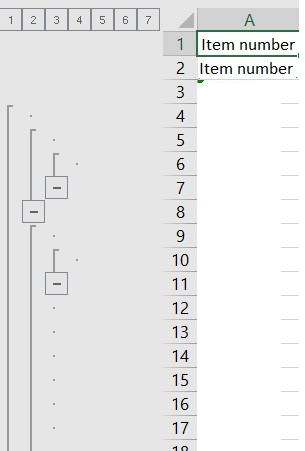
I want to Group the Cell using COM objects as we used in AX: 

Sample code of AX 4.0 

Code 1 : 

comRange = worksheetBOM.range(strfmt("%3%1:%4%2", rowLocal,row,'@SYS30306', '@SYS75441')).comObject();
comRange.select();
comSelection = comApplication.selection();
comRows = comSelection.rows();
comRows.group();

Code 2: 

comRange = worksheetBOM.range(strfmt("%3%1:%4%2", 1,1,'@SYS30306', '@SYS30306')).comObject();
comRange.select();
worksheetBOM.columns().autoFit();

How I can re-write above lines for D365 FO. 

Desired Output 
I have the same question (0)
  • André Arnaud de Calavon Profile Picture
    300,721 Super User 2025 Season 2 on at
    RE: How to use "Group" and COM objects using X++ in D365 FO ?

    Hi Pravin,

    You can't use the COM objects anymore as we now have a cloud based solution which is not aware of any installed Office product. You can use OfficeOpenXML to create and work with Excel files. An example can be found here:  How to Create and Export Excel Files using X++ in D365 FO (d365snippets.com)

  • Pravin Profile Picture
    5 on at
    RE: How to use "Group" and COM objects using X++ in D365 FO ?

    Hi Andre,

    Thank you for your reply,

    As I already Used same link to create the Export Excel using OfficeOpenXML Library.

    which gives me a expected output that I am looking for, But 

    I am looking for the solution for "Group", "Range" and "Selection" of the cell in Excel file using X++ which give me output of Tree node  in Excel file as screenshot attached Above.

    Regards,

    Pravin

  • André Arnaud de Calavon Profile Picture
    300,721 Super User 2025 Season 2 on at
    RE: How to use "Group" and COM objects using X++ in D365 FO ?

    Hi Pravin,

    Thanks for the clarification. I would then suggest searching for the commands and examples on the internet. When you need to call specific Excel features, you can also consider using the Office forum.

    With a quick search, I was able to find a post related to grouping: [Solved] How to Group the Rows n a Excel using OpenXML SDK - CodeProject

Under review

Thank you for your reply! To ensure a great experience for everyone, your content is awaiting approval by our Community Managers. Please check back later.

Helpful resources

Quick Links

Responsible AI policies

As AI tools become more common, we’re introducing a Responsible AI Use…

Neeraj Kumar – Community Spotlight

We are honored to recognize Neeraj Kumar as our Community Spotlight honoree for…

Leaderboard > Finance | Project Operations, Human Resources, AX, GP, SL

#1
Martin Dráb Profile Picture

Martin Dráb 683 Most Valuable Professional

#2
André Arnaud de Calavon Profile Picture

André Arnaud de Cal... 563 Super User 2025 Season 2

#3
Sohaib Cheema Profile Picture

Sohaib Cheema 398 User Group Leader

Last 30 days Overall leaderboard

Product updates

Dynamics 365 release plans
