web
You’re offline. This is a read only version of the page.
close
Skip to main content

Notifications

Announcements

No record found.

Community site session details

Community site session details

Session Id :
Microsoft Dynamics AX (Archived)

Another question about Modern POS activation error.

(0) ShareShare
ReportReport
Posted on by

We have a problem activating Modern POS in AX 2012 R3.
First of all,i complain about the error messages Retail Server shows us.The errors Retail Server shows almost does not reflect the root cause of error.For example we got the following error in two different use cases.
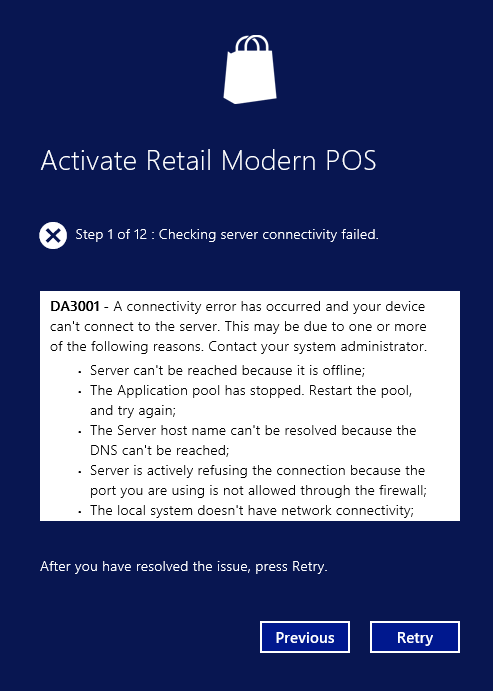
MPOS-Error.png

And when we look at the Event Viewer we see error "server/.../LogOn request failed."
We follow two scenario in order to activate MPos.
1.We have installed Retail Server and RealTimeService and AsyncServer and AsyncClient and Hardwarestation in HQ server(Windows Server).
We have setup Channel Database and Devices and Channel Profile and also run Jobs and all other things in order to activate MPOS.
And then we setup MPOS in another Windows 10 computer(Cachier computer).As i mentioned in above we got the error.
We follow all the steps in technet.microsoft.com/.../dn876713.aspx and also technet.microsoft.com/.../dn741434.aspx and also blogs.msdn.microsoft.com/.../how-to-connect-modern-pos-to-dynamics-ax-2012-r3-cu8-instance-in-azure
but none of them resolve our issue.After lots of searching we found this post ondynamicsax.blogspot.com/.../retail-pos-does-not-show-price-no.html and found a clue.According to mentioned post we found that CHANNELCONFIGURATIONVIEW does not return any result.We found that we must add a addresses for a legal entity( technet.microsoft.com/.../hh242184.aspx) and in address we must add Phone as a Contnact Information.
Any way, we resolve this issue and successfully activate MPOS.

2.In other scenario we uninstalled Retail Server and Hardwarestation from HQ server and installed them in mentioned Windows 10 computer(Cachier computer).
Now when we want to activate MPOS, again we got the same error as above.
We are really confusing what cause this problem.There is not any clue in Event Viewer except error "server/.../LogOn request failed."

It is better to say that when we configure direct database connectivity for Retail Modern POS,it is activated successfully, but we have problem with Retail Server.

Any way, i have one basic question.
How to debug Retail Server in order to understand why we got this error?Why does not Retail Server and MPOS error messages are not reflect the root cause of problem?

Any help?

*This post is locked for comments

I have the same question (0)
  • Community Member Profile Picture
    on at

    I do not know, but installing MPOS and Retail Server on the same computer(Windows 10) does not work.Maybe it is because of Loopback problem in Windows.

  • Community Member Profile Picture
    on at

    Hi,

    Can you check Retail server machine event viewer error log information? it will help us to analyse further. Most of the time, Retail server event viewer gives detailed information about this error.

    Sridharan J

  • Community Member Profile Picture
    on at

    Hi Ehsan12,  I actually have installed mPOS, Retail Server all on one machine running Windows 10 and it works perfectly fine. You might be right about the loopback issue. Do you know how to configure that?

  • Community Member Profile Picture
    on at

    Hi Sridharan,

    It is actually does not show stackTrace of Error.Your another answer here really helpful :

    community.dynamics.com/.../208035

  • Community Member Profile Picture
    on at

    Hi Ducle91,

    As i mentioned above Sridharan's answer solved my problem :

    https://community.dynamics.com/ax/f/33/t/208035#557088

    If you have installed everything (Retail Serve, RealTime service and MPOS) in one machine then you have to do loopback exception.

    If you haven't done this then it will not move and struck in Step 1.

    You can run following command from Command prompt (Run as administrator)

    checknetisolation.exe LoopbackExempt -a -p=<ID from Registry>

    Example: checknetisolation.exe LoopbackExempt -a -p=S-1-15-2-4063414866-187955044-4013043225-3214373788-2918839746-817992155-3950852329

    You can take the ID from Registry

    3666.Regedit.JPG

    [View:https://community.dynamics.com/ax/f/33/t/208035#557088:750:50]

Under review

Thank you for your reply! To ensure a great experience for everyone, your content is awaiting approval by our Community Managers. Please check back later.

Helpful resources

Quick Links

Responsible AI policies

As AI tools become more common, we’re introducing a Responsible AI Use…

Neeraj Kumar – Community Spotlight

We are honored to recognize Neeraj Kumar as our Community Spotlight honoree for…

Leaderboard > 🔒一 Microsoft Dynamics AX (Archived)

#1
Martin Dráb Profile Picture

Martin Dráb 4 Most Valuable Professional

#1
Priya_K Profile Picture

Priya_K 4

#3
MyDynamicsNAV Profile Picture

MyDynamicsNAV 2

Last 30 days Overall leaderboard

Featured topics

Product updates

Dynamics 365 release plans
