web
You’re offline. This is a read only version of the page.
close
Skip to main content

Announcements

No record found.

News and Announcements icon
Community site session details

Community site session details

Session Id :
Microsoft Dynamics 365 | Integration, Dataverse...
Answered

Advise on how to create a view in D365 CRM with a group by parent subject

(0) ShareShare
ReportReport
Posted on by

We are trying to create a view where it only show cases group by parent subject. This view will be used for the CRM dashboard, by default you can only show all the subject in chart but group by parent subject is not an option.
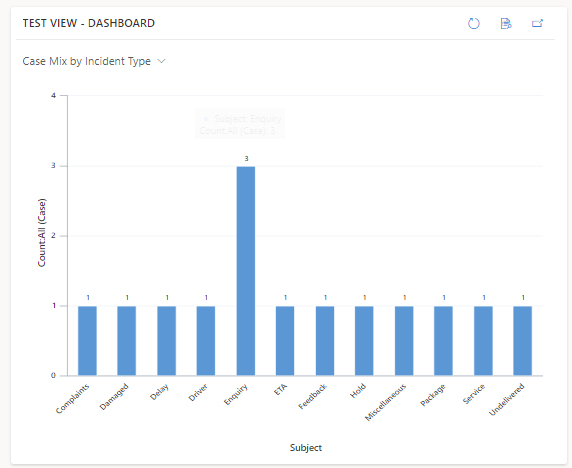
pastedimage1666830074809v1.png

----------------------------------------------------------------------------------------

For example (The typical view in CRM Cases)
CASE 1 - SUBJECT 1 - PARENT SUBJECT A

CASE 2 - SUBJECT 2 - PARENT SUBJECT A

CASE 3 - SUBJECT 3 - PARENT SUBJECT B

and so on.

What we are trying to achieve

PARENT SUBJECT A - 2 ACTIVE CASE

PARENT SUBJECT B - 1 ACTIVE CASE

----------------------------------------------------------------------------------------

Maybe someone can help or explain on how to do it. Thank you!

I have the same question (0)
  • Suggested answer
    Steve Zhao2 Profile Picture
    Microsoft Employee on at

    Hi Daisy J,

    If you want to use group up in the view, you could modify the FetchXML of the view. (FetchXML builder is an easy tool to do this.) FetchXML Builder  Â· XrmToolBox

    Here is the doc how to use group by in the fetchXML.

    Use FetchXML aggregation (Microsoft Dataverse) - Power Apps | Microsoft Learn

  • Daisy J Profile Picture
    on at

    Hi Steve Zhao2,

    I've managed to do what is my expected view/output on the FetchXML XrmToolBox

    pastedimage1666871530763v1.pngpastedimage1666871544847v2.png

    But did not know how to proceed and use this FetchXML as a view for our CRM Dashboard.

  • Verified answer
    Bipin D365 Profile Picture
    28,985 Moderator on at

    Hi,

    Please check below article on how to create chart in CRM based on fetchxml from fetchxml builder tool

    crmchartguy.wordpress.com/.../

  • Daisy J Profile Picture
    on at

    Hi Bipin,

    This was very helpful, I did a few tweaks on his code to cater my expectation and had my output perfectly publish on D365 CRM now. Thank you!

Under review

Thank you for your reply! To ensure a great experience for everyone, your content is awaiting approval by our Community Managers. Please check back later.

Helpful resources

Quick Links

Introducing the 2026 Season 1 community Super Users

Congratulations to our 2026 Super Stars!

Meet the Microsoft Dynamics 365 Contact Center Champions

We are thrilled to have these Champions in our Community!

Congratulations to the April Top 10 Community Leaders

These are the community rock stars!

Leaderboard > Microsoft Dynamics 365 | Integration, Dataverse, and general topics

#1
11manish Profile Picture

11manish 99

#2
André Arnaud de Calavon Profile Picture

André Arnaud de Cal... 78 Super User 2026 Season 1

#3
Martin Dráb Profile Picture

Martin Dráb 59 Most Valuable Professional

Last 30 days Overall leaderboard

Product updates

Dynamics 365 release plans
