web
You’re offline. This is a read only version of the page.
close
Skip to main content

Notifications

Announcements

No record found.

Community site session details

Community site session details

Session Id :
Microsoft Dynamics CRM (Archived)

Issue Field Service

(0) ShareShare
ReportReport
Posted on by 76

Hello 

I have an issue with field service where i have installed the woodford project , customized and published successfully where i still can't login from Resco MobileCRM it kept saying failed to login to Dynamics 365 on line, tutorial said after published is true synch and you can find the project on your mobile app and also on mobile application when i access booking it says can't access booking because the default project woodford project is not installed.

I also followed the directions of the other posts, but I didn't unlock the error

Thanks all!!!
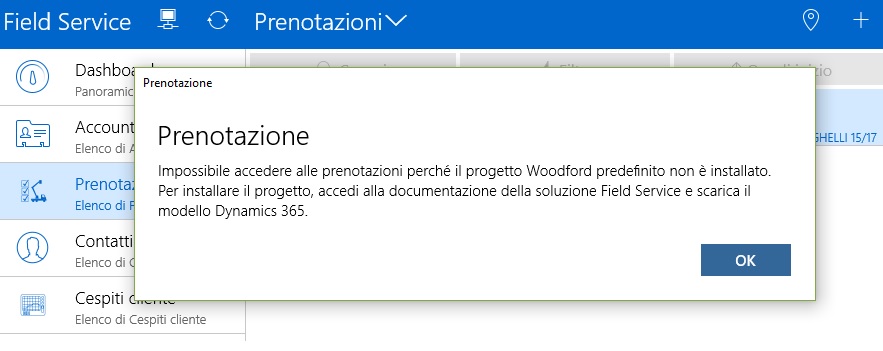
3731.Immagine.jpg

*This post is locked for comments

I have the same question (0)
  • Verified answer
    Shayan Soheili Profile Picture
    940 on at

    Dear Carmen,

    I think you didn't import the template which is provided by Microsoft in Woodford, 

    If you are using Field Service - Dynamics 365 mobile app, then you have to import the Woodford template which is made by Microsoft, so go to the following link in order to download the Woodford template:

    https://docs.microsoft.com/en-us/dynamics365/customer-engagement/field-service/install-the-mobile-app 

    There are two different templates, one for dynamics 365 and another one for dynamics online 2016. So download the appropriate template based on your Dynamics version. Once you imported the template you have to set the project version to 9.1 because the current version of field service mobile app is 9.1.2.

    Regards

    Shayan 

  • carmendangelo Profile Picture
    76 on at

    Thank you!!

Under review

Thank you for your reply! To ensure a great experience for everyone, your content is awaiting approval by our Community Managers. Please check back later.

Helpful resources

Quick Links

Responsible AI policies

As AI tools become more common, we’re introducing a Responsible AI Use…

Neeraj Kumar – Community Spotlight

We are honored to recognize Neeraj Kumar as our Community Spotlight honoree for…

Leaderboard > 🔒一 Microsoft Dynamics CRM (Archived)

#1
SA-08121319-0 Profile Picture

SA-08121319-0 4

#1
Calum MacFarlane Profile Picture

Calum MacFarlane 4

#3
Alex Fun Wei Jie Profile Picture

Alex Fun Wei Jie 2

Last 30 days Overall leaderboard

Featured topics

Product updates

Dynamics 365 release plans



