web
You’re offline. This is a read only version of the page.
close
Skip to main content

Announcements

No record found.

News and Announcements icon
Community site session details

Community site session details

Session Id :
Microsoft Dynamics AX (Archived)

Billing Rules

(0) ShareShare
ReportReport
Posted on by

Hello Experts

i have created a billing rules in a contract and under this contract i have 2 projects.

now i have 2 more project under this contract, how can i make same billing effective for this new projects. 

all projects are Time and Material type
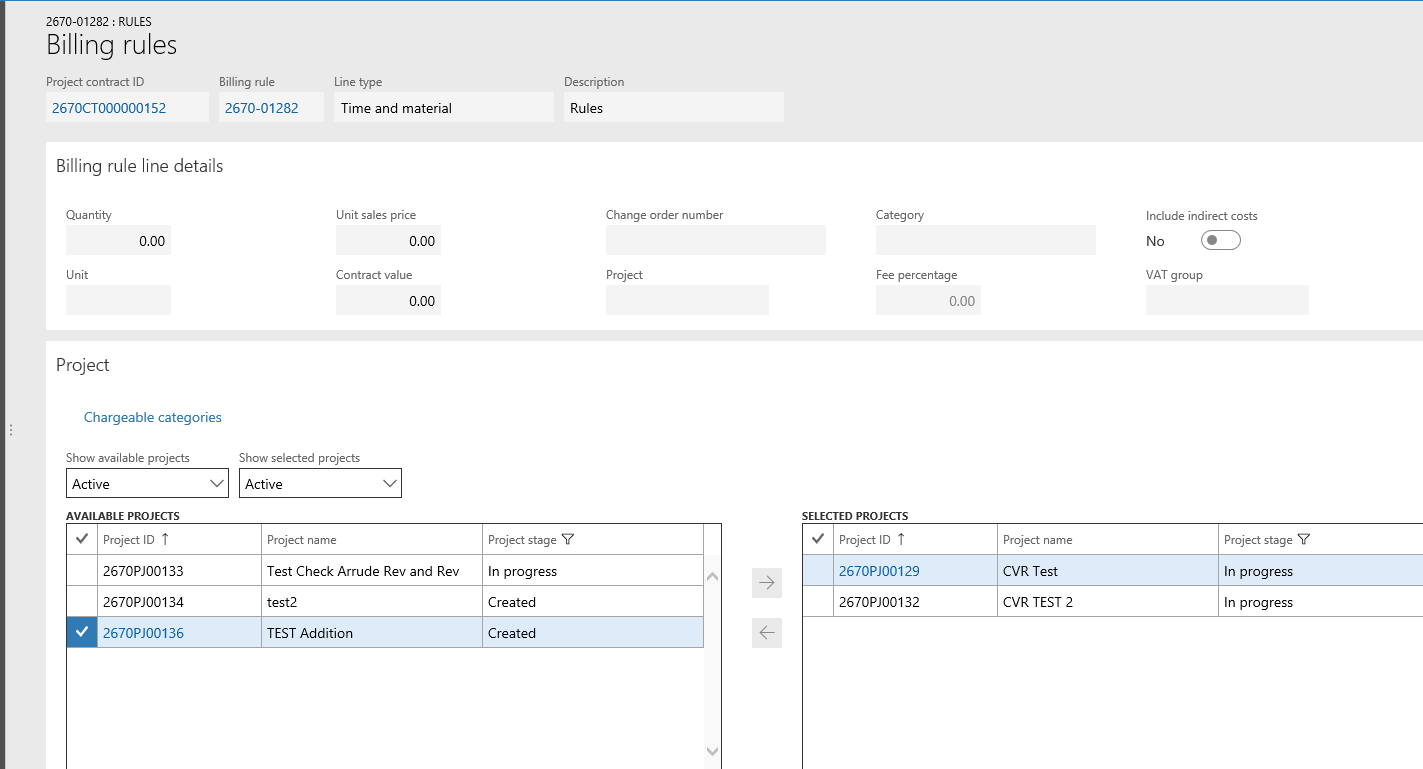
Billing-Rules.PNG

am not able to move these 2 new projects to selected projects!

thank you

*This post is locked for comments

I have the same question (0)
  • Suggested answer
    Ludwig Reinhard Profile Picture
    Microsoft Employee on at

    Hi sandeep madavi,

    Have you tried changeing the project stage to in process?

    Best regards,

    Ludwig

  • Community Member Profile Picture
    on at

    Hi Ludwig

    Thanks for responding

    Even am not able to move In progress projects or even changing project stage to In Progress

    Thank you

  • Ludwig Reinhard Profile Picture
    Microsoft Employee on at

    Hi sandeep madavi,

    What roles does your user have assigned?

    Best regards,

    Ludwig

  • Community Member Profile Picture
    on at

    System admin

  • Suggested answer
    Ludwig Reinhard Profile Picture
    Microsoft Employee on at

    Hi sandeep madavi,

    How have you been able to select the first two projects?

    If you create a new billing rule can you then select all of your projects?

    Are you aware of any system modification that might be responsible for the system behavior that you see?

    Best regards,

    Ludwig

  • Community Member Profile Picture
    on at

    There was no modification done on billing rules. If I create new billing rule in same contract am not able to selecte category I want as its already applied on existing billing rule

    Seam the only option is to add these new projects to existing selected projects but unable to do so!

  • Suggested answer
    Ludwig Reinhard Profile Picture
    Microsoft Employee on at

    Hi sandeep madavi,

    I see.

    Have you double checked your chargeable categories selected in the billing rule?

    Is anything selected there?

    Can you replicate this issue in a different test or demo environment? Let's say if you create a completely new project and project contract?

    Best regards,

    Ludwig

  • Community Member Profile Picture
    on at

    Hi Ludwig

    I created a new contract and projects, I posted fee journal. am able to change the billing rules.

    I posted the invoice proposal and then am back to same situation. cant edit anything. I don't have access to demo data company. but I can tell you for sure there is no customization / modification done here.

    I wonder if this is a standard behaviour. this does not make scenes. under a single contract we may have many projects over a period of time, and should be able to utilize same billing rule and chargeable category  

    thank you

    Sandeep

  • Suggested answer
    Community Member Profile Picture
    on at

    I realized that's the standard system behaviour and only way-out is create a new billing rule. exclude the projects from the earlier rule. and be able to re use the chargeable categories.

  • Ludwig Reinhard Profile Picture
    Microsoft Employee on at

    Hi sandeep madavi,

    What AX version do you operate AX2012 R3 or D365FO?

    Best regards,

    Ludwig

Under review

Thank you for your reply! To ensure a great experience for everyone, your content is awaiting approval by our Community Managers. Please check back later.

Helpful resources

Quick Links

Introducing the 2026 Season 1 community Super Users

Congratulations to our 2026 Super Stars!

Meet the Microsoft Dynamics 365 Contact Center Champions

We are thrilled to have these Champions in our Community!

Congratulations to the March Top 10 Community Leaders

These are the community rock stars!

Leaderboard > 🔒一 Microsoft Dynamics AX (Archived)

#1
Joris dG Profile Picture

Joris dG 5

#2
Andrew Jones a1x Profile Picture

Andrew Jones a1x 2

#3
GL-01081504-0 Profile Picture

GL-01081504-0 1

Last 30 days Overall leaderboard

Featured topics

Product updates

Dynamics 365 release plans
