Hi,
I have a special relation with stupid mistakes as they keep finding me often :D
I made a deployable package on Dev Environment and instead of applying it to UAT, I applied it to the same dev environment itself.
It has failed and I don't see a Rollback option. How to rollback the Dev Env?
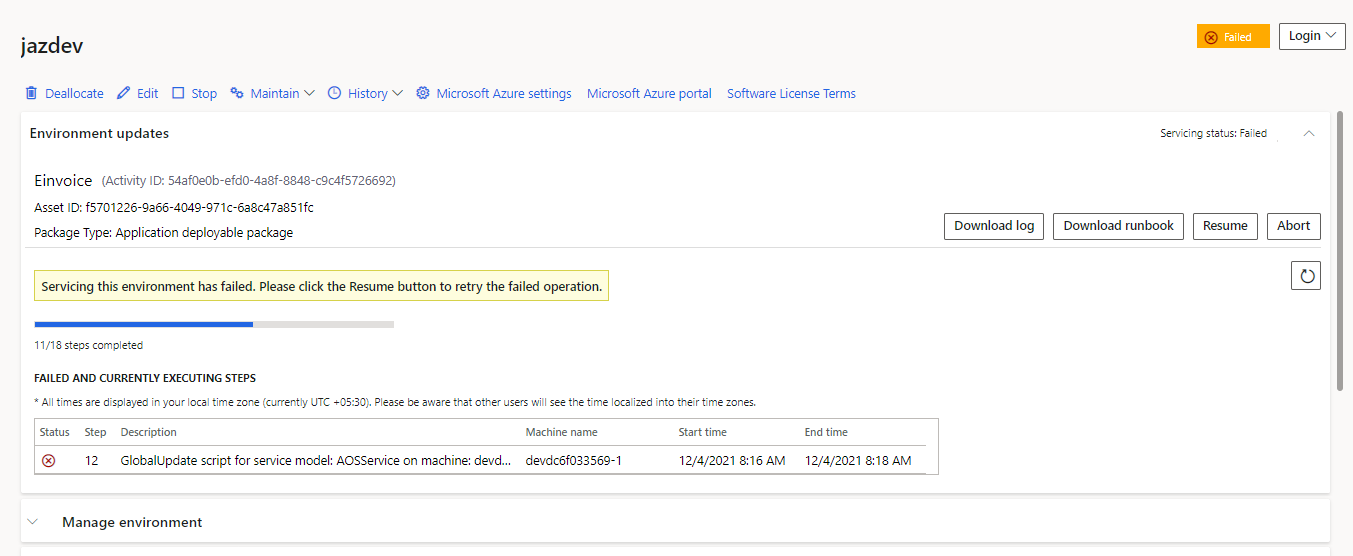
Log File:
========= Beginning trace at: 2021-12-03T21:10:25.7681531Z =========
--- Installer Version: 7.5689.35580.0
--- Runbook ID: 602ea638-a2e2-41c6-9574-fee796d2c79c
--- Mode: EXECUTE
====================================================================
[21:10:26.2368] Checking if 'Microsoft.Dynamics.AX.Deployment.Setup' is running
[21:10:26.2368] No running instances of 'Microsoft.Dynamics.AX.Deployment.Setup' is found
[21:10:26.2368] Successfully retrieved value:System.String[] for key:EnabledServicingFeatures
[21:10:26.2368] Is the machine level auto-resume enabled: True
[21:10:26.2524] Start: [1-Stop-RetailServer-devdc6f033569-1]
[21:10:26.2524] Start: [3-Stop-DIXFService-devdc6f033569-1]
[21:10:26.2524] Start: [2-Stop-MROneBox-devdc6f033569-1]
[21:10:27.5181] End: [3-Stop-DIXFService-devdc6f033569-1]
[21:10:29.7212] End: [2-Stop-MROneBox-devdc6f033569-1]
[21:10:30.1119] Exception caught when executing step. StepID: [1], StepType: [Stop script for service model: RetailServer on machine: devdc6f033569-1], ServiceModel: [RetailServer]
[21:10:30.1119]    at Microsoft.Dynamics.AX.AXUpdateInstallerBase.RunbookExecutor.ExecuteRunbookStepList(RunbookData runbookData, String updatePackageFilePath, Boolean silent, String stepID, ExecuteStepMode executeStepMode, Boolean versionCheck, Parameters parameters)
[21:10:30.1119]    at Microsoft.Dynamics.AX.AXUpdateInstallerBase.AXUpdateInstallerBase.<>c__DisplayClass30_0.b__0()
[21:10:30.1119] End: [1-Stop-RetailServer-devdc6f033569-1]
[21:10:30.4400] Resetting step [1-Stop-RetailServer-devdc6f033569-1] for attempt 2 of 4.
[21:10:30.4400] Start: [1-Stop-RetailServer-devdc6f033569-1]
[21:10:32.2994] End: [1-Stop-RetailServer-devdc6f033569-1]
[21:10:32.5025] Start: [4-Stop-AOSService-devdc6f033569-1]
[21:10:41.3620] End: [4-Stop-AOSService-devdc6f033569-1]
[21:10:42.6744] Start: [5-BackupConnectionString-AOSService-devdc6f033569-1]
[21:10:42.6744] Start: [6-Backup-AOSService-devdc6f033569-1]
[21:10:42.7682] End: [5-BackupConnectionString-AOSService-devdc6f033569-1]
[21:11:32.4135] End: [6-Backup-AOSService-devdc6f033569-1]
[21:11:34.8985] Start: [7-Update-AOSService-devdc6f033569-1]
[21:12:38.4543] End: [7-Update-AOSService-devdc6f033569-1]
[21:12:39.3905] Start: [8-ETWUpdate-AOSService-devdc6f033569-1]
[21:12:39.5467] End: [8-ETWUpdate-AOSService-devdc6f033569-1]
[21:12:41.4616] Start: [9-InstallationInfoUpdate-AOSService-devdc6f033569-1]
[21:12:41.4616] Start: [10-GlobalUpdateConfig-AOSService-devdc6f033569-1]
[21:12:41.5709] End: [10-GlobalUpdateConfig-AOSService-devdc6f033569-1]
[21:12:41.8053] End: [9-InstallationInfoUpdate-AOSService-devdc6f033569-1]
[21:12:43.5177] Start: [11-GlobalBackup-AOSService-devdc6f033569-1]
[21:12:43.5802] End: [11-GlobalBackup-AOSService-devdc6f033569-1]
[21:12:45.5846] Start: [12-GlobalUpdate-AOSService-devdc6f033569-1]
[21:13:31.6700] Exception caught when executing step. StepID: [12], StepType: [GlobalUpdate script for service model: AOSService on machine: devdc6f033569-1], ServiceModel: [AOSService]
[21:13:31.6700]    at Microsoft.Dynamics.AX.AXUpdateInstallerBase.RunbookExecutor.ExecuteRunbookStepList(RunbookData runbookData, String updatePackageFilePath, Boolean silent, String stepID, ExecuteStepMode executeStepMode, Boolean versionCheck, Parameters parameters)
[21:13:31.6700]    at Microsoft.Dynamics.AX.AXUpdateInstallerBase.AXUpdateInstallerBase.<>c__DisplayClass30_0.b__0()
[21:13:31.6700] End: [12-GlobalUpdate-AOSService-devdc6f033569-1]
[21:13:37.7599] The configured package types applicable for machine level auto resume: PlatformOnlyPackage,ApplicationPackage,ApplicationOnlyPackage,PlatAppBinaryHotfixPackage
[21:13:37.7599] Is the package type being applied on the environment applicable for machine-level auto resume?: True
[21:13:37.7599] A runbook step on this machine:devdc6f033569-1 is in a failed state and it's pending machine level auto-resume
[21:13:37.7599] Checking whether machine level auto resume can be started on machine:devdc6f033569-1, canStartMachineLevelAutoResume: True
[21:13:37.7599] Skipping machine level auto resume due to failure at the DBSync step in this machine:devdc6f033569-1
[21:13:37.8223] Exception[196609] found.
[21:13:37.8223] There are one or more failed step during the runbook execution, please check the runbook xml and log for more detail
[21:13:37.8223]
[21:13:37.8223] The step 12 failed with the following error:
[21:13:37.8223] 12/03/2021 21:13:25: Microsoft.Dynamics.AX.Metadata.Storage.MetadataReadRootDirectoryAccessException: Could not access to metadata directory 'C:\AOSService\PackagesLocalDirectory'. ---> System.IO.DirectoryNotFoundException: Could not find a part of the path 'C:\AOSService\PackagesLocalDirectory'.    at System.IO.__Error.WinIOError(Int32 errorCode, String maybeFullPath)    at System.IO.FileSystemEnumerableIterator`1.CommonInit()    at System.IO.FileSystemEnumerableIterator`1..ctor(String path, String originalUserPath, String searchPattern, SearchOption searchOption, SearchResultHandler`1 resultHandler, Boolean checkHost)    at System.IO.DirectoryInfo.EnumerateDirectories()    at Microsoft.Dynamics.AX.Metadata.Storage.Runtime.RuntimeMetadataProvider..ctor(RuntimeProviderConfiguration configuration, Boolean extensions, ExtensionLoader`1 formExtensionLoader, ExtensionLoader`1 tableExtensionLoader, ExtensionLoader`1 enumExtensionLoader, ExtensionLoader`1 menuExtensionLoader, ExtensionLoader`1 securityRoleExtensionLoader, ExtensionLoader`1 securityDutyExtensionLoader, ExtensionLoader`1 dataEntityViewExtensionLoader, ExtensionLoader`1 edtExtensionLoader, ExtensionLoader`1 viewExtensionLoader, ExtensionLoader`1 querySimpleExtensionLoader, ExtensionLoader`1 menuItemDisplayExtensionLoader, ExtensionLoader`1 menuItemActionExtensionLoader, ExtensionLoader`1 menuItemOutputExtensionLoader, ExtensionLoader`1 workflowTemplateExtensionLoader, ExtensionLoader`1 workflowTaskExtensionLoader, ExtensionLoader`1 workflowApprovalExtensionLoader)    --- End of inner exception stack trace ---    at Microsoft.Dynamics.AX.Metadata.Storage.ErrorReportingHelper.ThrowMetadataRootDirectoryAccessException(String metadataRoot, Exception exception)    at Microsoft.Dynamics.AX.Metadata.Storage.Runtime.RuntimeMetadataProvider..ctor(RuntimeProviderConfiguration configuration, Boolean extensions, ExtensionLoader`1 formExtensionLoader, ExtensionLoader`1 tableExtensionLoader, ExtensionLoader`1 enumExtensionLoader, ExtensionLoader`1 menuExtensionLoader, ExtensionLoader`1 securityRoleExtensionLoader, ExtensionLoader`1 securityDutyExtensionLoader, ExtensionLoader`1 dataEntityViewExtensionLoader, ExtensionLoader`1 edtExtensionLoader, ExtensionLoader`1 viewExtensionLoader, ExtensionLoader`1 querySimpleExtensionLoader, ExtensionLoader`1 menuItemDisplayExtensionLoader, ExtensionLoader`1 menuItemActionExtensionLoader, ExtensionLoader`1 menuItemOutputExtensionLoader, ExtensionLoader`1 workflowTemplateExtensionLoader, ExtensionLoader`1 workflowTaskExtensionLoader, ExtensionLoader`1 workflowApprovalExtensionLoader)    at Microsoft.Dynamics.AX.Metadata.Storage.MetadataProviderFactory.CreateRuntimeProviderWithExtensionsUpdated(RuntimeProviderConfiguration configuration, TableExtensionLoader tableExtensionLoader, MenuExtensionLoader menuExtensionLoader, FormExtensionLoader formExtensionLoader, EnumExtensionLoader enumExtensionLoader, SecurityRoleExtensionLoader securityRoleExtensionLoader, SecurityDutyExtensionLoader securityDutyExtensionLoader, DataEntityViewExtensionLoader dataEntityViewExtensionLoader, EdtExtensionLoader edtExtensionLoader, ViewExtensionLoader viewExtensionLoader, QuerySimpleExtensionLoader querySimpleExtensionLoader, MenuItemDisplayExtensionLoader menuItemDisplayExtensionLoader, MenuItemActionExtensionLoader menuItemActionExtensionLoader, MenuItemOutputExtensionLoader menuItemOutputExtensionLoader, WorkflowTemplateExtensionLoader workflowTemplateExtensionLoader, WorkflowTaskExtensionLoader workflowTaskExtensionLoader, WorkflowApprovalExtensionLoader workflowApprovalExtensionLoader)    at Microsoft.Dynamics.AX.Metadata.Kernel.Accessor.Initialize(String binPath, String businessSqlConnectionString, IMetadataFlushContext flushContext)    at MetadataBridge.CMetadataProviderFactory.Initialize(Char* metadataPath, Char* binDirectory, Char* businessSqlConnectionString)    at InitializeMetadata(SqlLogin* )    at Microsoft.Dynamics.AX.AOS.StartupInternal(String[] Arguments)    at Microsoft.Dynamics.AX.AOS.Startup()    at Microsoft.Dynamics.AX.AosConfig.?A0x89ed4e82.GetAosConfig()    at Microsoft.Dynamics.AX.AosConfig.Config.InitInternal()    at Microsoft.Dynamics.AX.AosConfig.Config.InitOnce(Boolean isOfflineMode)    at Microsoft.Dynamics.AX.Framework.Database.Tools.LegacyCodepath.StartAosCode(SyncOptions syncOptions, String sqlConnectionString, IMetadataProvider metadataProvider)    at Microsoft.Dynamics.AX.Framework.Database.Tools.LegacyCodepath.ExecuteWithinAOS(SyncOptions syncOptions, String sqlConnectionString, IMetadataProvider metadataProvider, Func`1 func, Action`1 errorHandler)    at Microsoft.Dynamics.AX.Framework.Database.Tools.LegacyCodepath.RunPartialTableSync(SyncOptions options, String sqlConnectionString, IMetadataProvider metadataProvider)    at Microsoft.Dynamics.AX.Framework.Database.Tools.SyncEngine.PartialTableViewSync()    at Microsoft.Dynamics.AX.Framework.Database.Tools.SyncEngine.PartialSync()    at Microsoft.Dynamics.AX.Framework.Database.Tools.SyncEngine.RunSync()    at Microsoft.Dynamics.AX.Framework.Database.Tools.SyncEngine.Run(String metadataDirectory, String sqlConnectionString, SyncOptions options) 12/03/2021 21:13:25:     Inner Exception: System.IO.DirectoryNotFoundException: Could not find a part of the path 'C:\AOSService\PackagesLocalDirectory'.    at System.IO.__Error.WinIOError(Int32 errorCode, String maybeFullPath)    at System.IO.FileSystemEnumerableIterator`1.CommonInit()    at System.IO.FileSystemEnumerableIterator`1..ctor(String path, String originalUserPath, String searchPattern, SearchOption searchOption, SearchResultHandler`1 resultHandler, Boolean checkHost)    at System.IO.DirectoryInfo.EnumerateDirectories()    at Microsoft.Dynamics.AX.Metadata.Storage.Runtime.RuntimeMetadataProvider..ctor(RuntimeProviderConfiguration configuration, Boolean extensions, ExtensionLoader`1 formExtensionLoader, ExtensionLoader`1 tableExtensionLoader, ExtensionLoader`1 enumExtensionLoader, ExtensionLoader`1 menuExtensionLoader, ExtensionLoader`1 securityRoleExtensionLoader, ExtensionLoader`1 securityDutyExtensionLoader, ExtensionLoader`1 dataEntityViewExtensionLoader, ExtensionLoader`1 edtExtensionLoader, ExtensionLoader`1 viewExtensionLoader, ExtensionLoader`1 querySimpleExtensionLoader, ExtensionLoader`1 menuItemDisplayExtensionLoader, ExtensionLoader`1 menuItemActionExtensionLoader, ExtensionLoader`1 menuItemOutputExtensionLoader, ExtensionLoader`1 workflowTemplateExtensionLoader, ExtensionLoader`1 workflowTaskExtensionLoader, ExtensionLoader`1 workflowApprovalExtensionLoader) 12/03/2021 21:13:25: The operation failed.
[21:13:37.8223]    at Microsoft.Dynamics.AX.AXUpdateInstallerBase.AXUpdateInstallerBase.ExecuteParallel(String runbookID, Boolean silent, String updatePackageFilePath, Boolean versionCheck, Parameters param)
[21:13:37.8223]    at Microsoft.Dynamics.AX.AXUpdateInstaller.Program.InstallUpdate(String[] args)
[21:13:37.8223]    at Microsoft.Dynamics.AX.AXUpdateInstaller.Program.Main(String[] args)
[21:13:37.8223] Exiting with exit code [196609]
=========== Ending trace at: 2021-12-03T21:13:37.8380019Z ==========
Appreciate any tips.
Best Regards,


