web
You’re offline. This is a read only version of the page.
close
Skip to main content

Announcements

No record found.

News and Announcements icon
Community site session details

Community site session details

Session Id :
Microsoft Dynamics AX (Archived)

DIXF didn't see Excel sheet

(0) ShareShare
ReportReport
Posted on by 182

dears,

i have an issue in data import export framework module,

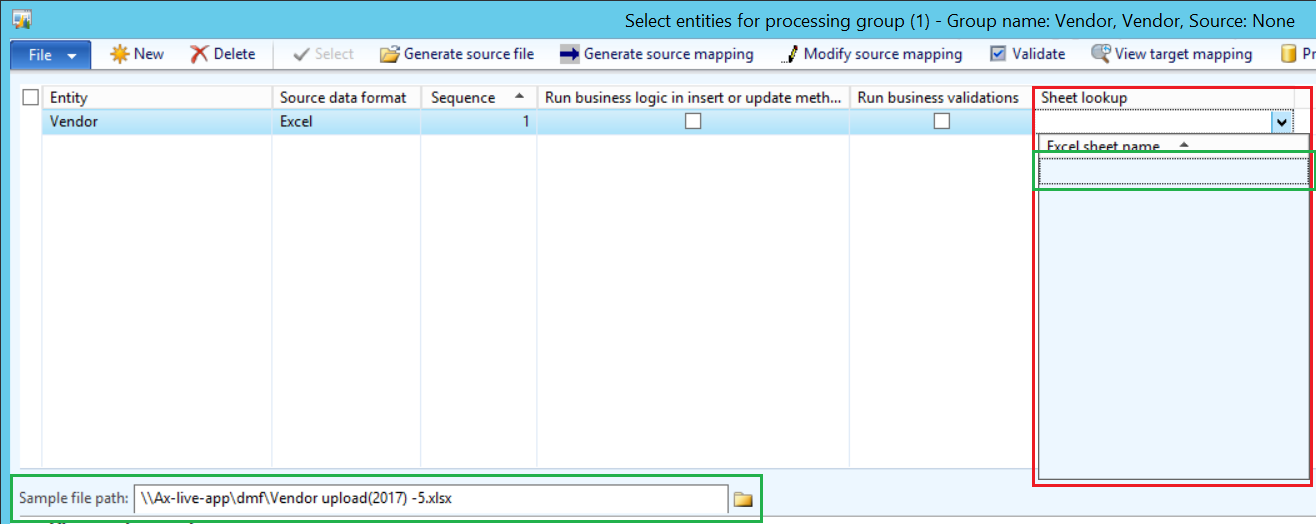
when i try to put any excel sheet to upload it,  the sheet lookup didn't see my sheet ash shown below,

i'm using Microsoft Dynamics AX R2
import.png

*This post is locked for comments

I have the same question (0)
  • Crispin John Augustine Profile Picture
    37,081 on at

    Hi,

    There is a known problem, which gives such errors, when the Office version is different from the machine 32 vs 64 bit.

    This can be resolved by installing the office driver corresponding to the machine version.

    Regards,

    Crispin

  • Pola Profile Picture
    182 on at

    i did that but nothing happen,

    is there any thing else make that happen!

  • Crispin John Augustine Profile Picture
    37,081 on at

    Hi,

    I haven't faced this error before.

    But here's something that might point you in the right direction ax2012dmfdataimport.blogspot.de/.../dynamics-ax-2012-dixf-issues-and.html

    Regards,

    Crispin

  • Yasir Shahzad Profile Picture
    1,635 on at

    Dear Pola....sometime its happened with me...copy the data and paste it on next sheet of your excel workbook....after pasting delete the previous and try again...if not working then again reply me

    Regards

  • Suggested answer
    Alex Voytsekhovskiy Profile Picture
    on at

    please check all three points alexvoy.blogspot.ca/.../dixf-setup-notes.html

  • Ahmadbarghouthi Profile Picture
    85 on at

    I'm facing the same issue, how it can be resolved?

  • Alex Voytsekhovskiy Profile Picture
    on at

    Hi Ahmadbarghouthi,

    Have you read the info by my link?

  • Ahmadbarghouthi Profile Picture
    85 on at

    Hi Alex,

    I've checked the articles, but the version is the same 64bit for the server and the excel, and I've created the ODBC folder for 64bit, but the MS Office is not licensed, maybe this is the problem?

  • Alex Voytsekhovskiy Profile Picture
    on at

    what is the error exactly?

  • Ahmadbarghouthi Profile Picture
    85 on at

    I'm trying to import the vendors list, but my problem is: the "Sheet Lookup" field in the Processing group screen, cannot see the excel sheet to map the information between the excel and the application...

    I've tried to import the GL COA as well, but the same problem happen again

Under review

Thank you for your reply! To ensure a great experience for everyone, your content is awaiting approval by our Community Managers. Please check back later.

Helpful resources

Quick Links

Introducing the 2026 Season 1 community Super Users

Congratulations to our 2026 Super Stars!

Congratulations to our 2025 Community Spotlights

Thanks to all of our 2025 Community Spotlight stars!

Leaderboard > 🔒一 Microsoft Dynamics AX (Archived)

#1
Joris dG Profile Picture

Joris dG 5

#2
Alexey Lekanov Profile Picture

Alexey Lekanov 2

#2
Henrik Nordlöf Profile Picture

Henrik Nordlöf 2 User Group Leader

Last 30 days Overall leaderboard

Featured topics

Product updates

Dynamics 365 release plans
