web
You’re offline. This is a read only version of the page.
close
Skip to main content

Notifications

Announcements

No record found.

Community site session details

Community site session details

Session Id :
Microsoft Dynamics 365 | Integration, Dataverse...
Suggested Answer

Plugin timeout for simple plugins and Plugin Registration Tool throwing an error

(0) ShareShare
ReportReport
Posted on by 7,396 User Group Leader

Hi All,

I'm facing this issue in a sync plugin. Even though the operation isn't that complex/lengthy, the plugin times out 2 mins every single time.

Also, when I debug, I go through all the code properly without any issues, however, at the end of the debug, when the VS should leave the Plugin Registration Tool, the Plugin Registration Tool shows me this failure.
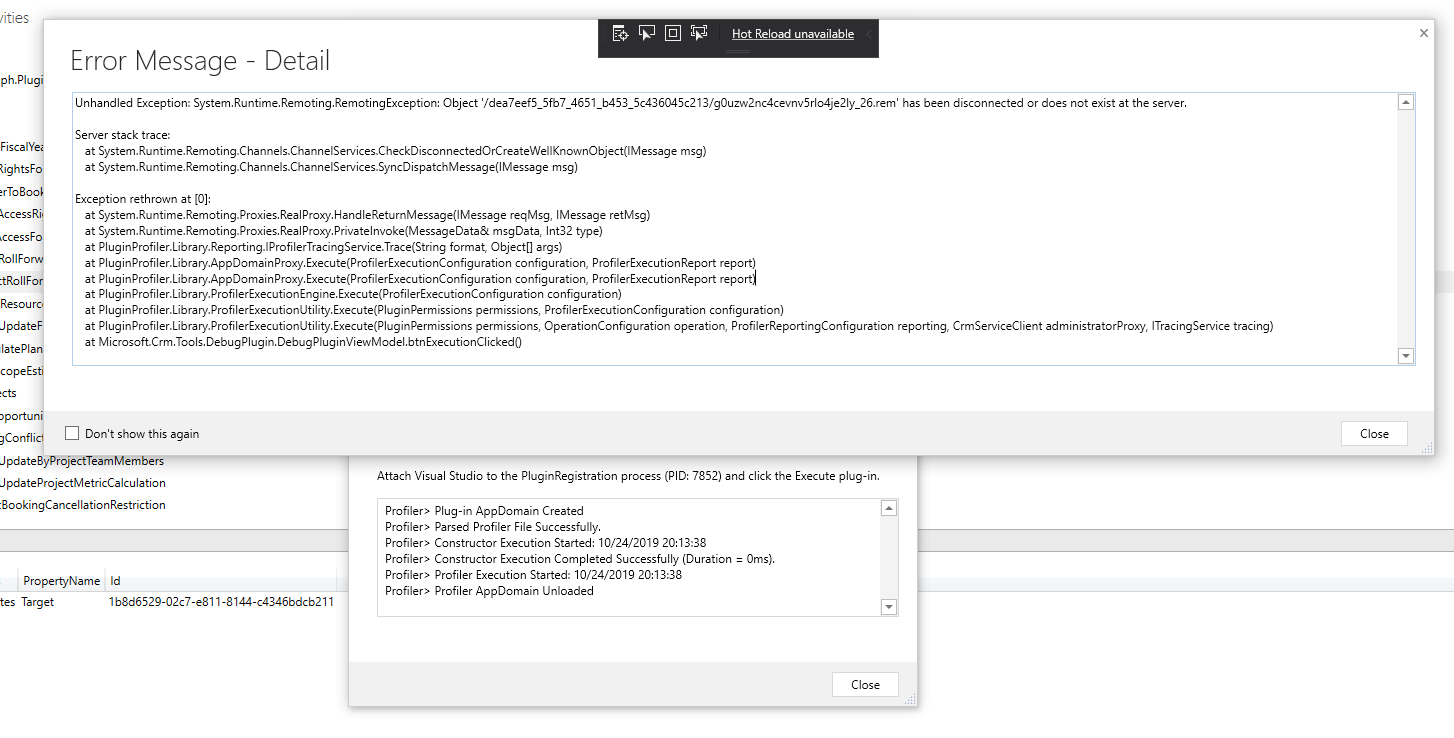
pluginRegToolIssue.png

The error reads as -

Unhandled Exception: System.Runtime.Remoting.RemotingException: Object '/dea7eef5_5fb7_4651_b453_5c436045c213/g0uzw2nc4cevnv5rlo4je2ly_26.rem' has been disconnected or does not exist at the server.

Server stack trace:
   at System.Runtime.Remoting.Channels.ChannelServices.CheckDisconnectedOrCreateWellKnownObject(IMessage msg)
   at System.Runtime.Remoting.Channels.ChannelServices.SyncDispatchMessage(IMessage msg)

Exception rethrown at [0]:
   at System.Runtime.Remoting.Proxies.RealProxy.HandleReturnMessage(IMessage reqMsg, IMessage retMsg)
   at System.Runtime.Remoting.Proxies.RealProxy.PrivateInvoke(MessageData& msgData, Int32 type)
   at PluginProfiler.Library.Reporting.IProfilerTracingService.Trace(String format, Object[] args)
   at PluginProfiler.Library.AppDomainProxy.Execute(ProfilerExecutionConfiguration configuration, ProfilerExecutionReport report)
   at PluginProfiler.Library.AppDomainProxy.Execute(ProfilerExecutionConfiguration configuration, ProfilerExecutionReport report)
   at PluginProfiler.Library.ProfilerExecutionEngine.Execute(ProfilerExecutionConfiguration configuration)
   at PluginProfiler.Library.ProfilerExecutionUtility.Execute(PluginPermissions permissions, ProfilerExecutionConfiguration configuration)
   at PluginProfiler.Library.ProfilerExecutionUtility.Execute(PluginPermissions permissions, OperationConfiguration operation, ProfilerReportingConfiguration reporting, CrmServiceClient administratorProxy, ITracingService tracing)
   at Microsoft.Crm.Tools.DebugPlugin.DebugPluginViewModel.btnExecutionClicked()

I'm not sure what this could be and I suppose this is why the plugin, even though after it finishes execution, it comes across this in the normal process and waits until 2 mins to finally tell me that the plugin didn't go through.

Any thoughts?

Thanks.

I have the same question (0)
  • Priyesh Profile Picture
    7,396 User Group Leader on at

    Additionally, the trace text shows this -

    Entered Microsoft.Dynamics.ProjectService.Plugins.PreProjectUpdate.Execute(), Correlation Id: 84dfdc1a-3edc-4cb8-a826-97584303e6ff, Initiating User: 3f013bd5-e34a-e711-80f5-fc15b4285da4

    Exiting Microsoft.Dynamics.ProjectService.Plugins.PreProjectUpdate.Execute(), Correlation Id: 84dfdc1a-3edc-4cb8-a826-97584303e6ff, Initiating User: 3f013bd5-e34a-e711-80f5-fc15b4285da4

    Entered Microsoft.Dynamics.ProjectService.Plugins.PostProjectUpdateFinalizePriceList.Execute(), Correlation Id: 84dfdc1a-3edc-4cb8-a826-97584303e6ff, Initiating User: 3f013bd5-e34a-e711-80f5-fc15b4285da4

    Exiting Microsoft.Dynamics.ProjectService.Plugins.PostProjectUpdateFinalizePriceList.Execute(), Correlation Id: 84dfdc1a-3edc-4cb8-a826-97584303e6ff, Initiating User: 3f013bd5-e34a-e711-80f5-fc15b4285da4

    Entered Microsoft.Dynamics.ProjectService.Plugins.PostOperationmsdyn_projectUpdate.Execute(), Correlation Id: 84dfdc1a-3edc-4cb8-a826-97584303e6ff, Initiating User: 3f013bd5-e34a-e711-80f5-fc15b4285da4

    Exiting Microsoft.Dynamics.ProjectService.Plugins.PostOperationmsdyn_projectUpdate.Execute(), Correlation Id: 84dfdc1a-3edc-4cb8-a826-97584303e6ff, Initiating User: 3f013bd5-e34a-e711-80f5-fc15b4285da4

  • Joana Pinto Profile Picture
    740 on at

    Hi,

    My first suggestion would be to put a trace on the start and end of your plugin with the DateTime.Now() to check the duration of your plugin. If you say that the plugin is not that complex, then my guess is that you have many processes triggering each other and even tho one process only takes 40s, the process it triggers also takes 40s, and so long.... until it hits the 2min exception. So put the trace to exclude that it's not your plugin, by itself, doing that.

    If not, review your entire process and start writing what process it includes. Which workflows and plugins are being used. There is no easy answer for this, you need to analyse your system and process and breakdown all of it. Play with TracingService here, to check exactly what points of the code does your process passes by.

    Regarding the other error "Unhandled Exception: System.Runtime.Remoting.RemotingException: Object '/dea7eef5_5fb7_4651_b453_5c436045c213/g0uzw2nc4cevnv5rlo4je2ly_26.rem' has been disconnected or does not exist at the server." I wouldn't mind with this. This error pops-up for me when I am debugging and I stay in the debugger for too much time. And then when I hit F10 again, it throws that error. I think it's just saying that it lost connection with the server and that's it.

    Regards,

    Joana

  • Priyesh Profile Picture
    7,396 User Group Leader on at

    Hi Joana,

    Thanks a lot! Putting timestamps across my traces helped. The plugin actually runs for 2-mins. I do have a complex plugin in PSA. But it depends on how deep the Project I'm working on is. So in this particular case, I learnt that the plugin actually streteched for 2-mins.

    Now, 1 thing I notice is that even between 2 Create operations, I found a gap of over 2-3 seconds. Which ideally shouldn't be the issue.

    I had the same thing previously running fine for longer and heavier projects.

    I'm wondering if Microsoft can pitch in and help me out to identify that the transactions internally are taking longer than they should. Else, I'll need to re-engineer this and break it down into 2 or more plugins to get the whole thing done.

    And regarding the remoting exception, I've faced that a lot in the past, but I knew I spent several minutes in the debugger. Now, I get this even when I'm debugging pretty quickly.

    Any other thoughts based on the above?

    Kindly advise.

    Thanks.

  • Suggested answer
    RaviKashyap Profile Picture
    55,410 Moderator on at

    Hi Priyesh,

    If you are running into 2 min timeout limit then you have no option other than changing the way you have implemented sync plugins/ workflows in your implementation.

    It is possible that your plugin is executing commands which are triggerring some other custom plugins/ workflows and so on. The sync plugin consider all the related sync operations as well.

    If it was working fine and has stopped working then it could be related to the data size as well i.e. earlier you may not have this much data but now you have. Scenario where we get 2 min limit only on production is very common for various reasons.

    Hope this helps.

  • Priyesh Profile Picture
    7,396 User Group Leader on at

    Thanks Ravi,

    Also, that being said, at times I've experiences faster speeds of execution and at times speed is terribly slow.

    I'm not sure if this is even a factor. I'll get in touch with MS for this and see if I can get some metrics on it.

  • Joana Pinto Profile Picture
    740 on at

    Did you do some debugg to see if there is a specific operation that is consuming more time? Like a complex query, for instance. 

  • Priyesh Profile Picture
    7,396 User Group Leader on at

    So what I found is, the actual PSA bookings i.e. creation of BookableResourceBooking records are taking time. And, I do these in bulk, meaning, I add to requent and then use ExecuteRequest to create these records. since this runs in loop, there's a gap of over 2-4 seconds between each execution.

    Previously, this used to be quicker and the failure rate was pretty less.

  • Priyesh Profile Picture
    7,396 User Group Leader on at

    Thanks to you, Joana,

    I was also able to make a blog post out of this approach. I hope this helps others too - d365demystified.com/.../

  • Joana Pinto Profile Picture
    740 on at

    Hi,

    Glad I could help with something :) Cheers!

  • Priyesh Profile Picture
    7,396 User Group Leader on at

    Thanks Joana! :)

Under review

Thank you for your reply! To ensure a great experience for everyone, your content is awaiting approval by our Community Managers. Please check back later.

Helpful resources

Quick Links

Responsible AI policies

As AI tools become more common, we’re introducing a Responsible AI Use…

Neeraj Kumar – Community Spotlight

We are honored to recognize Neeraj Kumar as our Community Spotlight honoree for…

Leaderboard > Microsoft Dynamics 365 | Integration, Dataverse, and general topics

#1
Martin Dráb Profile Picture

Martin Dráb 60 Most Valuable Professional

#2
#ManoVerse Profile Picture

#ManoVerse 51

#3
Satyam Prakash Profile Picture

Satyam Prakash 42

Last 30 days Overall leaderboard

Product updates

Dynamics 365 release plans
