Hi Laura,
Unfortunately, we can’t open the case resolve dialog directly by clicking ‘Cancel’button expect clicking on "Resolve Case" button.
But you can use workflow to create case resolution when case status is ‘canceled’.
Go Settings > Process to create a workflow in case entity.
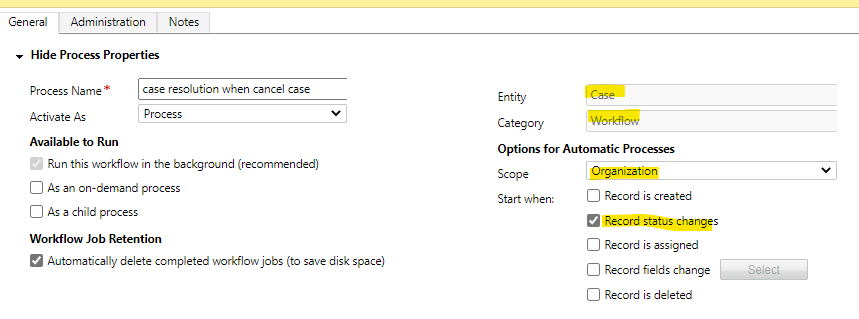
Then Add 'Check Condition' and ‘Perform action' step:
(1) Check Condition:
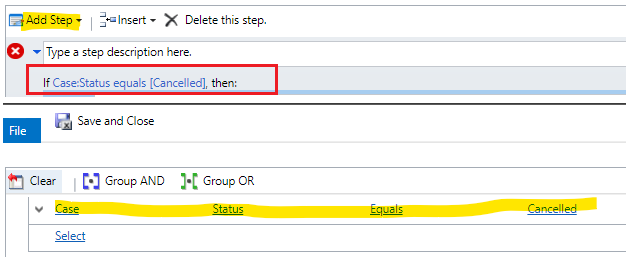
(2) Perform Action--ResolveIncident.

click 'Set Porperties' to fill value in Case Resolve dialog like "remark", "resolution".
If you want to use dynamic value, you can create new fields in case form before creating workflow, then use them to fill fields in following screenshot.
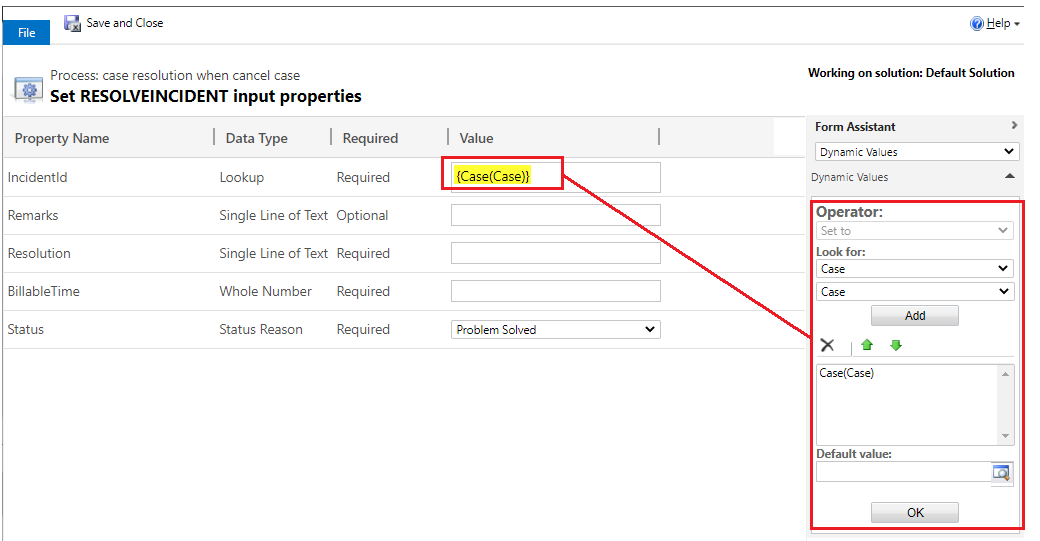
Save and Active the workflow.
Regards,
Leah Ju
Please mark as verified if the answer is helpful. Welcome to join hot discussions in Dynamics 365 Forums.







