web
You’re offline. This is a read only version of the page.
close
Skip to main content

Announcements

No record found.

News and Announcements icon
Community site session details

Community site session details

Session Id :
Microsoft Dynamics CRM (Archived)

Change owner field based on a dynamic user lookup on the form

(0) ShareShare
ReportReport
Posted on by

Hi All,

I'm trying to change the owner field of a custom entity record to the same value in another user lookup on the form (set owner field value as resource).
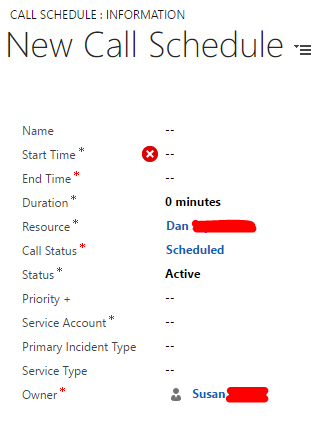
4008336.Capture.PNG

I've tried to create a WF that assign records but it seems I can't select my custom user lookup ("Resource") in the properties:
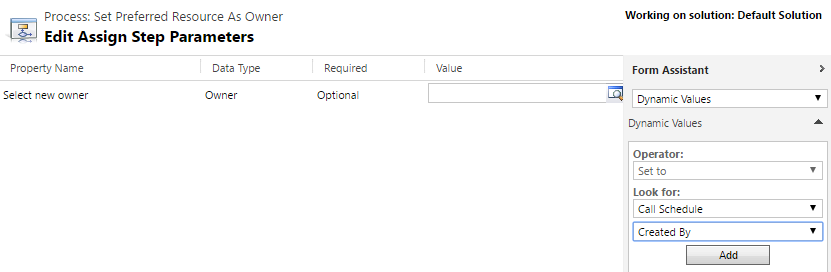
2352.Capture1.PNG


This needs to happen on create and it's not like one of two records that I can go and change the values by hand.

Does anyone know how to achieve this functionality?

Thanks,

- Bod 

*This post is locked for comments

I have the same question (0)
  • MaKeer Profile Picture
    Microsoft Employee on at

    Hi,

    I think you might not have Published the Customization after you created the Resource Lookup. I have tried same thing and it did show up on my WF designer

    I have L1 Engineer as custom User Lookup

    8231.Untitled-picture.png

  • Community Member Profile Picture
    on at

    What do you mean not published? I get the custom user lookup field (resource) displaying on my form correctly.

    So after taking a closer look into the issue, I've realized the user lookup is not a custom field but a system field.

    That's probably why I can't see/choose it in the WF assign properties.

    Anyway to get around it? 

  • Community Member Profile Picture
    on at

    Resource lookup points to an ootb entity named "bookableresource" it's not systemuser but yes it is an ootb entity under Field service.

  • Community Member Profile Picture
    on at

    There's no way to do it with js instead of a wf?

  • Community Member Profile Picture
    on at

    yeah I understand...

    Well, in light of what I've described above and all.

    Are there any alternatives that achieve the functionality I need?

    Thank you


  • Suggested answer
    Alagunellaikumar Profile Picture
    6,212 on at

    Hi Bodipal

    If system user and bookableresource  "name" is same, then we can achieve through JS or Plugin

    Please follow the below steps:

       In the on change event of owner lookup

       Get the owner lookup value name

       Retrieve bookableresource  through web API, apply filter by name of the bookableresource =system user lookup value

           [Organization URI]/api/data/v8.2/bookableresource?$filter=new_name eq 'name of the user lookup'

       In onsuccess event of retrieve bookableresource , you will get "bookableresource Id" and you set the value to bookableresource lookup

  • Community Member Profile Picture
    on at

    So the point is that it's not.

    SystemUser is the owner field lookup and that equates to the Created By user probably.

    The Resource lookup field is a BookableResource (Field Service) user system field. And although they need to be the same user eventually there's no way to identify it bc the guid/entityType differs from one another. So for example user "AAA BBB" that derives from systemUser entityType != "AAA BBB" that is in the bookable resource user list (I believe that's waht Guido Preite was trying to explain). 

    Basically, the situation is this:

    A call schedule form is created and then we drag it to the schedule board for a field service technician. However, the tech can't see the assigned call to him since he's not the owner.

    Hence, I was trying to default the owner field to same value of the resource field.

    Is it possible to take for example the resource name value from the lookup like so:

    var resName = Xrm.Page.data.entity.attributes.get("resource").getValue()[0].name;

    loop through the systemUser records based on that value alone (without the id/entityType) and re set the value of the owner lookup field when a match has been found? meaning name to name.

Under review

Thank you for your reply! To ensure a great experience for everyone, your content is awaiting approval by our Community Managers. Please check back later.

Helpful resources

Quick Links

Introducing the 2026 Season 1 community Super Users

Congratulations to our 2026 Super Stars!

Meet the Microsoft Dynamics 365 Contact Center Champions

We are thrilled to have these Champions in our Community!

Congratulations to the April Top 10 Community Leaders

These are the community rock stars!

Leaderboard > 🔒一 Microsoft Dynamics CRM (Archived)

Last 30 days Overall leaderboard

Featured topics

Product updates

Dynamics 365 release plans
