web
You’re offline. This is a read only version of the page.
close
Skip to main content

Announcements

No record found.

News and Announcements icon
Community site session details

Community site session details

Session Id :
Finance | Project Operations, Human Resources, ...
Answered

Set Address for Employee using PowerAutomate

(0) ShareShare
ReportReport
Posted on by

Using Power Automate, I'm trying to automatically assign an existing address to an Employee.

Steps I want to do are the same that I would do in the UI when in the Employee record, Address section click on More options - Select other, and choose an address from the list.
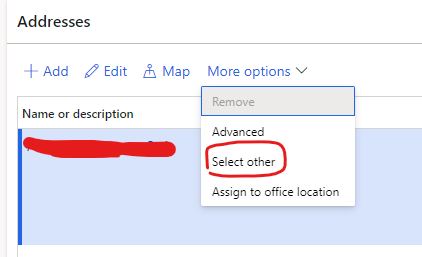
8508.ad1.png6763.address.png

To do so in Power Automate, I only need to set the PrimaryAddressLocation on the Employee record.

pastedimage1667493718934v1.png

However, I'm not able to find PrimaryAddressLocation

On the record details in F&O, I see the number I'm looking for is the Record-Id/Sequence number

An the table name is LogisticsLocation

However in PowerAutomate, I'm not able to find LogisticsLocation table.

Do you know how can I get PrimaryAddressLocation or why I cannot find LogisticsLocation table in PowerAutomate?

pastedimage1667493932152v3.png

I have the same question (0)
  • AnithaEswaran Profile Picture
    2,032 on at

    Hi,

    What is the FO entity used here ? Check if the field is set as 'Private'.  

  • Jorge_ Profile Picture
    on at

    The entity is Employees.

    Not sure what you mean with the field is Private

  • Verified answer
    GirishS Profile Picture
    27,843 Moderator on at

    I guess you need to make use of "DirPartyLocationPostalAddressV2Entity" (Entity name) , "Party postal address V2"(Label name).

    In this entity you will be having Location id - Party number and "IsPrimary" (Yes or no) field to check whether the address is primary or not.

    Thanks,

    Girish S.

  • Jorge_ Profile Picture
    on at

    Thanks

    Found out that I need to create a WorkerPostalAddressesV2 record after creting the employee.

    There I can use the LocationID

    (no need for the sequence number as I thought)

Under review

Thank you for your reply! To ensure a great experience for everyone, your content is awaiting approval by our Community Managers. Please check back later.

Helpful resources

Quick Links

Introducing the 2026 Season 1 community Super Users

Congratulations to our 2026 Super Stars!

Meet the Microsoft Dynamics 365 Contact Center Champions

We are thrilled to have these Champions in our Community!

Congratulations to the April Top 10 Community Leaders

These are the community rock stars!

Leaderboard > Finance | Project Operations, Human Resources, AX, GP, SL

#1
Giorgio Bonacorsi Profile Picture

Giorgio Bonacorsi 608

#2
André Arnaud de Calavon Profile Picture

André Arnaud de Cal... 591 Super User 2026 Season 1

#3
CP04-islander Profile Picture

CP04-islander 430

Last 30 days Overall leaderboard

Product updates

Dynamics 365 release plans
