web
You’re offline. This is a read only version of the page.
close
Skip to main content

Notifications

Announcements

No record found.

Community site session details

Community site session details

Session Id :
Microsoft Dynamics GP (Archived)

Fixed Asset Field Account Group ID

(1) ShareShare
ReportReport
Posted on by 766

I am trying to export fixed assets, with a goal to import them into a new company.

I am having a hard time locating the Account Group ID.

I can only find it in the Account Group Setup, but not sure which field would link to the asset table.

When I select the Account Group ID in Asset General Information window, it will populate the distribution accounts, but the Account Group ID remains "Blank".

Any recommendations how to get this data out of SQL for each Asset ID?
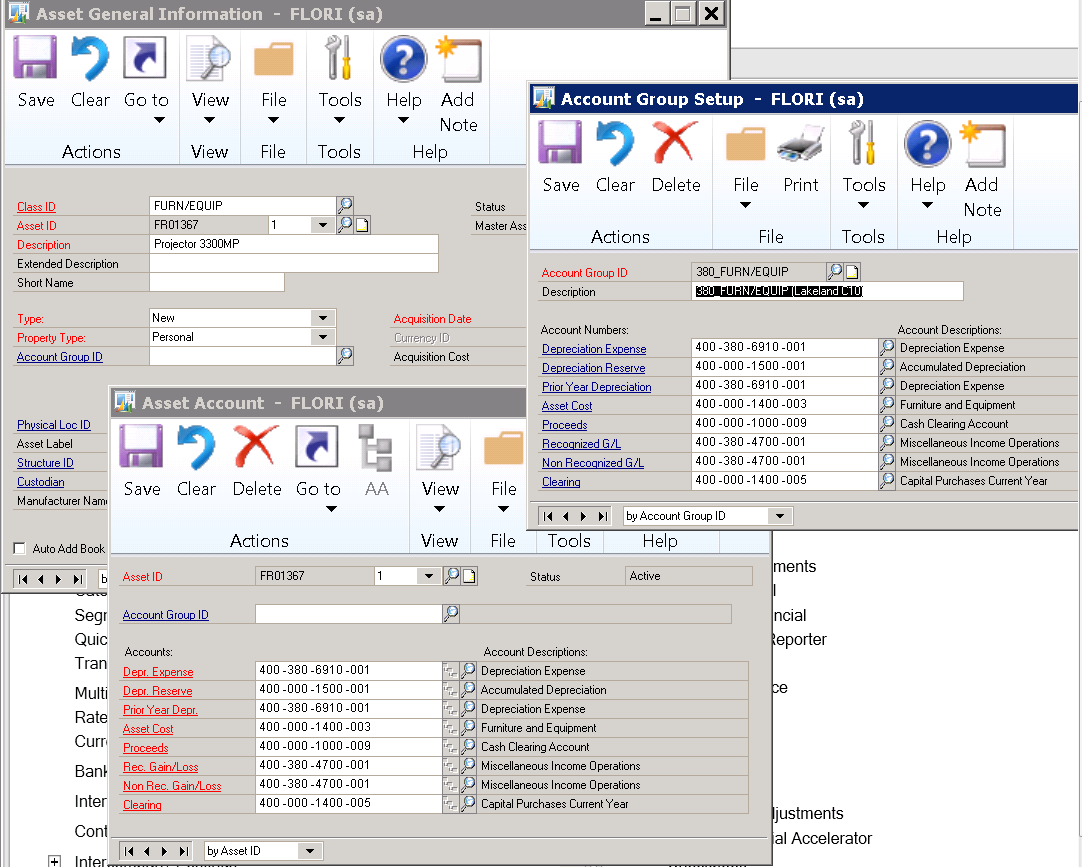
ACCOUNT-GROUPID.png

*This post is locked for comments

I have the same question (0)
  • Suggested answer
    Beat Bucher  GP Geek  GPUG All Star Profile Picture
    28,058 Moderator on at

    Hi Nicole,

    Microsoft's support team just published an article on their blog with a series of SQL views to use with your GP smart list designer/builder or Excel report builder.

    community.dynamics.com/.../microsoft-dynamics-gp-sql-views-for-smartlist-designer-to-enhance-reporting

    Have a lock at the 2 views for FA.

  • Napolo Profile Picture
    766 on at

    I have the below Query built in SQL. However, nothing ties back to the Account Group ID field except for the setup table.

    I am attempting to export via SQL the required columns for the GP FA import module.   This is the only column that is MIA.  When I import using that ID, the GL should populate based on the setup.  Just not how to get this data out of one company, so I can import it into our consolidated company.

    --FIXED ASSET EXPORT/IMPORT FILE *GENERAL*

    SELECT

    'GENERAL' AS 'General',

    a.assetid,

    a.ASSETIDSUF,

    a.SHRTNAME,

    a.ASSETDESC,

    a.EXTASSETDESC,

    a.Master_Asset_ID,

    'Account Group ID' AS 'Pending',

    a.STRUCTUREID,

    a.ASSETCLASSID,

    a.LOCATNID,

    CAST (a.ACQDATE AS Date) AS 'ACQDate',

    b.Orig_Acquisition_Cost,

    a.ASSETTYPE,

    a.PROPTYPE,

    a.ASSETQTY,

    a.ASSETCURRMAINT,

    a.ASSETYTDMAINT,

    a.ASSETLTDMAINT,

    CAST (a.LASTMAINTDATE as DATE) AS 'LastMaintDate',

    a.ASSESSEDVALUE,

    b.VENDORID,

    b.DOCNUMBR,

    CAST (b.DOCDATE as DATE) AS 'DocDate',

    b.TRXSORCE,

    ' ' AS 'Control Number',

    b.PORDNMBR,

    ' ' AS 'Document Description',

    a.MFGRNAME,

    a.SERLNMBR,

    a.MODELNUMBER,

    CAST (a.WARRENTYDATE AS DATE) AS 'WarrentyDate',

    a.CUSTODIAN,

    a.Physical_Location_ID,

    a.Asset_Label,

    CAST (a.Verified_Date AS DATE) AS 'VerifiedDate',

    a.PIN,

    ' ' AS 'Currency ID',

    '7/1/2017' AS 'Date Added',

    a.ASSETSTATUS

    FROM FA00100 AS a

    JOIN FA01400 AS b ON a.assetindex=b.assetindex

    WHERE ASSETSTATUS <> 4

  • Beat Bucher  GP Geek  GPUG All Star Profile Picture
    28,058 Moderator on at

    Nicole,

    How do you plan to import the data into the other consolidated company ?

  • Napolo Profile Picture
    766 on at

    I am planning to use the Import/Export feature. 

    assetimport.png

  • Verified answer
    L Vail Profile Picture
    65,271 on at

    Hi Nicole,

    The fixed assets module works differently than the other modules in GP. The Account Group ID is only used to pull the accounts into the asset card. The ID itself is not saved with the asset. There is no roll-down, etc. from the Account Group ID like you have from, say the vendor class, the Group ID is only used for setup. If you still have the Groups set up the same way, you'll need to compare the accounts from your existing groups if you want to go back to the ID initially assigned.

    Kind regards,

    Leslie

  • Victoria Yudin Profile Picture
    22,769 on at

    Leslie is exactly right. This behavior has baffled many users for many years since it works differently from just about everything else in GP.

  • Napolo Profile Picture
    766 on at

    Thank you.

    We did luck out with how we initially setup our StructureID and AssetClassID.  

    I was able to SELECT a column with a formula "structureid + '_' + assetclassid AS the Group id.

    Phew. Will make sure we keep this structure as our work around in the future.

    Thank you ALL for the confirmation that I wasn't going crazy.

Under review

Thank you for your reply! To ensure a great experience for everyone, your content is awaiting approval by our Community Managers. Please check back later.

Helpful resources

Quick Links

Responsible AI policies

As AI tools become more common, we’re introducing a Responsible AI Use…

Neeraj Kumar – Community Spotlight

We are honored to recognize Neeraj Kumar as our Community Spotlight honoree for…

Leaderboard > 🔒一 Microsoft Dynamics GP (Archived)

#1
mtabor Profile Picture

mtabor 1

Last 30 days Overall leaderboard

Featured topics

Product updates

Dynamics 365 release plans



