web
You’re offline. This is a read only version of the page.
close
Skip to main content

Announcements

No record found.

News and Announcements icon
Community site session details

Community site session details

Session Id :
Small and medium business | Business Central, N...
Suggested Answer

Physical Inventory Counting BIN vs LOT

(0) ShareShare
ReportReport
Posted on by

Hi Community,

In our system there are somesimple warehouse where I can use Phyical Inventory function without any issues either the item is lot controlled or not.

But I have a location where we use BINs This is the setup of the location:
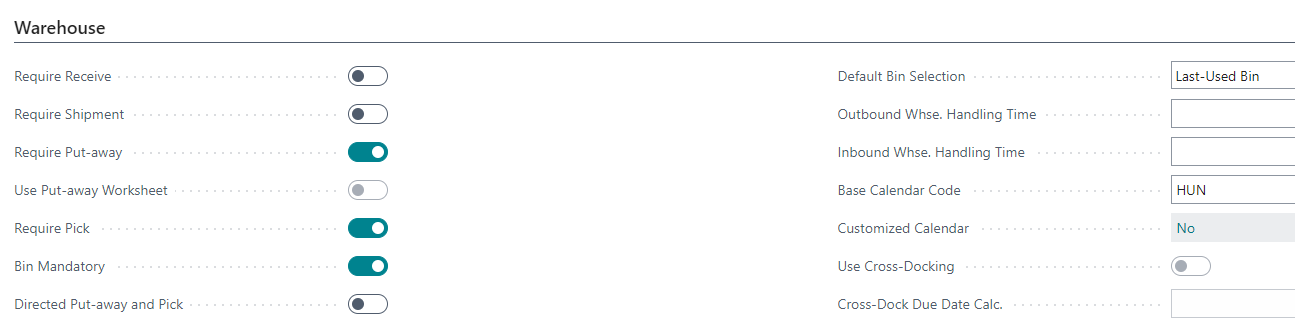
pastedimage1672728048719v4.png

I tried to use the Phyical Inventory which was working if the item was only in one bin, but when the item has 2 recording lines with 2 lots the system cannot pick the lot given in the recording when I want to post.

I used the Calculate Lines (Bins) functionality to prepare the order.

This is the order

pastedimage1672727879856v2.png

This is the Recording

pastedimage1672727943231v3.png

A

ny solution how to count warehouse like this?

I have the same question (0)
  • AAndras Profile Picture
    on at

    I tried to prepare the order with the simple Clculate Lines function but the result is the same.

    Sometimes I can see in the Lines > Item Tracking Lines > Pos. DIff Tracking Lines:

    pastedimage1672728671296v1.png

    It is correct but does not realy help. AT the end I got the same error:

    pastedimage1672728783401v2.png

  • Suggested answer
    Jarrod Case Profile Picture
    2 on at
    [quote user="AAndras"]

    I tried to prepare the order with the simple Clculate Lines function but the result is the same.

    Sometimes I can see in the Lines > Item Tracking Lines > Pos. DIff Tracking Lines:

    pastedimage1672728671296v1.png

    It is correct but does not realy help. AT the end I got the same error:

    pastedimage1672728783401v2.png

    [/quote]

    Hi AAndras ,

    I am not sure your logic is sound.

    You don't count stock by lot. It's you are either counting stock by warehouse location with no bins, or you have bins.

    If an item is tracked by LOT or serial, that is another matter.

    This would be better described over a video session on teams if you wish I'm happy to provide you 15 minutes free advice.

    Thanks

    Jarrod Case

    Follow/Learn more at https://youtube.com/@learnbusinesscentral 

    IF this helps, please click YES so other users know this is resolved.

  • AAndras Profile Picture
    on at

    Hi Jarrod,

    For sure and I would really appcitiate your help. I sent a friend request with more details.

Under review

Thank you for your reply! To ensure a great experience for everyone, your content is awaiting approval by our Community Managers. Please check back later.

Helpful resources

Quick Links

Introducing the 2026 Season 1 community Super Users

Congratulations to our 2026 Super Stars!

Meet the Microsoft Dynamics 365 Contact Center Champions

We are thrilled to have these Champions in our Community!

Congratulations to the April Top 10 Community Leaders

These are the community rock stars!

Leaderboard > Small and medium business | Business Central, NAV, RMS

#1
OussamaSabbouh Profile Picture

OussamaSabbouh 2,086 Super User 2026 Season 1

#2
YUN ZHU Profile Picture

YUN ZHU 1,290 Super User 2026 Season 1

#3
AndrewThomas81 Profile Picture

AndrewThomas81 1,218

Last 30 days Overall leaderboard

Featured topics

Product updates

Dynamics 365 release plans

