web
You’re offline. This is a read only version of the page.
close
Skip to main content

Announcements

No record found.

News and Announcements icon
Community site session details

Community site session details

Session Id :
Microsoft Dynamics NAV (Archived)

Edit 'Ready for Review' Status in Sales Order

(0) ShareShare
ReportReport
Posted on by

Hi,

I've been having an issue locating the area where I can edit the 'Ready for Review' status of a Sale's order. hi.png
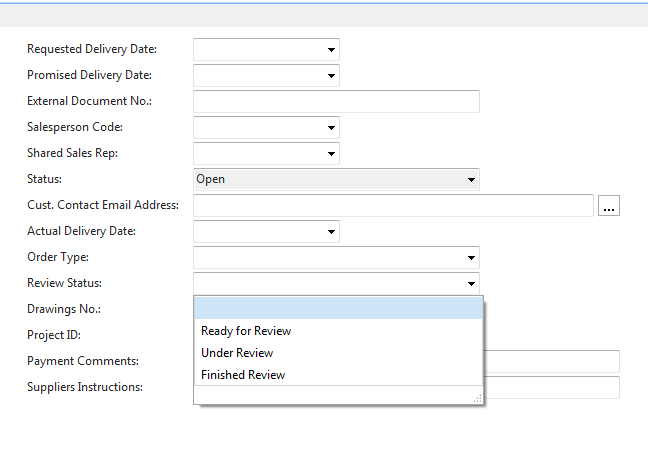
In most instances there will be a 'New' & 'Advanced' option at the bottom of the drop down. Unfortunately I cant find the list or task in which these settings reside. 

Any suggestions?

Thanks

*This post is locked for comments

I have the same question (0)
  • Suggested answer
    Mohana Yadav Profile Picture
    61,214 Super User 2026 Season 1 on at

    this is a option type field.

    you have to go to table 36 and find the field and modify option values..

  • Community Member Profile Picture
    on at

    Thanks Mohana,

    I can access the fields in table 36 however I'm not too sure how to modify them, I've tried all the options within Home & Actions.

    Any Suggestions?

    Review status is listed here as Field 65016

    Review-Status.PNG

  • Suggested answer
    Mohana Yadav Profile Picture
    61,214 Super User 2026 Season 1 on at

    I mean in development environment. not in RTC

  • Suggested answer
    Ahmed Mohamed Rafik Profile Picture
    3,049 User Group Leader on at

    What is the version of Dynamics Nav you use? and which Localization?

  • Hannes Holst Profile Picture
    5,767 on at

    Hi James,

    This is a bespoke field which is not part of the standard NAV-installation.

    Either you go the way explained by Mohana Yadav or you have to get in contact with your NAV-partner to determine the functionality in the process/GUI of this field.

Under review

Thank you for your reply! To ensure a great experience for everyone, your content is awaiting approval by our Community Managers. Please check back later.

Helpful resources

Quick Links

Introducing the 2026 Season 1 community Super Users

Congratulations to our 2026 Super Stars!

Meet the Microsoft Dynamics 365 Contact Center Champions

We are thrilled to have these Champions in our Community!

Congratulations to the April Top 10 Community Leaders

These are the community rock stars!

Leaderboard > 🔒一 Microsoft Dynamics NAV (Archived)

Last 30 days Overall leaderboard

Featured topics

Product updates

Dynamics 365 release plans
