web
You’re offline. This is a read only version of the page.
close
Skip to main content

Notifications

Announcements

No record found.

Community site session details

Community site session details

Session Id :
Microsoft Dynamics CRM (Archived)

Refresh page after smart button ribbon workbench

(0) ShareShare
ReportReport
Posted on by 600

Hi 

I am trying smart buttons in ribbon workbench to trigger a workflow. The functionality works fine but I am not able to refresh the page with callback javascript function. 
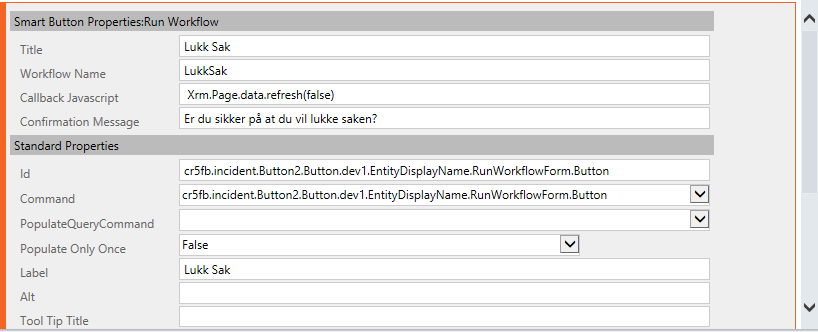
1411.9.PNG

Can anyone help me with the correct syntax for this ?

Thanks for help!

*This post is locked for comments

I have the same question (0)
  • Suggested answer
    Anas Rafik Profile Picture
    365 on at

    try this line of code

    Xrm.Utility.openEntityForm(Xrm.Page.data.entity.getEntityName(), Xrm.Page.data.entity.getId());

  • Suggested answer
    Community Member Profile Picture
    on at

    Callback function has an extra space at the start and is missing a semicolon at the end

    Xrm.Page.data.refresh(false);

    try this this first to test

    alert('test callback');

  • Verified answer
    gdas Profile Picture
    50,091 Moderator on at

    Hi Martin,

    You could refresh the form both the way using

    Xrm.Page.data.refresh();

    Or

    Xrm.Utility.openEntityForm(Xrm.Page.data.entity.getEntityName(), Xrm.Page.data.entity.getId());

    Please have a look below article which might help you to select as per your requirements.

    missdynamicscrm.blogspot.com/.../the-difference-xrmpagedatarefresh-vs-crm-utility-openentityform.html

    In addition you can also try with this-

    location.reload();

  • Suggested answer
    RaviKashyap Profile Picture
    55,410 Moderator on at

    Hi matin2000,

    I have recently implemented this and added the below code for refresh. The cathc here is that it just refreshes the data so you won't be able to see it happing if the data is not changing after running the workflow. In my case, I built it for lead qualification process so status was changing to qualified once it ran. I also added an alert to ensure that the workflow is executed.

    Xrm.Page.data.refresh();Xrm.Utility.alertDialog("Lead qualification process is now completed!!!");

    qualifylead.png

    Hope this helps.

  • stinger Profile Picture
    30 on at

    Hi all,

    since "Xrm.Page" is now deprecated, the refresh of the form cannot be done in these ways:

    - Xrm.Page.data.refresh()

    - Xrm.Utility.openEntityForm (Xrm.Page.data.entity.getEntityName (), Xrm.Page.data.entity.getId ());

    So how do I get the formContext in the "Callback Javascript" section in order to use most up-to-date function: formContext.data.refresh (true) ?

    In Ribbon Workbench the formContext is obtained from the PrimaryControl parameter, but how do you pass and read that parameter in the Javascript Callback?

    In debug, the Callback Function is an anonymous function:

    pastedimage1615298727265v3.png

    In console, if I try to access PrymaryControl I get an error: 

    pastedimage1615298780192v5.png

    Thanks in advance!

    Regards,

    Stinger

  • StevenRobert Profile Picture
    5 on at

    Hi Stinger,

    Did you or anyone figure out how this works now after xrm.page deprecation?

    Regards,

    Steven

Under review

Thank you for your reply! To ensure a great experience for everyone, your content is awaiting approval by our Community Managers. Please check back later.

Helpful resources

Quick Links

Responsible AI policies

As AI tools become more common, we’re introducing a Responsible AI Use…

Neeraj Kumar – Community Spotlight

We are honored to recognize Neeraj Kumar as our Community Spotlight honoree for…

Leaderboard > 🔒一 Microsoft Dynamics CRM (Archived)

#1
SA-08121319-0 Profile Picture

SA-08121319-0 4

#1
Calum MacFarlane Profile Picture

Calum MacFarlane 4

#3
Alex Fun Wei Jie Profile Picture

Alex Fun Wei Jie 2

Last 30 days Overall leaderboard

Featured topics

Product updates

Dynamics 365 release plans



