web
You’re offline. This is a read only version of the page.
close
Skip to main content

Announcements

News and Announcements icon
Community site session details

Community site session details

Session Id :
Small and medium business | Business Central, N...
Suggested Answer

Page 13 (Email Editor)

(0) ShareShare
ReportReport
Posted on by 911

My employer is running a legacy version of Business Central (On-Prem) - Spring '19 Release. When he opens a Purchase Order and selects Print/Send -> Send and then at the first dialog titled: 'Edit - Send Document to' sets Email to 'Yes (Prompt for settings)' and clicks OK, he is then presented with this 'Send Email' dialog:-
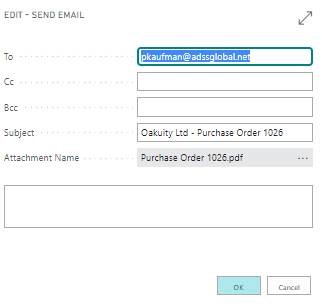
BC_5F00_EditSendEmail.jpg

When I do the same on the Cloud Sandbox, I get the dialog below (Page: 13 Email Editor):-

anydesk00169.png  anydesk00170.png  

This dialog allows the user to add extra attachments (exactly what my employer is looking for).

When did this functionality change (what version)?
Can my employer's legacy version be configured to use this new dialog?

I have the same question (0)
  • Suggested answer
    MahGah Profile Picture
    15,613 on at

    Hi

    You screenshots are from new BC capability named "Enhanced email capabilities" see this   https://docs.microsoft.com/en-us/dynamics365/business-central/admin-how-setup-email

    Check Future Management in BC and if you see "Enhanced email capabilities" you can activate it. Just a warning that first test in Sandbox. 

    pastedimage1646055994163v1.png

  • Suggested answer
    Dallefeld Profile Picture
    235 User Group Leader on at

    I've seen this before in the current version 19.3 depending upon the document layout chosen.  You might review the document layout.

  • Nick Webb Profile Picture
    911 on at

    The Feature Management option is not there to choose. Does it need to be switched on somehow or is it just that it's not available in the legacy version?

  • Suggested answer
    MahGah Profile Picture
    15,613 on at

    Hi

    If you do not see Future Management it means you cannot turn this function on. In other words, it is not available in legacy version until upgrade to newer version. I think you can see it after On-Premises 2020 Release Wave 2. 

    docs.microsoft.com/.../update-versions-17

  • Nick Webb Profile Picture
    911 on at

    Thanks for your response. I opened Document Layouts. There wasn't anything specified for Purchase Orders, so it must've been using defaults. I tried adding a record for P/O's but I couldn't see anywhere to specify what dialog should be used prior to sending the P/O. Or am I misunderstanding how this works?

  • Suggested answer
    Marco Mels Profile Picture
    Microsoft Employee on at

    Hello,

    It is written here:

    docs.microsoft.com/.../enhanced-email-capabilities

    Not available for BC140.

    Thanks.

Under review

Thank you for your reply! To ensure a great experience for everyone, your content is awaiting approval by our Community Managers. Please check back later.

Helpful resources

Quick Links

Season of Sharing Community Challenge Winners!

Congratulations to our community stars!

Women in Power Builds Momentum

Expanding mentorship, skilling, and AI innovation

Congratulations to the July Top 10 Community Leaders

These are the community rock stars!

Leaderboard > Small and medium business | Business Central, NAV, RMS

#1
OussamaSabbouh Profile Picture

OussamaSabbouh 548 Super User 2026 Season 2

#2
YUN ZHU Profile Picture

YUN ZHU 417 Super User 2026 Season 2

#3
Grigorios Mavrogeorgis Profile Picture

Grigorios Mavrogeorgis 377 Super User 2026 Season 2

Last 30 days Overall leaderboard

Featured topics

Microsoft Training Manuals

Product updates

Dynamics 365 release plans
