i want to create an SSRS report in visual studio for my dynamic 365 project. so i want SSRS report to show name of Primary entity (in this case ACCOUNTS) and all related records from related entity (in this case CONTACTS). ACOUNTS has 1:N relation with ACCOUNTS.
so when a user select an account record in dynamic 365 and run Report against it then then report should display name from ACCOUNT as text and then show all related CONTACTS to that record in a table.
but if a user select multiple records from ACCOUNT table then same should happen but report should only show record of one ACCOUNT and its related entity on single page and next ACCOUNT name and its related entities on another page. i-e if i select 3 records then it report should create the pages and should related records of each account on a single page
currently i have created a SSRS report (see below image) in Visual studio 2019 and uploaded the .rdl file to dynamic 365 solution.
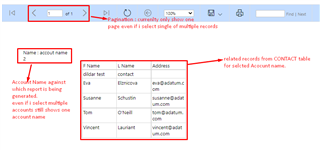
so basically what i want is when i select one record from ACCOUNT and then this report it should show only one page, Account name and related records in table.
but if i select multiple records from ACOUNT and run this report then it should show pagination and show single account name and related records to only that account on one page and records for second account name should be shown on second page.
i have been trying to to this from last 3 days but unable to solve the solve please if anyone could help me in this record i will really appreciate that.







