web
You’re offline. This is a read only version of the page.
close
Skip to main content

Notifications

Announcements

No record found.

Community site session details

Community site session details

Session Id :
Finance | Project Operations, Human Resources, ...
Suggested Answer

Issue finding Table name for Setting up the Database LOG

(0) ShareShare
ReportReport
Posted on by 200

Hi,

I am trying to Setup Database LOG for "PROJECT CATEGORY/RESOURCE", but I am unable to find the name of the tables while running the "Database Log Setup" wizard.

In Humans Resources module - Assign Categories. I need to have a history of changes in resource categories. 

pastedimage1572380328845v1.png

pastedimage1572380444064v2.png

In System Administration module - Database log setup. I configured this:

pastedimage1572380539991v3.png

But when I change categories, I don't see the history in Database LOG. For the Resource rol i see the historial...
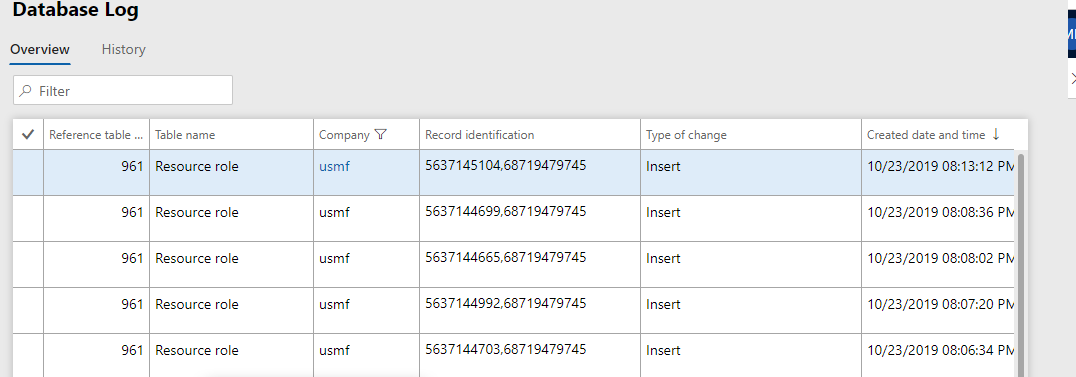
pastedimage1572380681884v4.png

Any idea?

Thanks!!

I have the same question (0)
  • Suggested answer
    Khushhal Garg Profile Picture
    1,514 on at

    Add "Project category" table to database log

  • Macarena Presa Rinaldi Profile Picture
    200 on at

    I did that, but don't register when changing the category of a resource.

    I included this: ValidateProjCategory in Project list. Is this what you said?

    pastedimage1572382921087v1.png

    pastedimage1572382969621v3.png

    pastedimage1572382942425v2.png

    Thanks!

  • Suggested answer
    Khushhal Garg Profile Picture
    1,514 on at

    Table name is "Project category". I see you added Projects. You need to add table with name "Project category". Click on show all tables to see this table in the list.

  • IMIR Profile Picture
    15 on at

    If you are interested in the best alternative to standard database log setup, you can take a look at the solution:

    https://appsource.microsoft.com/ru-ru/product/dynamics-365-for-finance-and-operations/naviconuk.advanced_database_log

    Or youtube channel: https://www.youtube.com/channel/UCtiJ6p_rBfP4IAoe7-4RKtQ/videos

    It would much appreciate it if you could provide your feedback.

  • Suggested answer
    Khushhal Garg Profile Picture
    1,514 on at

    do you see this in the list? It is one of these tables.

    pastedimage1572485229548v1.png

  • Macarena Presa Rinaldi Profile Picture
    200 on at

    Hi! I enable the option you told me. But I still don't see the modification in my log.

    pastedimage1572530995177v1.png

    This is where I modify the category of the resource:

    pastedimage1572531082752v2.png

    pastedimage1572531100131v3.png

    When i'm entry in the database log i dont see anything:

    pastedimage1572531148506v4.png

    I'm also modified the default category value in the resource setup, in case in this registered the modification in the log, but it doesn't:

    pastedimage1572531263562v5.png

    Any idea?  Thanks!!

Under review

Thank you for your reply! To ensure a great experience for everyone, your content is awaiting approval by our Community Managers. Please check back later.

Helpful resources

Quick Links

Responsible AI policies

As AI tools become more common, we’re introducing a Responsible AI Use…

Neeraj Kumar – Community Spotlight

We are honored to recognize Neeraj Kumar as our Community Spotlight honoree for…

Leaderboard > Finance | Project Operations, Human Resources, AX, GP, SL

#1
Martin Dráb Profile Picture

Martin Dráb 544 Most Valuable Professional

#2
André Arnaud de Calavon Profile Picture

André Arnaud de Cal... 450 Super User 2025 Season 2

#3
Sohaib Cheema Profile Picture

Sohaib Cheema 250 User Group Leader

Last 30 days Overall leaderboard

Product updates

Dynamics 365 release plans
