web
You’re offline. This is a read only version of the page.
close
Skip to main content

Notifications

Announcements

No record found.

Community site session details

Community site session details

Session Id :
Microsoft Dynamics CRM (Archived)

Access Denied error when assigning a record to a user in a different BU

(0) ShareShare
ReportReport
Posted on by

I have a scenario where i have a Root Business unit A and two child business units B and C.

When a user in BU B assigns a Contact record they own to a user in BU C using the assign button on the form navigation they are presented  with the following 
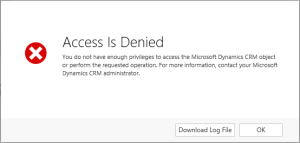
However, once i go and click Ok it goes ahead and assigns the record as desired.

Also if change the owner field instead of using the assign button, it works fine with no error.

All the security roles are configured correctly and I've even disabled all plugins, workflows etc.

I have also went through each option on the security role, right up to full privileges on all sections

When i look at the Log file the OwnerId is set to the user who i am trying to assign it to and the Calling user is the person who is trying to assign it (who is the owner also).

They only way this error doesn't appear is if:

  1. I give Org level assign privileges on Contact record
  2. I assign to user or Team within the same BU

Just to note also, this error is consistent across a number of entities such as Lead, Opportunity and Account.

I suspect it may be a bug and that the assign button assigns the record before the validation executes (hence why it doesn't show the error using either of the 2 steps above) 

Has anyone else experienced this?

The log file extract is as follows:

<s:Envelope xmlns:s="http://schemas.xmlsoap.org/soap/envelope/"><s:Body><s:Fault><faultcode>s:Client</faultcode><faultstring xmlns:xml="http://www.w3.org/XML/1998/namespace" xml:lang="en-IE">SecLib::AccessCheckEx failed. Returned hr = -2147187962, ObjectID: e7d94673-e3b5-e411-80d1-00155d028b34, OwnerId: 55222524-d396-e411-80c2-00155d016739,  OwnerIdType: 8 and CallingUser: 49222524-d396-e411-80c2-00155d016739. ObjectTypeCode: 1, objectBusinessUnitId: 790df068-3ea6-e411-80c7-00155d016739, AccessRights: 524296 </faultstring><detail><OrganizationServiceFault xmlns="http://schemas.microsoft.com/xrm/2011/Contracts"><ErrorCode>-2147187962</ErrorCode><ErrorDetails /><Message>SecLib::AccessCheckEx failed. Returned hr = -2147187962, ObjectID: e7d94673-e3b5-e411-80d1-00155d028b34, OwnerId: 55222524-d396-e411-80c2-00155d016739,  OwnerIdType: 8 and CallingUser: 49222524-d396-e411-80c2-00155d016739. ObjectTypeCode: 1, objectBusinessUnitId: 790df068-3ea6-e411-80c7-00155d016739, AccessRights: 524296 </Message><Timestamp>2015-03-13T14:10:36.7648681Z</Timestamp><InnerFault><ErrorCode>-2147187962</ErrorCode><ErrorDetails /><Message>SecLib::AccessCheckEx failed. Returned hr = -2147187962, ObjectID: e7d94673-e3b5-e411-80d1-00155d028b34, OwnerId: 55222524-d396-e411-80c2-00155d016739,  OwnerIdType: 8 and CallingUser: , and the calling user . ObjectTypeCode: 1, objectBusinessUnitId: 790df068-3ea6-e411-80c7-00155d016739, AccessRights: 524296 </Message><Timestamp>2015-03-13T14:10:36.7648681Z</Timestamp><InnerFault xmlns:i="http://www.w3.org/2001/XMLSchema-instance" i:nil="true" /><TraceText xmlns:i="http://www.w3.org/2001/XMLSchema-instance" i:nil="true" /></InnerFault><TraceText xmlns:i="http://www.w3.org/2001/XMLSchema-instance" i:nil="true" /></OrganizationServiceFault></detail></s:Fault></s:Body></s:Envelope>


*This post is locked for comments

I have the same question (0)
  • Suggested answer
    Mahadeo Matre Profile Picture
    17,021 on at

    Log file is showing some of the permission is missing.. to find out which permission is missing you can run following query in CRM database

    select * from Privilege where AccessRight=524296

    Check for Privilege name,  give the missing permission to user.

    hope this will help..  

  • James Donohoe Profile Picture
    on at

    Hi Mahadeo,

    It's crm 2015 online

  • James Donohoe Profile Picture
    on at

    To add to that i have given both users a security role with full privileges (same as admin), and the error is thrown when Assign is set to BU but ok when set to Org.

    The record being assigned was user owned

  • Mahadeo Matre Profile Picture
    17,021 on at

    Is the Record owning user and New owner are in same BU?

    Try with Same BU users..

    Or by changing Privileges to Parent-Child BU

  • James Donohoe Profile Picture
    on at

    Hi Mahadeo,

    Both users are in different child Bu's. I moved the target user to the same BU and no error.

    I have tried all the privilege levels on the the Assign action on the Contact record, and it doesn't show an error when set to Org when user is in different BU but does for all the others (user, Business Unit...)

    When both users are in the same BU it works fine for all levels.

  • Suggested answer
    Mahadeo Matre Profile Picture
    17,021 on at

    Hi James,

    I tried to reproduce your problem..

    I have also two level of BU.. Parent and child.. One Parent and multiple child..

    Say Parent BU is USA, and child BU are -- Texas, Wisconsin, Florida..

    I gave permission to user role on Contact Entity, Assign--> Parent : Child Business Units.

    I created contact record [Says: James Bond] from from USA BU and owner is USA BU user.

    then I assigned this contact record [James Bond] to user in Texas BU. --> This works fine because of Parent: Child Business unit permission on assign.

    then I logged in As Texas BU user and I able to see this James Bond contact record .. now I assigned this record to Back to USA.. and this is also works fine..

    here is the problem..

    I searched James Bond record from Texas user.. [I gave Texas user read permission on contact organization wide].  and I am able to find this record.. now owner is USA BU user.

    when I am trying to assign this record from Texas BU to user , at that time it is giving same error which you are getting.. AccessRight=524296

    So the problem is You are not assigning record which belongs to users business unit.

    You cannot assign record from child business unit which is belongs to his parent business unit, but you can re-assign record to parent BU user from parent BU and record belongs to child BU user.

    To assign record you need to in that business unit or in Parent BU.. or that business unit user can only assign that record.. if you have Parent : Child Business Units permission..

    If you gave Organization wide permission then you can able to assign record from any where..

    Hope this will help..

  • James Donohoe Profile Picture
    on at

    Hi Mahadeo,

    In my scenario the record assigns anyway, regardless of the error.

    Also i'm assigning from a child BU to another child BU.

    The user that is assigning the record to the user in the other BU is the owner of the record, so does it matter what the records owning BU is once the user owns the record?

  • Mahadeo Matre Profile Picture
    17,021 on at

    User BU matters only to determine permission depth.. So If you gave Organization wide permissions on assign record then you will not get any error when assigning record from any where.

  • Suggested answer
    Mahadeo Matre Profile Picture
    17,021 on at

    check these links.. for how CRM security is working

    msdn.microsoft.com/.../gg334717.aspx

    crmbook.powerobjects.com/.../security-roles

  • James Donohoe Profile Picture
    on at

    Correct me if i'm wrong here, but if a user has assign permission with local access on a record he/she owns then they can assign that record to any user in any BU regardless of whether is a parent or child BU?

Under review

Thank you for your reply! To ensure a great experience for everyone, your content is awaiting approval by our Community Managers. Please check back later.

Helpful resources

Quick Links

Responsible AI policies

As AI tools become more common, we’re introducing a Responsible AI Use…

Neeraj Kumar – Community Spotlight

We are honored to recognize Neeraj Kumar as our Community Spotlight honoree for…

Leaderboard > 🔒一 Microsoft Dynamics CRM (Archived)

#1
SA-08121319-0 Profile Picture

SA-08121319-0 4

#1
Calum MacFarlane Profile Picture

Calum MacFarlane 4

#3
Alex Fun Wei Jie Profile Picture

Alex Fun Wei Jie 2

Last 30 days Overall leaderboard

Featured topics

Product updates

Dynamics 365 release plans



