web
You’re offline. This is a read only version of the page.
close
Skip to main content

Notifications

Announcements

No record found.

Community site session details

Community site session details

Session Id :
Small and medium business | Business Central, N...
Answered

Troubleshoot Business Central - One Drive Connection (Failed to

(0) ShareShare
ReportReport
Posted on by 82

Hello Fellow Developers:

I am trying to share Business Central Attachments on One Drive by clicking the 'Share' button on Sales Order Attachments.

pastedimage1662060357379v1.png

While it was all working a day ago, I am suddenly getting 'Failed to acquire an access token' today.

It would first open a pop-up window asking to sign-in, after I am signed in, it would show the error below:
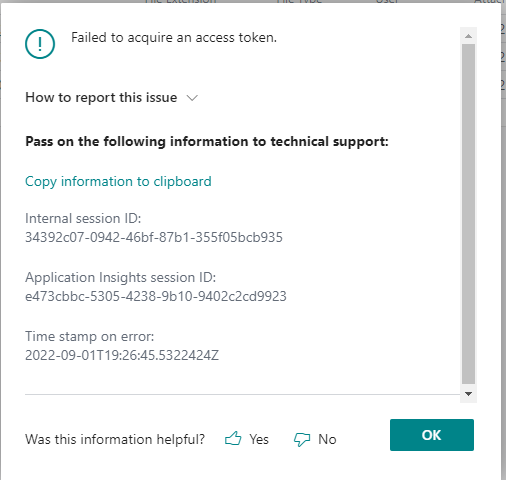
pastedimage1662060429667v2.png

I also tried deleting the configured Service in the 'Microsoft SharePoint Connection Setup' page and it wasn't helpful.

When I am logged into Azure Access Directory, I can see an Enterprise Application called "Business Central Integration to SharePoint" being created automatically for the OneDrive integration, and my user has full access to the App. I've also checked the Sign-in logs and it shows my sign-in attempt was successful. 

I've also tried delete the Enterprise App in AAD and re-add it by clicking 'Share' button on Business Central, after granting consent, I would end up with same error screen.

Has anyone run into same error before and any advice on troubleshooting will be much appreciated.

Thanks in advance!

GingerGrog

I have the same question (0)
  • Verified answer
    YUN ZHU Profile Picture
    95,329 Super User 2025 Season 2 on at

    Hi, is there a OneDrive license in this tenant? Like Office e3 or e5?

    Hope the following helps.

    OneDrive for Business FAQ: 

    https://docs.microsoft.com/en-us/dynamics365/business-central/admin-onedrive-faq

    And my test:

    https://yzhums.com/19896/

    Thanks.
    ZHU

  • Suggested answer
    Nitin Verma Profile Picture
    21,698 Moderator on at

    Hi,

    The first steps you Zhu mentioned you need to check if you have access the One drive section and then during Azure Active directory setup you need to have Admin consent before use. Please confirm.

    Thanks.

  • Ginger Frog Profile Picture
    82 on at

    Hi ZHU,

    Thanks a lot for the link to your article it is very helpful.

    I checked the 'My Setting' tab, Cloud Storage link and it does link me to the One Drive folder successfully. I can also see the files I shared in the One Drive folder from earlier this week. Seems like checking the Cloud Storage link in Business Central 'My Setting' doesn't verify licenses.

    When I check inside my Microsoft 365 Admin, my account doesn't have Office E3 nor E5 indeed so it must be due to missing the license.

    I will contact our administrator to get the required licenses on this one.

    Thanks again for all your help!

  • Ginger Frog Profile Picture
    82 on at

    Hi Nitin,

    I do have access to One Drive section via My Settings and grated admin consent via AAD. but when I check 365 admin I am missing the required license. Thanks!

    Thank you,

    GingerFrog

Under review

Thank you for your reply! To ensure a great experience for everyone, your content is awaiting approval by our Community Managers. Please check back later.

Helpful resources

Quick Links

Responsible AI policies

As AI tools become more common, we’re introducing a Responsible AI Use…

Neeraj Kumar – Community Spotlight

We are honored to recognize Neeraj Kumar as our Community Spotlight honoree for…

Leaderboard > Small and medium business | Business Central, NAV, RMS

#1
OussamaSabbouh Profile Picture

OussamaSabbouh 3,229

#2
Jainam M. Kothari Profile Picture

Jainam M. Kothari 1,867 Super User 2025 Season 2

#3
YUN ZHU Profile Picture

YUN ZHU 1,153 Super User 2025 Season 2

Last 30 days Overall leaderboard

Featured topics

Product updates

Dynamics 365 release plans
