web
You’re offline. This is a read only version of the page.
close
Skip to main content

Announcements

No record found.

News and Announcements icon
Community site session details

Community site session details

Session Id :
Microsoft Dynamics AX (Archived)

batch Processing Errors

(0) ShareShare
ReportReport
Posted on by 1,307

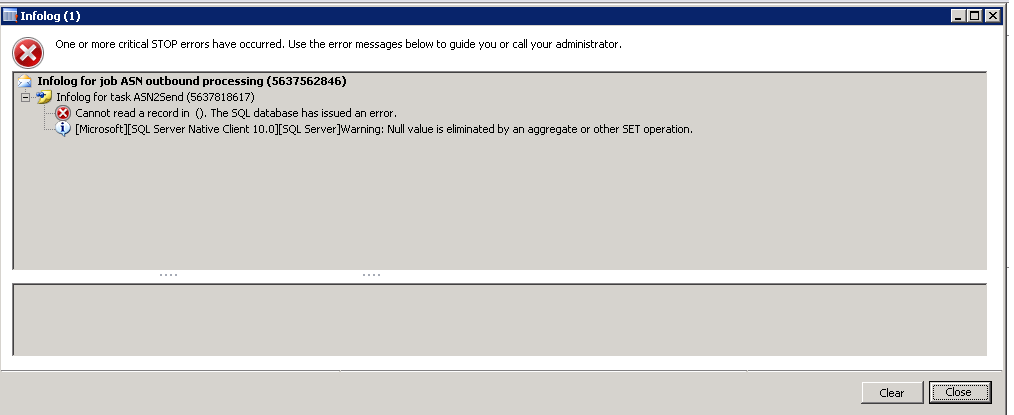
While a batch processing is run, 2 errors are occurring in a alternate fashion.

   1854.ASN-Outbound-2nd-error.png    ASN-Outbound.png

Not sure what is causing the error.  Any ideas will be highly helpful.

Also is there a way to debug the batch processing?

Thanks,

Lakshmi

*This post is locked for comments

I have the same question (0)
  • Jonathan  Halland Profile Picture
    11,310 on at

    Hi Lakshmi

    Please can you give us more info on the batch job you are trying to run, I believe the ASN prefix is not part of any standard adding on AX R3? You can always run the batch job directly from the client, ensuring that you have unticked the "batch mode" option

  • Lakshmi Karambakkam Profile Picture
    1,307 on at

    It's running 2 service classes. Aifoutboundprocessingservice and AifGatewaySendservice.

    Let me know what other inputs you are expecting.  I can definitely provide them.

    At one time, these codes worked. Their is no change in code.

    My best guess is some link between AX and SQL Server is missing and that's what is causing these errors but you can correct me if I am wrong.

    What all services must be enabled to run Aif service classes?

    Any ideas and hints are most welcome.

    Thanks,

    Lakshmi

  • Verified answer
    Jonathan  Halland Profile Picture
    11,310 on at

    Hi Lakshmi.

    Can you test this in a non-prod environment? Try looking at your AIF Queue to see if there are any records that may be broken, this may well be causing the error.

  • Lakshmi Karambakkam Profile Picture
    1,307 on at

    There are many in Queue manager (around 20) but without any error message. the XMLs are generated but these XML files are not saved in their folder.

    Aif-Queue-manager.png

    How to proceed from here?

  • Verified answer
    Jonathan  Halland Profile Picture
    11,310 on at

    Hi Lakshmi.

    Can you try a test in a dev environment to (from the table browser) clear the queue table entirely and try generate a new XML. We've have had a similar issue where we got a queue record pointing to a record that no longer exists.

  • Lakshmi Karambakkam Profile Picture
    1,307 on at

    Thanks Jonathan. That was awesome. It worked. Thanks a lot.

Under review

Thank you for your reply! To ensure a great experience for everyone, your content is awaiting approval by our Community Managers. Please check back later.

Helpful resources

Quick Links

Introducing the 2026 Season 1 community Super Users

Congratulations to our 2026 Super Stars!

Meet the Microsoft Dynamics 365 Contact Center Champions

We are thrilled to have these Champions in our Community!

Congratulations to the March Top 10 Community Leaders

These are the community rock stars!

Leaderboard > 🔒一 Microsoft Dynamics AX (Archived)

#1
CP04-islander Profile Picture

CP04-islander 39

#2
Michel ROY Profile Picture

Michel ROY 14

#3
imran ul haq Profile Picture

imran ul haq 8

Last 30 days Overall leaderboard

Featured topics

Product updates

Dynamics 365 release plans
