web
You’re offline. This is a read only version of the page.
close
Skip to main content

Notifications

Announcements

Community site session details

Community site session details

Session Id :
Service | Customer Service, Contact Center, Fie...
Answered

Error on annotation on random calls

(1) ShareShare
ReportReport
Posted on by 243

Hi,

On some calls when we try to add annotations from Teams client to HoloLens, the screen border is flashing red and a few seconds later we got a message saying that it can't deactivate annotations for now.

This is happening very randomly, on some calls we are not able to make any annotations at all, on some other calls the problem appears randomly.

It seems to happen more often when the call is initiated from HoloLens but we have the problem on the other way too.

We tried with differents tenants, sometimes it's working, sometimes not. It's not seem to be related to multi tenant calls.

At first we think about connectivity/low bandwith problem but it happens even with a good connexion.
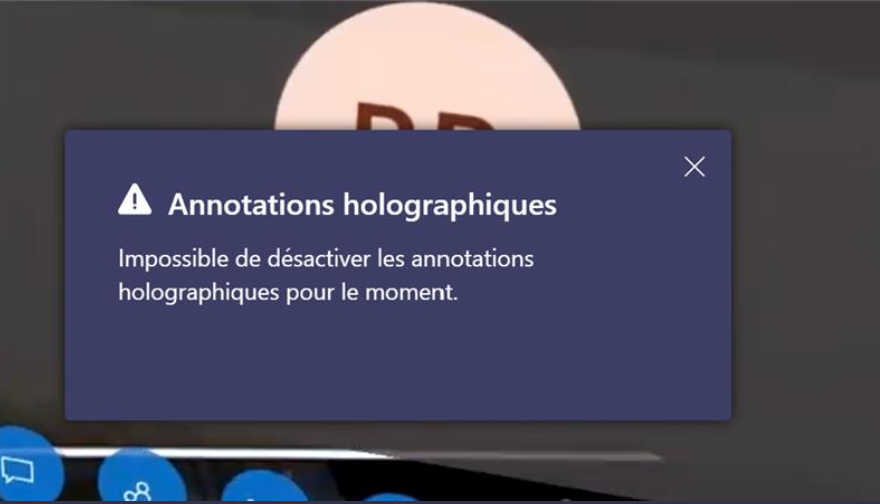
pastedimage1623857616666v1.png

The message is in french because we are french ^^

Thank you,

I have the same question (0)
  • Remy Rouinvy Profile Picture
    243 on at

    Apparently the problem is gone with the latest update, we will see on the long term.

    Thanks you everyone for your time !

  • RyanN Profile Picture
    on at

    Can you please check to see if the HL user is also in the meeting/group call from a PC or Mobile. If they are participating in the call with a non-HL device, annotations get disabled. 

    Here is a summary of expected annotation behaviour: 

    https://docs.microsoft.com/en-us/dynamics365/mixed-reality/remote-assist/add-annotations-hololens

    pastedimage1626982881887v2.png

  • ford_sopris Profile Picture
    1,229 on at

    Has anyone figured out the fix for this issue?  We are demoing the Hololens and this Teams to Hololens annotation USED to work.  It does not now.  

  • DavePinch Profile Picture
    on at

    Hi Marcel, I am sorry you are experiencing a similar issue. Our team is keen to track these down and more data will be helpful for investigation. If you can, please submit telemetry/repros through the same links as above. Note there are separate logs for Teams and Remote Assist. If you have any troubles, reply here and we will arrange for alternate delivery. Thank you!

  • Marcel H. Profile Picture
    5 on at

    We are facing the same or similar problem. Placing annotation or adding documents from PC user to HL user does not work anymore.

    Somtimes with the message above somtimes just does not display anything in HL and PC Teams call.

    What I also realized: It stil works on direct calls from Teams user to HL-user. But if you join an existing call (Teams Appointment) as Hololens user it does not work anymore to place annotations or documents.

  • Remy Rouinvy Profile Picture
    243 on at

    Hi Dave,

    Thank you for your reply.

    I've made a support request for Teams with the logs from teams (I only managed to get desktop and meeting files, not debug).

    this is the Service request #‎26237547

    I've also managed to make a support request with Remote Assist but I've don't saw a service request number to share with you.

    Thank you,

  • Verified answer
    DavePinch Profile Picture
    on at

    Hi Remy, I reached out to our engineering team and they would like to get the logs from HoloLens (instructions here: https://docs.microsoft.com/en-us/dynamics365/mixed-reality/remote-assist/faq-hololens#how-do-i-report-a-bug) and logs from Teams (desktop and debug logs) (instructions here: https://docs.microsoft.com/en-us/microsoftteams/log-files) -- specifically when 2 participants are in the call when you encounter the issue. Once you've done that, feel free to email me at davepinch @ microsoft.com and/or reply here so we can watch for the feedback report and get it routed quickly and our engineering team can investigate. Thank you for posting and your feedback.

  • Remy Rouinvy Profile Picture
    243 on at

    Hi,

    I've already saw that post, but after reading it multiple times, I'm pretty sure that I'm not facing the same problem.

    We doesn't use mobile version of remote assist.

    The video attached to the post show nothing similar to my problem.

    Thank you,

  • Suggested answer
    Nya Profile Picture
    29,060 on at

    Hi Rémy,

    Here is a similar issue posted by other user. Would you please refer to the issue and the replies to confirm if you’re facing the same problem?

    (+) Remote Assist MR annotation does not work when call is started from HoloLens - Dynamics 365 Remote Assist Forum Community Forum

    If yes, it is recommended to create a ticket to MS for more help.


    If this helped you, I'd appreciate it if you'd mark this as a Verified Answer, which may in turn help others as well.

    Best Regards,

    Nya

Under review

Thank you for your reply! To ensure a great experience for everyone, your content is awaiting approval by our Community Managers. Please check back later.

Helpful resources

News and Announcements

Season of Giving Solutions is Here!

Quick Links

Responsible AI policies

As AI tools become more common, we’re introducing a Responsible AI Use…

Neeraj Kumar – Community Spotlight

We are honored to recognize Neeraj Kumar as our Community Spotlight honoree for…

Leaderboard > Service | Customer Service, Contact Center, Field Service, Guides

#1
Tom_Gioielli Profile Picture

Tom_Gioielli 21 Super User 2025 Season 2

#2
TAHER Mehdi Profile Picture

TAHER Mehdi 14

#3
LightningStrikes Profile Picture

LightningStrikes 9

Last 30 days Overall leaderboard

Featured topics

Product updates

Dynamics 365 release plans
