web
You’re offline. This is a read only version of the page.
close
Skip to main content

Notifications

Announcements

No record found.

Community site session details

Community site session details

Session Id :
Microsoft Dynamics CRM (Archived)

CRM 2013 SDK\SDK\Solutions\PortalBase functionality

(0) ShareShare
ReportReport
Posted on by

Hi All ,

Can anyone tell me

CRM\CRM 2013 SDK\SDK\Solutions\PortalBase

I have imported the solution in CRM and Can see following component in PortalBase solution
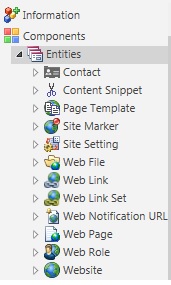
72380.Untitled.jpg5670.Untitled1.jpg5187.Untitled2.jpgUntitled3.jpg

I am not sure how it work does anyone have tried it before? What Plugin assemblies in that CRM solution.

Any help greatly appreciated.

*This post is locked for comments

I have the same question (0)
  • Colin V Profile Picture
    on at

    Hi Maddy, the Xrm.Portals is the Microsoft CRM SDK Extension and PortalBase is the CRM solution of the core components to building a portal site entirely off the data within CRM, no other databases need.  You can use the entities in the solution to help you start creating the components of a portal site if you wanted.

    There is also ADXStudio Portals which is an implementation of the SDK extension but with a ton more out of box features.  That product was acquired by Microsoft and has been released as CRM portals most recently. You can learn more about ADXStudio Portals at the following link and download the full version from the community site.

    https://community.adxstudio.com/products/adxstudio-portals/documentation/

    https://community.adxstudio.com/products/adxstudio-portals/releases/adxstudio-portals-7/ 

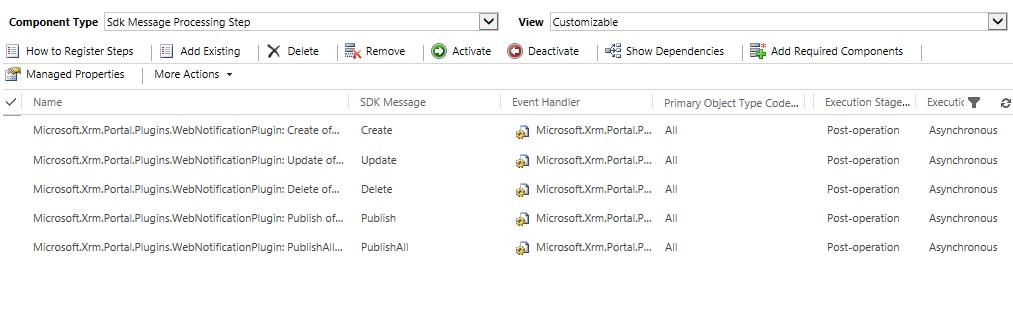
    The plugin assemblies you see are the WebNotification are plugins that are registered on all entities on the 5 messages create, update, delete, associate, and disassociate.  The reason for this plugin is so that when a change in CRM is made the portal site is notified about the change.  The portal is notified so that it removes the cached data and will know to re-query the CRM on the next request for that data so it does not display the old dirty data.  You can configure what URLs this plugin notifies by creating records in the Web Notification URL entity found under Settings.  You can learn more about the cache and web notifications here - https://community.adxstudio.com/products/adxstudio-portals/documentation/developers-guide/cache/ 

    You can build your own portal using the SDK extensions or you can use the ADXStudio legacy version on the community or now you can get CRM portals directly from Microsoft as well.  Keep in mind with ADXStudio that the legacy product will no longer be supported by Microsoft as of October 2017 and that for CRM portal it is only currently offered as Software as a Service and you do not have access to add your our custom ASP.NET or C# code whereas you do with ADXStudio.

  • Inogic Profile Picture
    682 on at

    Hi MaddyBoss,

    Adxstudio Portal is a simple “install the software” and start playing with it. There are quite a few components and understanding what they are and what they all do will go a long way in getting a good start on a successful solution.

    ADXStudio Portal solution is two parts:
    Dynamics CRM Solution(s) that define the entities that will contain the portal data.
    A Visual Studio .NET web application project that can compile to a portal that integrates with CRM.
    ADXStudio Portal is an implementation of SDK extension, as you can create the “Company portal”, “Customer Portal” etc using CRM data.

    The Visual Studio project is the portal application that can be compiled and installed on an IIS or Azure web server. While building your portal, you can “run” it in debug mode in Visual Studio directly on your developer workstation.

    To set up the ADXStudio prtalsyou can use the below link:

    http://www.inogic.com/blog/2016/07/set-up-adx-studio-portals-for-dynamics-crm/ 

    Thanks,
    Sam

Under review

Thank you for your reply! To ensure a great experience for everyone, your content is awaiting approval by our Community Managers. Please check back later.

Helpful resources

Quick Links

Responsible AI policies

As AI tools become more common, we’re introducing a Responsible AI Use…

Neeraj Kumar – Community Spotlight

We are honored to recognize Neeraj Kumar as our Community Spotlight honoree for…

Leaderboard > 🔒一 Microsoft Dynamics CRM (Archived)

#1
SA-08121319-0 Profile Picture

SA-08121319-0 4

#1
Calum MacFarlane Profile Picture

Calum MacFarlane 4

#3
Alex Fun Wei Jie Profile Picture

Alex Fun Wei Jie 2

Last 30 days Overall leaderboard

Featured topics

Product updates

Dynamics 365 release plans