web
You’re offline. This is a read only version of the page.
close
Skip to main content

Announcements

No record found.

News and Announcements icon
Community site session details

Community site session details

Session Id :
Microsoft Dynamics AX (Archived)

POS send amount to external device

(0) ShareShare
ReportReport
Posted on by 2,050

i'm trying to send amount to external device only and receive respond from that device to POS 

for example here when i pressed on payment by card must be send amount to that device then must be respond if accept payment successfully end of progress if doesn't accept payment you can try again i have this device 
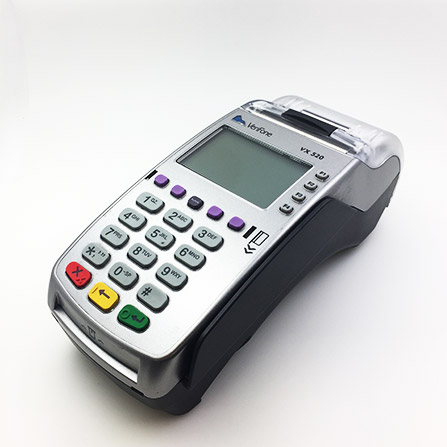
VerifoneVx520.jpg

*This post is locked for comments

I have the same question (0)
  • Rodolfo Recalde Profile Picture
    on at

    Hi,

    Please, Could you elaborate the question better?

    Are you developing a new payment connector?

    What is the version of your Retail (EPOS, MPOS, CPOS | R2, R3, 365)?

    Regards,

    Rodolfo Recalde.

  • mohammed.mqi Profile Picture
    2,050 on at

    thanks for replay

    i want link this device and want use it when i press pay by card

    i'm using POS retail and R3

  • Suggested answer
    Rodolfo Recalde Profile Picture
    on at

    You should check what the rules in the country / state that you are install. And verify that Microsoft or a partner has a conector to a credit card payment  service

    Check this links:

    https://blogs.msdn.microsoft.com/axsupport/2012/01/14/ax-for-retail-a-better-sample-for-eft-plug-in-credit-card-processing/

    https://blogs.msdn.microsoft.com/axsupport/2013/10/22/ax-2012-r2-for-retail-configuring-the-eft-service-in-the-retail-hardware-profile-with-dynamics-online-payment-services/

    Check:

    Retail > Setup > POS > Profiles > Hardware Profiles > EFT service | Pin Pad  (the parameterization may depend on the availability of the payment conector. Check to see if there is support from the payment partner or Microsoft.)

    POS_5F00_Hardware_5F00_Profiler_5F00_Recalde_5F00_DAX.png

    I Hope this Helps!

    Regards,

    Rodolfo Recalde.

  • mohammed.mqi Profile Picture
    2,050 on at

    thanks for replay

    i'm using Port COM1 where must be define settings of this device on ax2012

Under review

Thank you for your reply! To ensure a great experience for everyone, your content is awaiting approval by our Community Managers. Please check back later.

Helpful resources

Quick Links

Introducing the 2026 Season 1 community Super Users

Congratulations to our 2026 Super Stars!

Meet the Microsoft Dynamics 365 Contact Center Champions

We are thrilled to have these Champions in our Community!

Congratulations to the March Top 10 Community Leaders

These are the community rock stars!

Leaderboard > 🔒一 Microsoft Dynamics AX (Archived)

#1
CP04-islander Profile Picture

CP04-islander 26

#2
imran ul haq Profile Picture

imran ul haq 8

#3
André Arnaud de Calavon Profile Picture

André Arnaud de Cal... 4 Super User 2026 Season 1

Last 30 days Overall leaderboard

Featured topics

Product updates

Dynamics 365 release plans
