web
You’re offline. This is a read only version of the page.
close
Skip to main content

Notifications

Announcements

No record found.

Community site session details

Community site session details

Session Id :
Microsoft Dynamics GP (Archived)

Change default file type in Report Destination screen

(0) ShareShare
ReportReport
Posted on by

Anyone know of a way to set the default file type to something other than "text file" in the report destination dialogue screen?  We never save any of our documents as a txt file, almost all of them are saved as pdf format.  This is not the posting reports I am referring to, I know how to change this option through the setup/posting scren, it is invoices, picking tickets, etc.  Instead of printing them to screen or to the printer, often we save them as a file and we spend many wasted minutes having to change the file type to pdf since it currently defaults to 'text file'.  Any help would be greatly appreciated!
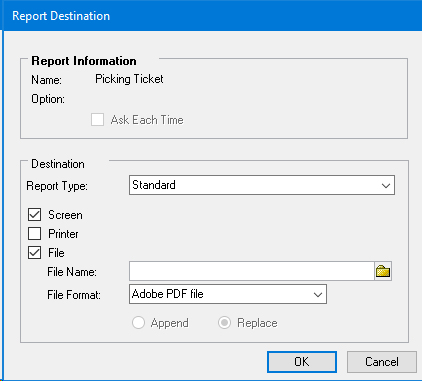
reportDest.jpg

*This post is locked for comments

I have the same question (0)
  • Almas Mahfooz Profile Picture
    11,009 User Group Leader on at

    I have done this by doing customization, by using dexterity. you can also try VB.

    Almas

  • Community Member Profile Picture
    on at

    Tried to do it with VB, seems the window is not available to add to a project.  Seems you can customize most anything with dexterity, I have no idea how to do that.  Any other suggestions or steps?

  • Almas Mahfooz Profile Picture
    11,009 User Group Leader on at

    Yeah dexterity is cool. : )

  • Community Member Profile Picture
    on at

    Hi, In Posting Setup  (Tools >> Setup >> Posting >> Posting) - you can select the series and transaction...and set the related reports to print to file. You can select the file type and the output location. When the report generates it will follow this setting. Have a look and see if you can see your report.

  • Community Member Profile Picture
    on at

    As I mentioned, I am familiar with the posting solution but I am not saving the posting reports to file.  It is the invoice and picking ticket that we are more interested in and since these do not post anything, they are not available in the posting setup window.

  • Community Member Profile Picture
    on at

    Indeed it is

  • Almas Mahfooz Profile Picture
    11,009 User Group Leader on at

    But if you are lookking for the report other than the one available in posting setup then you have to do customization.

  • Suggested answer
    L Vail Profile Picture
    65,271 on at

    Hi,

    I would create a macro that would do all of the clicking for me. You could add it to the shortcut pane and bind a shortcut key - like F2 - that will launch the macro. Then when it came time to print, you just hit the F2 key. You may need different macros for different mixes of documents. You will probably want to pause the macro, or create two of them, so that you can enter a filename if you don't want to append all of the forms to a single file.

    I think that would work well for you in this situation.

    Kind regards,

    Leslie

  • Suggested answer
    Community Member Profile Picture
    on at

    So, I was able to do what I wanted to do with some basic VBA.  The problem is that it adds the report destination window as a universal window and not specific to any given report.  Therefore, anytime this window is called upon, my vba mods get applied.  Not the worse solution but not ideal.  Simply put, I have VBA checking the "File" box and then selecting the file type as "PDF" on window open.  If we do not want to print to file, we can simply uncheck the "File" box and proceed to screen or print.

    Thanks for any help or suggestions.

  • Community Member Profile Picture
    on at

    Thank you - we have a lot of macros at work already and although this is a possible solution, I think it would get a little messy.

Under review

Thank you for your reply! To ensure a great experience for everyone, your content is awaiting approval by our Community Managers. Please check back later.

Helpful resources

Quick Links

Responsible AI policies

As AI tools become more common, we’re introducing a Responsible AI Use…

Neeraj Kumar – Community Spotlight

We are honored to recognize Neeraj Kumar as our Community Spotlight honoree for…

Leaderboard > 🔒一 Microsoft Dynamics GP (Archived)

#1
mtabor Profile Picture

mtabor 1

Last 30 days Overall leaderboard

Featured topics

Product updates

Dynamics 365 release plans



