web
You’re offline. This is a read only version of the page.
close
Skip to main content

Notifications

Announcements

No record found.

Community site session details

Community site session details

Session Id :
Microsoft Dynamics 365 | Integration, Dataverse...
Suggested Answer

Power Automate flow to send email connect d365 sales

(0) ShareShare
ReportReport
Posted on by 55

Hi,

I have never used power automate earlier, Requirement is I need to send email notification to Owner's of the record if the due date is Overdue. How can I achieve this in Power Automate. Like recurring every morning, this flow should run and check for the records which is overdue and send email notification. I googled everwhere but couldnt find the exact way
6175.pastedimage1626224946870v1.png

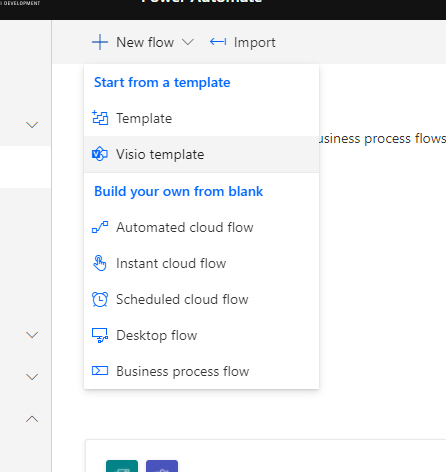
What I need to select from here? Help

I have the same question (0)
  • Suggested answer
    Nya Profile Picture
    29,060 on at

    Hi,

    Please refer to my answer in the following issue:

    (+) Automating the Opportunities Tab: Email Notification When Opportunity is 2 weeks from Est. Close Date - Dynamics 365 Sales Forum Community Forum

    It is similar to your issue and you just need to remove the 14 days ahead condition in it.

  • Indhu Profile Picture
    55 on at

    Thanks Nya, thats really helpfull to get into power automate. What I have done is

    1st Step                      Recurrence ( Interval 3min Frequency Minute) - For testing purpose

                                                                    |

                                                                    |

    2nd Step                       List Rows (connected to Dataverse and Action-> List rows)

                                                                   |

                                                                   |

    3rd step                       Apply to each (Value-> Overdue field(A calculation field which returns yes/No by checking if the due date is crossed))

                                           Condition (overdue field -> Is equal to -> 'Overdue' text)

    then send email.

  • AriaConsulting Profile Picture
    2 on at

    Looks correct to me.  Are you getting an error?

  • Indhu Profile Picture
    55 on at

    Thanks for the reply

    Is it ok I can add text "Overdue" in

    Condition--> Overdue -> is equal to -> "Overdue"

  • Suggested answer
    Nya Profile Picture
    29,060 on at

    Hi,

    It's something wrong with the condition.

    It should be the due date equals to utcNow(), so that it allows to compare the time of the day with the due date to determine if it is overdue.

  • Indhu Profile Picture
    55 on at

    Actually I have two option set in Overdue Field- but when I try to check the value of overdue it shows True. It always fails.

  • Nya Profile Picture
    29,060 on at

    Hi,

    Would you please tell me how the field Overdue get its value and if there is a field called like due date whose date type is date (or date and time)?

    In my example, the condition is to compare the date and today's date. It has nothing to do with an option set.

    So if there is a date field, there would be no need to use a two option field.

  • Indhu Profile Picture
    55 on at

    ok, I have a field

    1. due date(data and time field)

    2. Overdue - (calculated field to check if the status is completed and due date is less than today)- based on the check it returns Overdue / In

                        due value)- Two Option set field

    what i did is -

    • create recurring cloud flow - then connected to Dataverse
    • then it asked me to enter odata/ fetch XML- I did fetch XML in Model driven app and pasted it here
    • then I am trying to send email.

    Is it right?? 

  • Indhu Profile Picture
    55 on at

    .

  • Nya Profile Picture
    29,060 on at

    Hi,

    There should be no need to use fetchXML for this flow.

    If you still have any problems after trying it, you can let me know the entity you are currently using and I will attempt to write a full flow to share with you.

Under review

Thank you for your reply! To ensure a great experience for everyone, your content is awaiting approval by our Community Managers. Please check back later.

Helpful resources

Quick Links

Responsible AI policies

As AI tools become more common, we’re introducing a Responsible AI Use…

Neeraj Kumar – Community Spotlight

We are honored to recognize Neeraj Kumar as our Community Spotlight honoree for…

Leaderboard > Microsoft Dynamics 365 | Integration, Dataverse, and general topics

#1
Siv Sagar Profile Picture

Siv Sagar 93 Super User 2025 Season 2

#2
#ManoVerse Profile Picture

#ManoVerse 80

#3
Martin Dráb Profile Picture

Martin Dráb 64 Most Valuable Professional

Last 30 days Overall leaderboard

Product updates

Dynamics 365 release plans



