web
You’re offline. This is a read only version of the page.
close
Skip to main content

Announcements

No record found.

News and Announcements icon
Community site session details

Community site session details

Session Id :
Customer experience | Sales, Customer Insights,...
Suggested Answer

Event Website - Remove Languages

(0) ShareShare
ReportReport
Posted on by 12

Hello Community,

Is there an easy way to remove 'extra' languages from the Event Portal? We are a small company supporting a single language, and having all of the content for the various languages is quite a bit to wade through when we want to make a simple change.

Has anyone built a single-language version of the Events Portal? If not, can anyone provide some hints on how this could be done?

Thanks!

I have the same question (0)
  • Suggested answer
    cloflyMao Profile Picture
    25,210 on at

    Hi Partner,

    We need to download sample event website and add customization locally, then upload the compiled files to portal using an automation deployment script.

    You can find tutorial about how to customize event website in this article:

    https://docs.microsoft.com/en-us/dynamics365/marketing/developer/event-management-web-application

    Or refer to this blog:

    https://community.dynamics.com/crm/b/misscrm360exploration/posts/tutorial-how-to-build-deploy-and-test-locally-dynamics-365-portal-or-dynamics-marketing-event-portal-and-connect-it-to-your-dynamics-365-instance-live-1670080455

    However, it is very easy to disable language options menu: in extracted folder, open src\environments\environment.ts, set showLanguageDropdown property to false.

    d1.JPG

    Result

    d2.PNG

    Introduction to all environment configuration parameters can be found here:

    https://docs.microsoft.com/en-us/dynamics365/marketing/developer/event-management-web-application#environment-configuration-parameters

    Regards,

    Clofly

  • PriyaGarg Profile Picture
    30 on at

    Hi SPArchitect,

    Language of the Event Portal can be controlled by restricting "Supported Languages" on the Event Portal website record. The extra languages that is not required can be deactivated.

    To do:

    • Go to Portals > Website > Websites.
    • Open Event Portal record
    • In the Supported Languages section under the General tab, deactivate the unwanted website languages.

                pastedimage1610695214324v1.png

    This should limit the number of languages in the drop-down on Event Portal.

    - Priya

  • SPArchitect Profile Picture
    12 on at

    Thank you, PriyaGarg

    We have done this, yet the languages drop-down still displays all of them.

  • SPArchitect Profile Picture
    12 on at

    Thank you, cloflyMao

    Ideally, we would like to leave out ALL of the localized content related to the languages that we do not intend to support; it's quite a lot to wade through.

    It's looking like we will have to get the source code and do our own build, but I was hoping somone already had...

  • cloflyMao Profile Picture
    25,210 on at

    Hi Partner,

    Please refer to following steps to remove localized content.

    1. Open DeployToDynamics365Instance.ps1, comment all lines which contain keyword "json" besides 1033.json.(English)
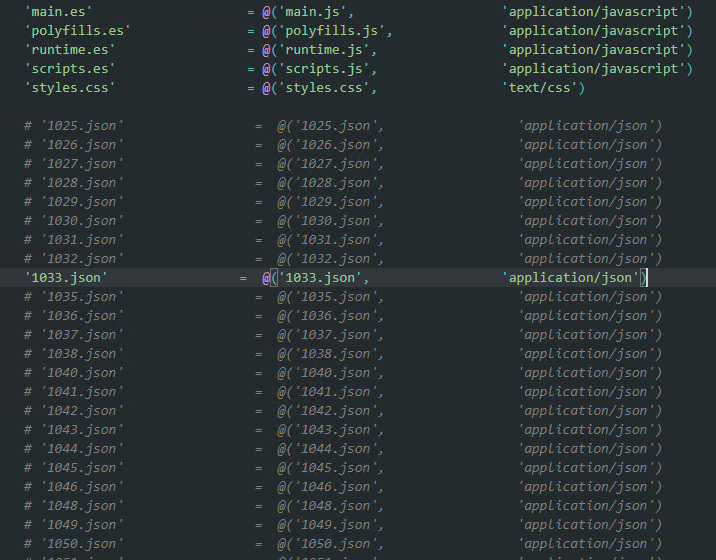
    pastedimage1610957136008v1.png

    2. Set the property which controls display of language dropdown list to false.

    3. Delete all json related web files and their attachments.
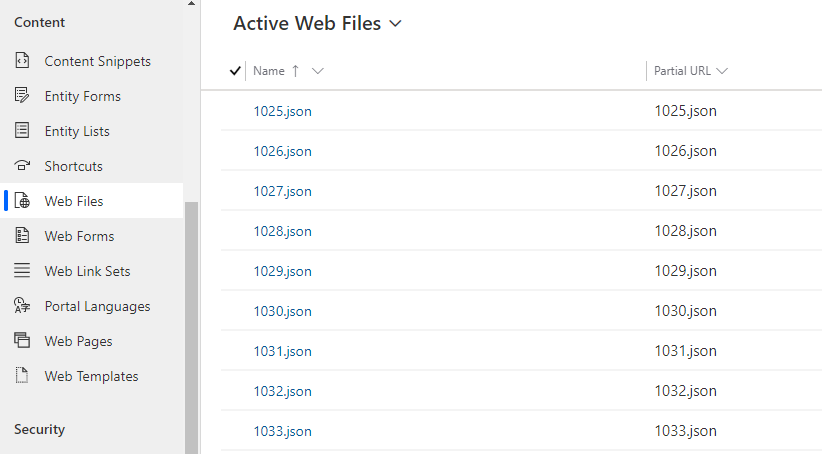
    pastedimage1610957623084v3.png

    pastedimage1610957728930v4.png

    However, I still recommend that you only disable the property of configuration file, which will leave extensibility for future and avoid potential issue.

    Furthermore, size of total localization files is lower than 1MB.

    Regards,

    Clofly

Under review

Thank you for your reply! To ensure a great experience for everyone, your content is awaiting approval by our Community Managers. Please check back later.

Helpful resources

Quick Links

Introducing the 2026 Season 1 community Super Users

Congratulations to our 2026 Super Stars!

Congratulations to our 2025 Community Spotlights

Thanks to all of our 2025 Community Spotlight stars!

Leaderboard > Customer experience | Sales, Customer Insights, CRM

#1
ManoVerse Profile Picture

ManoVerse 213 Super User 2026 Season 1

#2
CU11031447-0 Profile Picture

CU11031447-0 100

#3
NeerajPawar Profile Picture

NeerajPawar 71

Last 30 days Overall leaderboard

Product updates

Dynamics 365 release plans

