web
You’re offline. This is a read only version of the page.
close
Skip to main content

Announcements

No record found.

News and Announcements icon
Community site session details

Community site session details

Session Id :
Finance | Project Operations, Human Resources, ...
Suggested Answer

Vendor group number sequence

(0) ShareShare
ReportReport
Posted on by 93

Hi Everyone, 

I´m setting a new number sequence for vendor ID, but I receive this message when I add it:

pastedimage1572630369474v1.png

do you have any idea where I have jto clear the vendor group sequence?, as when I create a new vendor de ID is empty

pastedimage1572630499741v2.png

I have the same question (0)
  • Sukrut Parab Profile Picture
    71,735 Moderator on at

    Do you have customization  to generate number sequence for vendor groups ? There is no set up for vendor group number sequence in standard , so this is definitely coming through custom code

  • Suggested answer
    Zain Mehmood Profile Picture
    4,189 Most Valuable Professional on at

    Hi Dolly,

    There is no standard setup for vendor group wise number sequence. Do you have any customisations involved in this? Please check in for a developer or ask the system administrator.

    Warm Regards,

    Zain

  • DOLLY.LO Profile Picture
    93 on at

    No, I dont have any customization here

  • Suggested answer
    Andrew Xu Profile Picture
    3,877 on at

    Actually this message is not accurate (consider it as a bug?), you'll see it as a warning when changing the number sequence of vendor account to another number sequence with different scope.

    here's the code where this message pops up in validate method in vendparameters form,

    if (ret && ExtendedTypeNum(VendAccount) == NumberSequenceDatatype::find(NumberSequenceReference.orig().NumberSequenceDatatype).DatatypeId)
    {
    RefRecId oldNumSeq = NumberSequenceReference.orig().NumberSequenceId;
    RefRecId newNumSeq = NumberSequenceReference_NumberSequenceId.value();

    if (NumberSequenceTable::find(oldNumSeq).NumberSequenceScope != NumberSequenceTable::find(newNumSeq).NumberSequenceScope)
    {
    info("@AccountsPayable:MessageUpdateNumSeqForVendAccount");
    }
    }

    But you can just ignore it since vendor account could be using shared number sequence. Most likely the reason of not getting vendor account Id is that you don't have number sequence assigned to vendor account, or the assigned one is not correctly configured.

  • Suggested answer
    Ludwig Reinhard Profile Picture
    Microsoft Employee on at

    Hello Dolly.Lo,

    Please have a look at this article that describes how to setup number sequences for customer groups out of the box.

    The same should work for your vendors/vendor groups.

    www.linkedin.com/.../

    Best regards,

    Ludwig

  • Suggested answer
    Satish Panwar Profile Picture
    14,671 Moderator on at

    Hi Dolly.lo,

    I received the same error message. See details on how to fix.
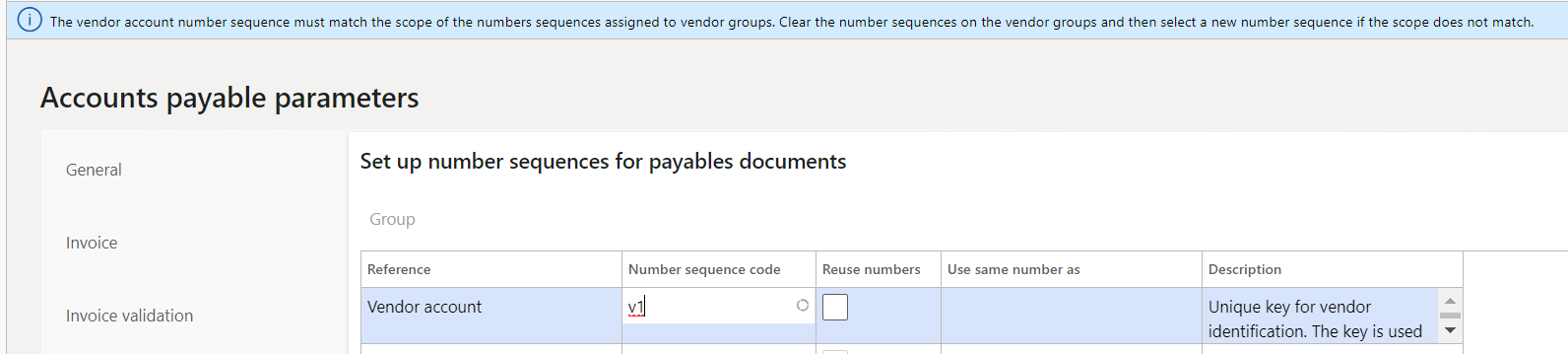
    pastedimage1572769874159v1.png

    Do you really need shared number sequence? If not, create a number sequence that's not shared and select that instead of ARG-PR (Or remove ARG-PR, delete and create new). Then select the number sequence again and this error message won't be there.

    If you don't remove it from shared, there is difference in how your vendor account number will work. On vendor page, when you try to create a new vendor, the vendor number will be greyed out. You have to select vendor group first and then enter name and when you save, it will generate a vendor number.

    However if you do change to regular number sequence like below, then you will not have to first select vendor group. 
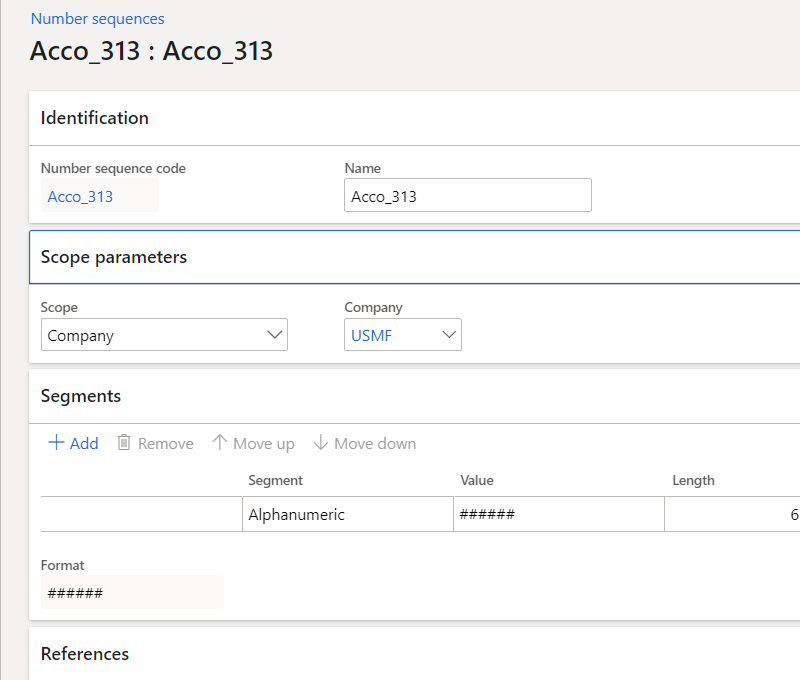
    pastedimage1572773052573v1.png

    Give it a try and let us know if you have any further questions.

Under review

Thank you for your reply! To ensure a great experience for everyone, your content is awaiting approval by our Community Managers. Please check back later.

Helpful resources

Quick Links

Introducing the 2026 Season 1 community Super Users

Congratulations to our 2026 Super Stars!

Meet the Microsoft Dynamics 365 Contact Center Champions

We are thrilled to have these Champions in our Community!

Congratulations to the March Top 10 Community Leaders

These are the community rock stars!

Leaderboard > Finance | Project Operations, Human Resources, AX, GP, SL

#1
Giorgio Bonacorsi Profile Picture

Giorgio Bonacorsi 689

#2
André Arnaud de Calavon Profile Picture

André Arnaud de Cal... 455 Super User 2026 Season 1

#3
Syed Haris Shah Profile Picture

Syed Haris Shah 308 Super User 2026 Season 1

Last 30 days Overall leaderboard

Product updates

Dynamics 365 release plans
