web
You’re offline. This is a read only version of the page.
close
Skip to main content

Announcements

No record found.

News and Announcements icon
Community site session details

Community site session details

Session Id :
Microsoft Dynamics AX (Archived)
Answered

Validation in Absence Code

(0) ShareShare
ReportReport
Posted on by 90

Hello!

I have tried validation in absence code. I thought it would prevent me from creating absences when validation is violated. It gave me only warning and absence is created.. 

  1. I want to know whether it gives a warning message only or it can prevent us from creating absences if validation rule is violated?
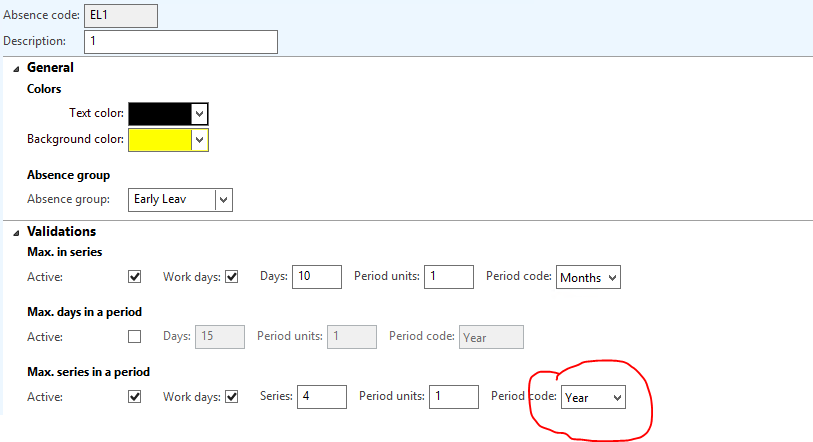
  2. I am attaching a screenshot of absence code validation.. Here i want to know how this period code works? For example an employee can have 10 days absence thrice in a year. Is it yearly based or for life time? I tried it for 2019 it is giving me warning message when validation is violated. But when i tried it for 2020, it is still giving me warning message that i am violating validation.. How this works? For 2020 it should allow me thrice after that it should give me warning.... But from the very first attempt it is giving me warning.. 31273.Capture.PNG
*This post is locked for comments

I have the same question (0)
  • Suggested answer
    Khurshid Wali Profile Picture
    928 on at

    Hello Salman,

    Regarding your 1st question: I am supposing that you are using ValidateWrite method of Datasource.

    If your validation fail try to return false and true other wise. It will not insert if it get false from Validatewrite method.

    boolean ret;

       ret = super();

         if(ret && your check)

          {

           ret= checkField("Failed");

           }

    return ret;

  • Muhammad Salman Khan Profile Picture
    90 on at

    Hello Khurshid!

    No i am talking about validation in absence code. You can see the the picture in point 2. Its by default in system.

  • Khurshid Wali Profile Picture
    928 on at

    Please upload large resolution image..

    while uploading keep resolution 540X430

  • Muhammad Salman Khan Profile Picture
    90 on at

    Dear!

    I am talking about this validation. 


    2768213.Untitled.png

  • Verified answer
    Khurshid Wali Profile Picture
    928 on at

    Hello Salman,

    These Validations are there to let your employee know how many days you are allowing your employee to take leave without any salary deductions.

    By default, it only warns and stores absence qty to a negative value.

    You can use these validations in your leave request workflow and strict employee to take extra Leaves.

    There is no expiration to this absence code. Expiration may be on assigning to Employee groups

    regards,

    Khurshid wali

Under review

Thank you for your reply! To ensure a great experience for everyone, your content is awaiting approval by our Community Managers. Please check back later.

Helpful resources

Quick Links

Introducing the 2026 Season 1 community Super Users

Congratulations to our 2026 Super Stars!

Meet the Microsoft Dynamics 365 Contact Center Champions

We are thrilled to have these Champions in our Community!

Congratulations to the March Top 10 Community Leaders

These are the community rock stars!

Leaderboard > 🔒一 Microsoft Dynamics AX (Archived)

#1
CP04-islander Profile Picture

CP04-islander 16

#2
GiacomoRovai Profile Picture

GiacomoRovai 4

#3
Douglas Noel Profile Picture

Douglas Noel 2

Last 30 days Overall leaderboard

Featured topics

Product updates

Dynamics 365 release plans
