web
You’re offline. This is a read only version of the page.
close
Skip to main content

Notifications

Announcements

No record found.

Community site session details

Community site session details

Session Id :
Microsoft Dynamics GP (Archived)

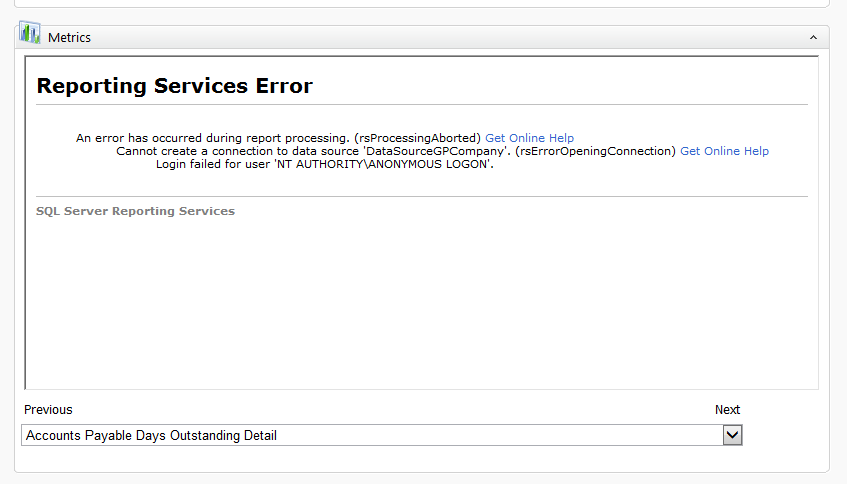
Reporting Services Error

(0) ShareShare
ReportReport
Posted on by 75,850 Moderator

Suddenly today no one's Metric work. They all see this message in the Metrics frame. SSRS is still working and is accessible to all users using their domain credentials. Where do I even begin to look for the cause of this?
GP_2D00_Metrics_2D00_Gone.png

*This post is locked for comments

I have the same question (0)
  • Derek Albaugh Profile Picture
    on at

    Hello Richard,

    First question, since SQL SRS reports uses permissions assigned to the user's Windows user accounts and not their GP logins, are the users logged into the machine(s) where they are accessing Dynamics GP, as the same Windows user account that they use to access the SQL SRS reports outside of Dynamics GP?

    We've also seen issues like this occur when SQL and SQL Reporting Services are on two different servers, and Dynamics GP is being launched from a third machine. Because Windows Authentication can only make one hop, it can't make the call from GP to SRS to SQL and back, Kerberos Authentication would be needed if this was the case.

    Incorrect SQL Security can also cause this. Make sure each Windows user is assigned as a User and a minimum of Browser under the SQL Reporting Services site itself, and then also assigned to the RPT_AllUser or RPT_AllGroup roles under the DYNAMICS system database, which is required for users to be able to access the SRS reports through Dynamics GP. They would also need to be assigned to the RPT_ roles under the DYNAMICS system and/or company databases for Dynamics GP, depending on what SRS reports they need to access.

    Looking through our case history, these are the main causes of the error being seen as mentioned.

    Thanks,

  • Richard Wheeler Profile Picture
    75,850 Moderator on at

    Derek, all user GP user IDs are different from their Domain IDs.  In this case, the SQL database and SSRS engines are on the same server. That leaves the third possibility. I will get onsite soon and take a look and update this case.

  • Richard Wheeler Profile Picture
    75,850 Moderator on at

    How can the domain administrator who is also a sysadmin in SQL be getting this message?

    • Query execution failed for dataset 'seeGLAPDaysOutstandingDetail'. (rsErrorExecutingCommand) Get Online Help
      • The EXECUTE permission was denied on the object 'seeGLAPDaysOutstandingDetail', database 'POWMT', schema 'dbo'.
  • Derek Albaugh Profile Picture
    on at

    Looking at this stored procedure, by default, it only gives EXECUTE permissions to the following RPT_ roles:

    rpt_accounting manager

    rpt_accounts payable coordinator

    rpt_bookkeeper

    rpt_certified accountant

    rpt_executive

    My thinking is that even though the domain admin is a sysadmin, even the sa login doesn't have permissions to the DYNAMICS system or GP databases by default, though within Dynamics GP it has PowerUser role assigned to it so it has access to everything.

    If you assign one of the above rpt_ roles to the domain admin, it should resolve this issue.

    Thanks

  • Richard Wheeler Profile Picture
    75,850 Moderator on at

    OK, that fixed the domain admin. The users are now getting this:

    I have run the GRANT.SQL script on the company database. What could have caused this sudden change? I have never had to do any security changes like this before. These reports also do not run using SSRS.

    • An error has occurred during report processing. (rsProcessingAborted)
      • Query execution failed for dataset 'dsPrmVendorID'. (rsErrorExecutingCommand)
        • Semantic query execution failed. The SELECT permission was denied on the object 'Vendors', database 'POWMT', schema 'dbo'. (rsSemanticQueryEngineError)
  • Derek Albaugh Profile Picture
    on at

    This works about the same way. The 'Vendors' object is a SQL View. By default, the DYNGRP role and various RPT_ roles will have the SELECT permission for it. The user(s) would need to be assigned to either DYNGRP or one of these RPT_ roles.

  • Richard Wheeler Profile Picture
    75,850 Moderator on at

    Well they are all members of the DYNGRP and always have been. I added the report role to my domain account and logged out and back in and this issue remains.

  • Derek Albaugh Profile Picture
    on at

    If you go into the properties of the Vendors view, for the company database that is seeing this issue, and look at the permissions, is DYNGRP showing the SELECT permission marked?

    Other than that, that would be the things to check in that the DYNGRP role has SELECT permissions for any GP views, the SELECT, INSERT, DELETE and UPDATE permissions to any GP tables and EXECUTE permissions to any GP stored procedures. Then, the user needs to be assigned to the DYNGRP role.

    That being said, if the error is a result of trying to access SQL SRS reports, it may not be looking at the DYNGRP role, since the SRS reports use RPT_ role permissions, and it may be a matter of the user needs to be assigned to.

    As a test, if you assign the user to the RPT_Accounting Manager role in the company database they are logging into attempting to view SRS reports via the Metrics, does that change this error?

  • Richard Wheeler Profile Picture
    75,850 Moderator on at

    Over the weekend when no one is using SQL I am going to turn on the SQL Profiler and try to access this SSRS report. I have checked every privilege you have mentioned and they all look correct. The only domain user that can run the GP SSSRS reports is the domain admin. I have set myself as a SQL sysdadmin and that did not help nor did specifying myself in any of the roles. I have never had to adjust any of these security settings in the past for any of our clients. Why all of a sudden for this client I have no idea. I can do a SELECT * FROM VENDORS just fine in SSMS just not through SSRS or GP. This one has got me scratching my head and will keep me awake at night until I find what it is!

  • Derek Albaugh Profile Picture
    on at

    That is curious......

    Normally, as far as SQL SRS report permissions, we have the following setup per user:

    If they were deployed in Native Mode, there are three places where permissions need to be set when GP SSRS reports are deployed in Native mode:

    1. On the Report Manager URL, Home > Site Settings > Security, users are setup either as 'System Administrator' or 'System User' permissions.

    2. Still on Report Manager URL, Home > Properties tab > Security, users are setup with either Browser, Content Manager, My Reports, Publisher, and/or Report Builder permissions.

    3. Lastly, user's Windows account will need to be assigned to the RPT_ roles under the Dynamics GP databases in SQL Server Mgmt Studio.

        The RPT_All group or RPT_All user database role, under the DYNAMICS database, is required for all users to run SRS reports.

        Under the company databases, assign users to the RPT_ roles they need to access the data for the SRS reports they have access to.

    The SQL SRS logs may be another place to look for more information on this type of error. Those are located at the C:\Program Files\Microsoft SQL Server\MSRS12.MSSQLSERVER\Reporting Services\LogFiles\

    Thanks

Under review

Thank you for your reply! To ensure a great experience for everyone, your content is awaiting approval by our Community Managers. Please check back later.

Helpful resources

Quick Links

Responsible AI policies

As AI tools become more common, we’re introducing a Responsible AI Use…

Neeraj Kumar – Community Spotlight

We are honored to recognize Neeraj Kumar as our Community Spotlight honoree for…

Leaderboard > 🔒一 Microsoft Dynamics GP (Archived)

#1
mtabor Profile Picture

mtabor 1

Last 30 days Overall leaderboard

Featured topics

Product updates

Dynamics 365 release plans
